

Vozo AI Video Translator & Dub
Vistring Technology Holdings Limited Photo & Video iPhoneiPadiPod touch
Vozo AI Video Translator & Dub is a free Photo & Video app for iPhone and iPad by Vistring Technology Holdings Limited. Rated 4.8/5 from 2,131 ratings.
- Rating
- 4.8
- 2.1K ratings
- Price
- Free
- on the App Store
- Size
- 185 MB
- Age 4+
- Updated
- Oct 13
- 2026 · v5.16.1
Screenshots

About Vozo AI Video Translator & Dub
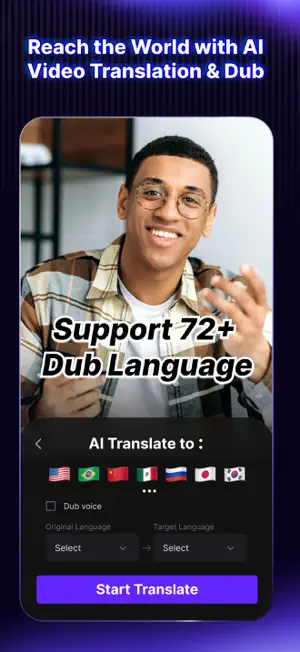
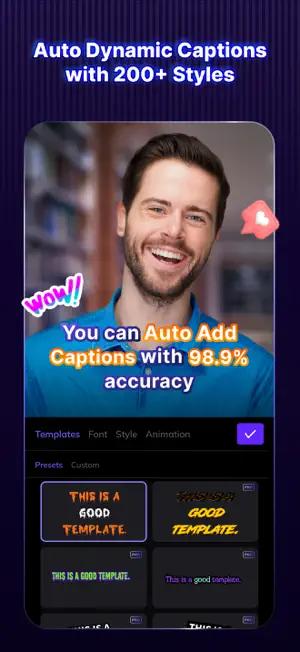
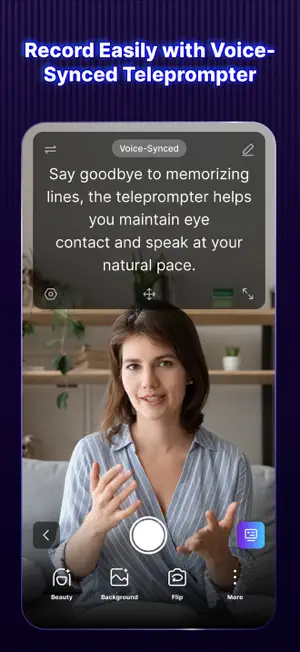
Leveraging the power of AI, Vozo AI Video Creator (Formerly known as Blink Captions) enable you to generate, edit, and translate talking videos, featuring auto captions with 200+ styles, avatar video generation, AI edit, AI teleprompter, AI script writing, and AI translate! With Vozo AI (Blink Captions), you can make stunning talking videos 10x easier! Here's the full set of features offered by Vozo AI (Blink Captions): AI Captions: Use speech-to-text technology to auto-add captions with 99.97% accuracy, significantly improving the engagement of your short form or long form videos from YouTube videos, Shorts, TikTok, to Instagram Reels. Vozo AI (Blink Captions) supports 118 languages and 200+ styles that are 100% customizable at the sentence or batch level. Avatar Video Generation: Create personalized avatars from existing videos. Then, simply add scripts to generate impressive talking videos! Vozo AI (Blink Captions) also offers a rich avarat library for your choice. Talking Photos Generation: Turn images into talking videos and create memes easily with Vozo AI! Upload a video and add a script or a recorded audio. You can let portraits, anime, or animals speak up! AI Translate: Select your original and target languages, click "translate," and your video with translated subtitles is ready for export! Vozo AI (Blink Captions) support 118 languages and dialects. Captions Presets: Cool captions styles make your videos or reels eye-catching! Vozo AI (Blink Captions) offers 200+ presets for your choice, including font, color, size, background, and animations. All styles can be further modified. AI Trim: In one click, Vozo AI (Blink Captions) can remove filler words and silent parts from both your captions and video, making talking video or reel editing super easy, smooth, and fluent! AI Zoom: Mark the area you want to stand out in your talking video and when you want it to pop in the captions. Vozo AI (Blink Captions) will automatically zoom into this area at your specified timing. AI Highlight: You can also choose to highlight any part of your captions, and Vozo AI (Blink Captions) will automatically apply the styles for you. AI Title Get automatic, personalized talking video titles that fit right into your content. Let Vozo AI (Blink Captions) help you create attractive titles! AI Teleprompter Forget memorizing scripts. Our prompter automatically scrolls at your talking speed. when recording talking videos, allowing natural delivery and eye contact. AI Script Writing Jot down your thoughts, and our AI turns them into a finished script, allow you to focus on delivering your message with Vozo AI (Blink Captions)! Download Watermark-Free Videos Download watermark free videos from Tiktok and other social media and repost for free! AI Denoise and Isolate Vocal from Audio for talking videos Vozo AI (Blink Captions) can identify human voices from complicated audio and isolate the vocal part from audio. You can choose to keep or remove the human voice for further video editing. Lyrics Mode: Accurately Add Lyrics for Music Videos From Pop to Rap, Vozo AI (Blink Captions) accurately detects and transcribes the lyrics for your music videos. Photo Blend Merge faces, pets, or products into anime, portraits, or showcase visuals—then animate them into talking videos. Fast, fun, and creative storytelling starts with a blend. AI Background Blur your background or switch it in real-time with Vozo AI (Blink Captions)' virtual green screen. No need for physical green screens or additional editing. Fun Emojis, GIFs & Sound Effects Vozo AI (Blink Captions) spice up your talking videos with emojis, GIFs, and sounds—all it takes is a click. We can't wait to see what you'll create with Vozo AI (Blink Captions)! Should you have any feedback or suggestions, contact us at [email protected]. Terms of service: https://www.vozo.ai/blinkcaptions/terms Privacy policy: https://www.vozo.ai/blinkcaptions/privacy_policy
Ratings & reviews
4.8
2.1K ratings
What’s new
Version 5.16.1 · Updated October 13, 2026
* Bug fixes and improve app stability
App privacy
The developer, Vistring Technology Holdings Limited, reported these privacy practices to Apple.
Data Used to Track You
The following data may be used to track you across apps and websites owned by other companies:
- Usage Data: Product Interaction, Other Usage Data
Data Not Linked to You
The following data, which may be collected but is not linked to your identity, may be used for the following purposes:
- Identifiers: Device ID, User ID
- Usage Data: Product Interaction, Other Usage Data
- Diagnostics: Crash Data, Performance Data, Other Diagnostic Data
- User Content: Photos or Videos, Audio Data
Used for: Analytics, App Functionality
Alternatives to Vozo AI Video Translator & Dub
Looking for apps like Vozo AI Video Translator & Dub? Here are 6 similar apps on the App Store. The highest rated is VEED Lite: Quick Video Edits (4.8/5), and all 6 are free to download.
-
 Captions AI for Videos - Dubs
4.4
Captions AI for Videos - Dubs
4.4
-
 MixCaptions: Video Captions
4.6
MixCaptions: Video Captions
4.6
-
 Zeemo: AI Video&Auto Captions
4.7
Zeemo: AI Video&Auto Captions
4.7
-
 Auto Captions: Video Subtitles
4.6
Auto Captions: Video Subtitles
4.6
-
 VEED Lite: Quick Video Edits
4.8
VEED Lite: Quick Video Edits
4.8
-
 Subcap: Captions AI, Subtitles
4.6
Subcap: Captions AI, Subtitles
4.6
| App | Rating | Price | Last updated | Compare |
|---|---|---|---|---|
| Vozo AI Video Translator & Dub | 4.8 / 5 (2,131 ratings) | Free | October 13, 2026 | |
| Captions AI for Videos - Dubs | 4.4 / 5 (871) | Free | Sep 2, 2026 | Compare |
| MixCaptions: Video Captions | 4.6 / 5 (3,906) | Free | Apr 22, 2026 | Compare |
| Zeemo: AI Video&Auto Captions | 4.7 / 5 (1,496) | Free | Oct 13, 2026 | Compare |
| Auto Captions: Video Subtitles | 4.6 / 5 (1,493) | Free | Dec 23, 2025 | Compare |
| VEED Lite: Quick Video Edits | 4.8 / 5 (19,975) | Free | Aug 24, 2026 | Compare |
| Subcap: Captions AI, Subtitles | 4.6 / 5 (2,042) | Free | Oct 9, 2026 | Compare |