

Chatway Live Chat & AI Chatbot
Chatway Business iPhoneiPadiPod touch
Chatway Live Chat & AI Chatbot is a free Business app for iPhone and iPad by Chatway. Rated 4.9/5 from 283 ratings. Requires iOS 15.1.
- Rating
- 4.9
- 283 ratings
- Price
- Free
- on the App Store
- Size
- 49 MB
- Age 17+
- Updated
- Sep 10
- 2026 · v2.0.510
Screenshots



About Chatway Live Chat & AI Chatbot
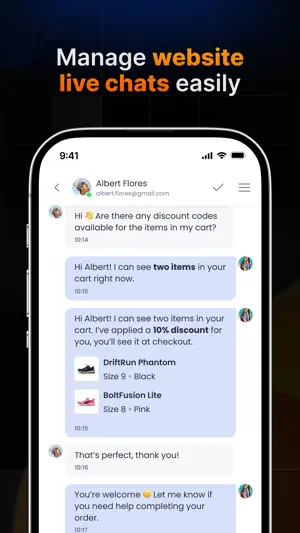
Chat with your website customers wherever you are. Chatway gives you the tools to manage live chat and customer support directly from your mobile device. Reply to website visitors, follow conversations handled by your AI chatbot, check visitor activity in real time, and manage messages from multiple communication channels in one customer support app. Whether you're working from your computer or away from your desk, Chatway helps you stay available and respond to customers quickly. Website live chat from your phone See active website visitors and reply to incoming live chat messages from your mobile device. View useful customer and visitor information including visited pages, device type, location, tags, and browsing history. This additional context helps your team understand customer questions and provide more relevant support. You can also access available order details, shopping cart information, and product data inside the conversation, making it easier to assist customers without switching between different tools. AI chatbot and automated customer service Use the Chatway AI chatbot to provide automated customer support and help website visitors around the clock. The AI support agent can use your website content and connected knowledge sources to respond to frequently asked questions, handle repetitive customer inquiries, and provide faster answers. Your support team always remains in control. Review AI chatbot conversations, monitor customer interactions, and join any chat when a customer needs help from a human agent. Manage multiple customer communication channels Bring your customer conversations together in a single inbox, including: * Website live chat * WhatsApp * Facebook Messenger * Instagram * Email Manage customer messages without constantly moving between separate communication apps and support tools. Understand your website visitors Get valuable information about the people contacting your business: * See visitors currently browsing your website * Check the pages each visitor has viewed * View device and location details * Access customer tags and conversation information * See available order, cart, and product data * Review previous chats and visitor activity Organize your customer support inbox Keep your support conversations easy to manage and make sure important messages receive attention. * View active and resolved customer chats * Search your conversation history * Add tags to organize customer inquiries * Assign chats to different support agents * Work together with other team members * Identify conversations that still require a response Respond to customers more efficiently * Use saved responses for frequently asked questions * Customize replies for individual customers * Send screenshots, images, documents, and files through chat Control your mobile notifications Customize how you receive alerts for new customer messages and website visitor activity. Flexible notification settings help your team remain responsive while giving you greater control over mobile alerts. What you can do with Chatway * Chat with website visitors in real time from your mobile phone * Provide 24/7 automated support using an AI chatbot * Review AI support conversations and switch to human support when necessary * Answer customer questions using visitor and shopping information * Manage multiple customer messaging channels from one inbox * Assign conversations to support team members * Organize chats using tags and conversation statuses * Save time with reusable replies for common customer questions * Manage customer service and website conversations while on the go You can also access the Chatway web application from desktop or mobile when you need additional customer support tools and account management options. Visit https://chatway.app to learn more about Chatway and manage live chat, AI chatbot support, customer messaging, and multi-channel customer service from one platform.
Ratings & reviews
4.9
283 ratings
What’s new
Version 2.0.510 · Updated September 10, 2026
- Access the Help Center directly from the mobile apps. - Long links now displayed in a compact format. - Email or download chat transcripts with improved validation. - Added an owner-only setting to switch timestamps between 12-hour and 24-hour format.
App privacy
The developer, Chatway, reported these privacy practices to Apple.
Data Linked to You
The following data, which may be collected and linked to your identity, may be used for the following purposes:
- Contact Info: Email Address, Name
- Identifiers: User ID
Used for: App Functionality
Data Not Linked to You
The following data, which may be collected but is not linked to your identity, may be used for the following purposes:
- Location: Coarse Location
- User Content: Photos or Videos, Customer Support
Used for: App Functionality
Alternatives to Chatway Live Chat & AI Chatbot
Looking for apps like Chatway Live Chat & AI Chatbot? Here are 6 similar apps on the App Store. The highest rated is Tidio (4.8/5), and all 6 are free to download.


| App | Rating | Price | Last updated | Compare |
|---|---|---|---|---|
| Chatway Live Chat & AI Chatbot | 4.9 / 5 (283 ratings) | Free | September 10, 2026 | |
| Smartsupp | 4.1 / 5 (143) | Free | Aug 4, 2026 | Compare |
| Tidio | 4.8 / 5 (4,769) | Free | Sep 28, 2026 | Compare |
| Tawk.to | 3.7 / 5 (211) | Free | Aug 29, 2026 | Compare |
| Text - Live Chat for Business | 4.3 / 5 (110) | Free | Sep 12, 2026 | Compare |
| Crisp | 4.4 / 5 (520) | Free | Sep 10, 2026 | Compare |
| PaySika | 3.6 / 5 (295) | Free | Sep 17, 2026 | Compare |