

OrigNotes
Hangzhou Future Writing Technology Co.,LTD. Productivity iPhoneiPadiPod touch
OrigNotes is a free Productivity app for iPhone and iPad by Hangzhou Future Writing Technology Co.,LTD. Rated 4.7/5 from 371 ratings. Requires iOS 15.0.
- Rating
- 4.7
- 371 ratings
- Price
- Free
- on the App Store
- Size
- 97 MB
- Age 4+
- Updated
- Oct 28
- 2026 · v2.0.3
Screenshots
About OrigNotes
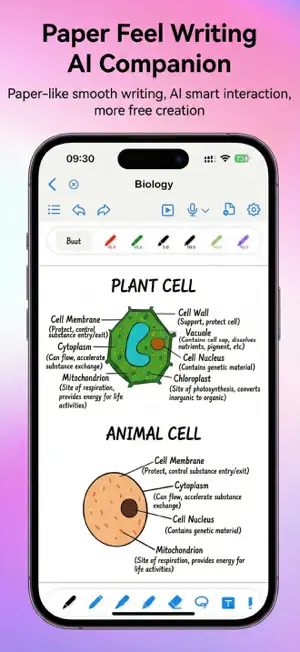
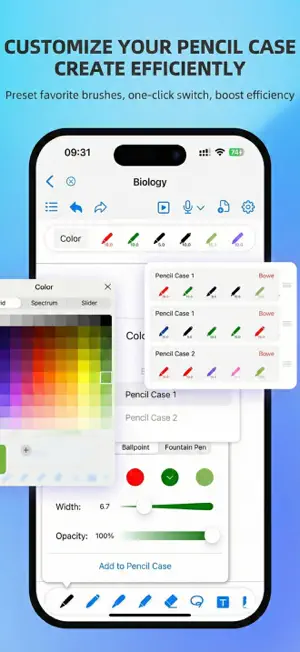
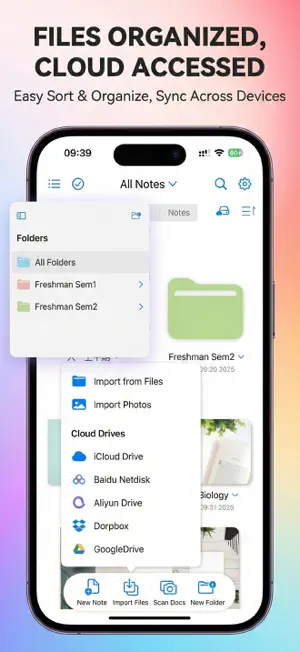
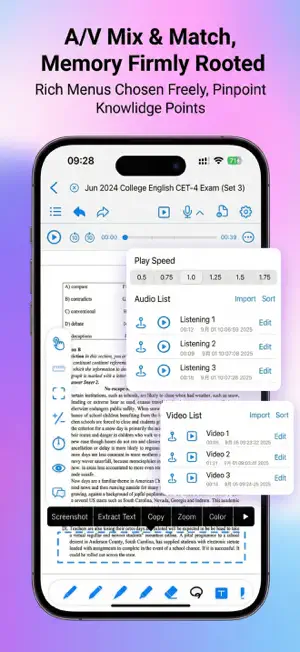
OrigNotes is a powerful, free digital note-taking app built for iPad and iPhone. Whether you're taking handwritten notes, annotating PDFs, organizing ideas with mind maps, or capturing inspiration with images, audio, and video, OrigNotes gives you the tools to keep everything in one place. Write naturally with Apple Pencil, convert handwriting into editable text, search through your notes, and customize your workspace to fit the way you think and work. OrigNotes is free to use, and we're committed to keeping it that way. If you're enjoying OrigNotes, we'd greatly appreciate a 5-star review. Your support helps us continue improving the app and building new features for everyone. Have an idea or feature request? Leave us a review or contact us directly through the app. You can also check our Future Plans inside OrigNotes to see what we're working on and follow the progress of upcoming features. KEY FEATURES • Handwriting & Drawing Enjoy a natural writing experience with a variety of pens, brushes, and creative tools designed for Apple Pencil. • PDF Reading & Annotation Import PDFs to read, highlight, annotate, draw, and take notes directly on your documents. • Mind Maps Create mind maps to organize ideas, study topics, and brainstorm visually. Add topics and subtopics, drag and rearrange nodes, and customize your mind map to fit your ideas. • Handwriting to Text Turn handwritten notes into editable text for easier editing, organizing, and reuse. • Powerful Search Find information faster by searching handwritten notes and text inside PDFs. • Images, GIFs, Audio & Video Bring your notes to life with images, animated GIFs, audio, and video—all within your notebook. • Personalized Notebooks Customize covers, paper templates, and themes to create a workspace that feels like your own. • Custom Toolbar & Tool Box Arrange your favorite tools around the way you work and keep the ones you use most within easy reach. • Smooth Writing Experience Optimized handwriting, palm rejection, and Apple Pencil interactions help writing feel smooth, responsive, and natural. • Easy Organization Organize and sort your documents, bookmark important pages, and quickly get back to the content you need. • Data Protection & Backup Multiple backup options and improved data protection help keep your important notes safe. • Cloud Backup Back up your notebooks to cloud storage for easier long-term storage and management. MADE FOR THE WAY YOU TAKE NOTES From class notes and study materials to work documents, PDF annotation, brainstorming, and everyday ideas, OrigNotes gives you a flexible space to capture, organize, and develop your thoughts. Simple when you need it. Powerful when you need more. Write. Think. Create. Organize. All in OrigNotes.
Ratings & reviews
4.7
371 ratings
What’s new
Version 2.0.3 · Updated October 28, 2026
2.0.3 Release Notes: New Features: 1.Introduced the Feedback Center to submit issues and suggestions, attach images and files, or select a note to share 2.Track feedback status, view developer replies, and enable reply notifications Improvements: 1.Added support for iPhone Duo, with improved layouts and interactions across screen configurations 2.Improved text pen layout, including character spacing and baseline alignment 3.Improved thumbnail rendering and cover generation for complex PDFs 4.Improved home screen window resizing, canvas undo operations, and accidental touch prevention 5.Updated the default free AI model and improved thinking mode and chat theme appearance 6.Improved feedback upload progress, attachment handling, and keyboard interactions to prevent accidental dismissal while editing Bug Fixes: 1.Fixed an issue where images and handwriting could become misaligned after copying with the lasso tool 2.Fixed an issue where the long-press menu could fail to appear in certain writing modes 3.Fixed text box position shifts after dragging with multiple fingers 4.Fixed potential conversion result errors when cancelling and then reimporting Office files 5.Fixed crashes that could occur when opening notes 6.Fixed an issue where app icon changes were not immediately reflected
App privacy
The developer, Hangzhou Future Writing Technology Co.,LTD., reported these privacy practices to Apple.
Data Not Linked to You
The following data, which may be collected but is not linked to your identity, may be used for the following purposes:
- Identifiers: Device ID
- Diagnostics: Crash Data
Used for: Analytics, App Functionality
Alternatives to OrigNotes
Looking for apps like OrigNotes? Here are 6 similar apps on the App Store. The highest rated is Feenote - Notes and lists (4.8/5), and all 6 are free to download.
-
 Feenote - Notes and lists
4.8
Feenote - Notes and lists
4.8
-
 BoardNotes: Notes, PDF, Docs
4.7
BoardNotes: Notes, PDF, Docs
4.7
-
 Prodrafts - Infinite Notes
4.8
Prodrafts - Infinite Notes
4.8
-
 Notes Writer: PDF, AI, Markup
4.5
Notes Writer: PDF, AI, Markup
4.5
-
 QuickNotes X: Notes, AI & PDF
4.3
QuickNotes X: Notes, AI & PDF
4.3
-
 Element Note
4.6
Element Note
4.6
| App | Rating | Price | Last updated | Compare |
|---|---|---|---|---|
| OrigNotes | 4.7 / 5 (371 ratings) | Free | October 28, 2026 | |
| Feenote - Notes and lists | 4.8 / 5 (2,058) | Free | Oct 16, 2026 | Compare |
| BoardNotes: Notes, PDF, Docs | 4.7 / 5 (115) | Free | Oct 21, 2026 | Compare |
| Prodrafts - Infinite Notes | 4.8 / 5 (3,927) | Free | Oct 17, 2026 | Compare |
| Notes Writer: PDF, AI, Markup | 4.5 / 5 (7,331) | Free | Oct 28, 2026 | Compare |
| QuickNotes X: Notes, AI & PDF | 4.3 / 5 (3,772) | Free | Sep 9, 2026 | Compare |
| Element Note | 4.6 / 5 (2,633) | Free | Sep 24, 2026 | Compare |
Compare OrigNotes with the top alternatives: ratings, updates, ASO score and keyword gaps →