

BoardNotes: Notes, PDF, Docs
Chongqing Ouluowa Technology Co., Ltd. Productivity iPhoneiPadiPod touchMac
BoardNotes: Notes, PDF, Docs is a free Productivity app for iPhone and iPad by Chongqing Ouluowa Technology Co., Ltd. Rated 4.7/5 from 115 ratings.
- Rating
- 4.7
- 115 ratings
- Price
- Free
- on the App Store
- Size
- 342 MB
- Age 4+
- Updated
- Sep 30
- 2026 · v1.4.0
Screenshots


About BoardNotes: Notes, PDF, Docs
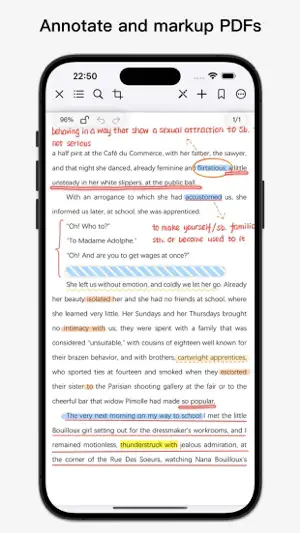
Feature Introduction: BoardNotes is a versatile handwriting note-taking app that integrates five major functions—whiteboard, notebook, PDF, mind map, and flashcards—covering most note-taking scenarios. It serves as your All-In-One App. Handwriting Pen: 1. BoardNotes utilizes Apple's native pen technology and has developed additional pens tailored for Chinese writing, including a fountain pen, a laser pointer for presentations, and a tape pen for masking notes. 2. Choose from a variety of brushes (laser pen, tape pen, ballpoint pen, straight-line pen, wavy-line pen, custom fountain pen, quill pen, pencil, marker, watercolor pen, fill pen, single-line pen, crayon, freehand pen) to unleash your creativity. 3. Lasso tool (extremely powerful). 4. Eraser (pixel eraser and object eraser). Whiteboard: 1. The whiteboard is ideal for organizing fragmented knowledge, brainstorming, and boosting creativity. 2. Write and draw freely without worrying about boundaries. 3. Customize background colors and grid templates. 4. Add various card types (text, image, video, audio, webpage, file, handwriting). 5. Multiple auxiliary tools: background board, pins, link navigation (supports bidirectional links), connectors, timer (countdown supported), calculator. 6. Quickly locate notes using the search function. Notebook & PDF: 1. Create notebooks and PDFs with multiple paper templates and cover options. Import images from Photos or PDFs from the Files app as pages or covers. 2. Add text, images, stickers, videos, webpage snapshots, audio recordings, links (bidirectional links supported), timers, calculators, and floating PDF windows. 3. Layer functionality—show or hide layers as needed. 4. Insert new pages via blank sheets, images, scanned documents, or files. 5. Cut, copy, and paste pages into other notebooks or PDFs. 6. Duplicate, rotate, or delete pages. 7. Reorder pages via long-press and drag in thumbnail view. 8. Create outlines and add bookmarks. 9. Search (text, handwritten notes, etc.). 10. Import e-books (epub, mobi, azw, etc.). Mind Map: 1. Mind mapping is a key feature within the whiteboard. 2. Nodes support multiple formats (text, image, handwriting, video, audio, webpage snapshot, file). 3. Offers 3 structures and 18 color schemes. 4. Add summaries (brackets). 5. Handwritten mind maps (using handwritten cards). 6. Long-press and drag selected cards into the mind map. 7. Reorder nodes or adjust hierarchy via long-press and drag. Flashcard: 1. Flashcards use the SuperMemo algorithm to automatically schedule optimal review intervals, reminding you before forgetting to maximize memory efficiency. 2. Flashcards support text, images, and handwriting. 3. Quickly create cards from notes in whiteboards, notebooks, or PDFs using the rectangular lasso tool. Download BoardNotes for free on iPad, iPhone, and Mac. For suggestions, please contact us via the in-app feedback feature.
Ratings & reviews
4.7
115 ratings
What’s new
Version 1.4.0 · Updated September 30, 2026
1. The function buttons in the top toolbar of the whiteboard and notebook support showing or hiding. 2. Optimized some features and fixed some bugs.
App privacy
The developer, Chongqing Ouluowa Technology Co., Ltd., reported these privacy practices to Apple.
Data Used to Track You
The following data may be used to track you across apps and websites owned by other companies:
- Identifiers: Device ID
Data Not Linked to You
The following data, which may be collected but is not linked to your identity, may be used for the following purposes:
- Identifiers: Device ID
- Diagnostics: Crash Data
Used for: Third-Party Advertising, App Functionality
Alternatives to BoardNotes: Notes, PDF, Docs
Looking for apps like BoardNotes: Notes, PDF, Docs? Here are 6 similar apps on the App Store. The highest rated is TouchMind-handwritten mind map (4.8/5), and all 6 are free to download.
-
 GUGA-Hyperboard
4.6
GUGA-Hyperboard
4.6
-
 OrigNotes
4.7
OrigNotes
4.7
-
 BigPaper -Mind Map, PDF Markup
4.0
BigPaper -Mind Map, PDF Markup
4.0
-
 享做笔记
2.5
享做笔记
2.5
-
 MarginNote 3
4.7
MarginNote 3
4.7
-
 TouchMind-handwritten mind map
4.8
TouchMind-handwritten mind map
4.8
| App | Rating | Price | Last updated | Compare |
|---|---|---|---|---|
| BoardNotes: Notes, PDF, Docs | 4.7 / 5 (115 ratings) | Free | September 30, 2026 | |
| GUGA-Hyperboard | 4.6 / 5 (170) | Free | Oct 29, 2025 | Compare |
| OrigNotes | 4.7 / 5 (353) | Free | Sep 29, 2026 | Compare |
| BigPaper -Mind Map, PDF Markup | 4.0 / 5 (20) | Free | Sep 9, 2025 | Compare |
| 享做笔记 | 2.5 / 5 (4) | Free | Sep 28, 2026 | Compare |
| MarginNote 3 | 4.7 / 5 (5,045) | Free | Nov 29, 2025 | Compare |
| TouchMind-handwritten mind map | 4.8 / 5 (37) | Free | Sep 29, 2026 | Compare |