

Keep Browser: Tree Tabs
RSA TECHNOLOGIES, LIMITED LIABILITY CO. Utilities iPhoneiPadiPod touch
Keep Browser: Tree Tabs is a free Utilities app for iPhone and iPad by RSA TECHNOLOGIES, LIMITED LIABILITY CO. Rated 5.0/5 from 4 ratings. Requires iOS 15.6.
- Rating
- 5.0
- 4 ratings
- Price
- Free
- on the App Store
- Size
- 144 MB
- Age 17+
- Updated
- Oct 5
- 2026 · v1.40
Screenshots



About Keep Browser: Tree Tabs
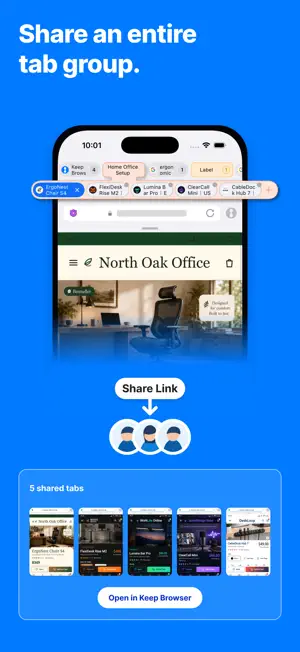
Keep Browser turns search results, comparison pages, and research links into organized tree-style tabs. Open links at the top level, in the same group, or in a subgroup so research, shopping, travel planning, work, and study pages stay connected and easy to find. Organized tab groups can be sent as shared links. Share tab groups across supported devices, making it easier to continue research across devices. Useful when you want to: • Open multiple search results and compare them later • Organize products, hotels, restaurants, properties, or other candidates • Keep frequently used pages and pages to read later in groups • Manage many open tabs with hierarchy and labels • Share a group of tabs with family, friends, or another device Main features • Tree-style tab management: Keep related pages in a clear hierarchy. • Tab group sharing: Send selected tab groups as shared links and open them across supported devices. Private tabs are not shared. • Keep Mode: Open tapped links as new tabs in a subgroup and preserve your research flow. • Labels: Add names and colors to tab groups. • Tab List, Tab Map, and related-node preview: Review open tabs and related groups, then jump to the page you need. • Pinned tabs: Keep important pages from being closed by mistake. • Closed tab restore: Restore closed tabs from the list. • Ad blocking: Choose the blocking strength and adjust settings per site to balance cleaner pages with site compatibility. • Private Mode: Browse without saving history or cookies. • Fast scroll: Move quickly through long pages and large tab lists by dragging the scroll bar. • Backup and restore: Back up and restore regular tabs, bookmarks, browsing history, search history, and settings across supported devices. Private tabs, cookies, and login state are not restored. • Bookmarks, history, downloads, page translation, find in page, PDF search, desktop site display, and zoom are also supported. Keep Browser is built not only to open pages, but to organize and preserve them. Manage research, comparison, saving, sharing, and backup in one place.
What’s new
Version 1.40 · Updated October 5, 2026
■ New features and improvements • Added haptic feedback when long-pressing the “+” button on the Tab bar or attempting to scroll when no further scrolling is possible. • Made connections between parent and child Tabs easier to see while scrolling the Tab bar. • Made switching Tabs and interacting with Home Tabs smoother. • Improved loading of browsing history and closed Tabs. ■ Bug fixes • Reduced unwanted shifts in the view when creating, duplicating, or closing Tabs. • Fixed the Tab list so that each mode’s selected Tab is displayed correctly when switching between regular and Private modes. • Fixed Tab bar display issues when rotating the screen and when using right-to-left languages. Keep Browser is always working to improve performance and stability. Please share your feedback and requests through the app’s contact feature or in an App Store review.
App privacy
The developer, RSA TECHNOLOGIES, LIMITED LIABILITY CO., reported these privacy practices to Apple.
Data Used to Track You
The following data may be used to track you across apps and websites owned by other companies:
- Location: Coarse Location
- Identifiers: Device ID
- Usage Data: Product Interaction, Advertising Data
- Diagnostics: Performance Data
Data Linked to You
The following data, which may be collected and linked to your identity, may be used for the following purposes:
- Location: Coarse Location
- Identifiers: Device ID
- Usage Data: Product Interaction, Advertising Data, Other Usage Data
- Diagnostics: Performance Data, Other Diagnostic Data
- Browsing History: Browsing History
Used for: Third-Party Advertising, Analytics
Data Not Linked to You
The following data, which may be collected but is not linked to your identity, may be used for the following purposes:
- Diagnostics: Crash Data
- Browsing History: Browsing History
Used for: Analytics, App Functionality
Alternatives to Keep Browser: Tree Tabs
Looking for apps like Keep Browser: Tree Tabs? Here are 6 similar apps on the App Store. The highest rated is Loom - Web Ai Browser App (4.6/5), and all 6 are free to download.
-
 Perfect Browser - All in One
3.0
Perfect Browser - All in One
3.0
-
 Shiori Web Browser
4.4
Shiori Web Browser
4.4
-
 AI Browser: AD Block
4.5
AI Browser: AD Block
4.5
-
 Loom - Web Ai Browser App
4.6
Loom - Web Ai Browser App
4.6
-
 TabTasu - Browser Tab Manager
-
 Ohajiki Web Browser
4.3
Ohajiki Web Browser
4.3
| App | Rating | Price | Last updated | Compare |
|---|---|---|---|---|
| Keep Browser: Tree Tabs | 5.0 / 5 (4 ratings) | Free | October 5, 2026 | |
| Perfect Browser - All in One | 3.0 / 5 (4) | Free | Jul 4, 2026 | Compare |
| Shiori Web Browser | 4.4 / 5 (25) | Free | Jul 28, 2026 | Compare |
| AI Browser: AD Block | 4.5 / 5 (11) | Free | Jan 9, 2025 | Compare |
| Loom - Web Ai Browser App | 4.6 / 5 (30) | Free | Feb 22, 2025 | Compare |
| TabTasu - Browser Tab Manager | – | Free | Oct 4, 2026 | Compare |
| Ohajiki Web Browser | 4.3 / 5 (23) | Free | Jul 31, 2026 | Compare |