

TabTasu - Browser Tab Manager
Shohei Ohno Utilities iPhoneiPadiPod touch
TabTasu - Browser Tab Manager is a free Utilities app for iPhone and iPad by Shohei Ohno. Requires iOS 26.5. Updated October 18, 2026.
- Price
- Free
- on the App Store
- Size
- 40 MB
- Age 17+
- Updated
- Oct 18
- 2026 · v2.10.0
Screenshots



About TabTasu - Browser Tab Manager
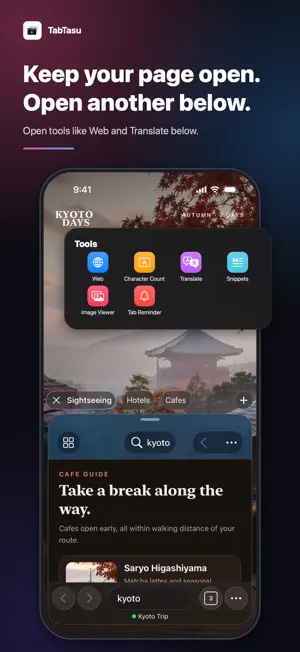
Keep tabs and logins separate for work, personal life, and more, and switch in a tap. TabTasu is a browser that keeps web pages together in purpose-based groups. Switch groups and pick up right where you left off. ORGANIZE TABS BY PURPOSE • Create groups for work, hobbies, study, shopping, and more • See a group's tabs lined up at the bottom and switch with a tap or swipe • Touch and hold the tab count button to switch groups quickly • Search tabs in all groups from the group list • Your current pages and tab order are saved, so you can pick up where you left off • Move a tab to another group from the tab list • Add pages to a group from the Share button in other apps • Make TabTasu your default browser to open links from other apps in the group you choose • Save pages to a group's bookmarks, and open favorites from the Start Page with one tap KEEP LOGINS SEPARATE BY GROUP • Set a group's Browsing Mode to Group Only to keep its sign-ins separate from other groups • Stay signed in to the same site with different accounts, and switch just by switching groups • Give each group a color to see at a glance which account you're using • Open the current page or a link in another group to check it with a different account • Private groups don't save browsing or search history, and their sign-ins and site data are deleted when the app quits • Delete just one Group Only group's site data while your other groups stay signed in PROTECT GROUPS YOU WANT TO KEEP PRIVATE • Choose Tap to Show or Authenticate to Show for each group • Authenticate to Show unlocks with Face ID, Touch ID, or your passcode YOUR BROWSING DATA STAYS ON YOUR DEVICE • No account needed, so you can start right away • Tabs, groups, browsing history, and sign-ins are stored on your device and never sent to TabTasu's servers • To improve the app and show ads, usage data and similar information is sent to Google services (see the Privacy Policy for details) TOOLS WHILE YOU BROWSE • Open another page below the current one to compare • Count the characters and lines in your text • Take a full-page screenshot, then mark it up, save it, or share it • Translate text you select on a page, right on your device • Save text you type often as snippets and copy it with a tap • Set a time on an open tab to get a notification, and tap it to pick up right where you left off • View the images on a page one at a time, full screen MORE FEATURES • Set a name and home page for each tab • Protect important tabs • Browsing and search history kept separately for each group • Request the desktop version of a site • Choose your search engine • Scan QR codes and open them in the current group PERFECT FOR • Using the same service with separate work and personal accounts • Anyone tired of digging through an endless list of tabs • People who revisit the same pages every day • Research that moves between multiple websites • Browsing in public when you would rather keep the current screen hidden Works on iPhone and iPad in portrait and landscape, with support for Light and Dark Mode.
What’s new
Version 2.10.0 · Updated October 18, 2026
• Give your groups a color. A color dot appears before the group name at the bottom of the screen, in the tab list, and when you choose a group, so you can tell at a glance which group, and which account, you're using • Touch and hold a tab or link and choose Open in another group to open the page in a different group. Quickly check the same page while signed in with another account • Touch and hold the tab count button to switch, create, or edit groups • Search tabs in all groups from the group list. The search field now shows what it searches • New Tab Reminder tool: set a time on an open tab to get a notification. Tap it to return to the same tab in the same group, right where you left off. You can also set one from Reminder when you touch and hold a tab • New Image Viewer tool: see the images on the current page as a list and flip through them one at a time, full screen • In Settings, Automatically Select the New Tab is now Open Tabs from Menus. Menu items read Open in New Tab or Add to Tabs to match your choice • Groups you create from the group list now open right away • Browsing mode and display method changes you make when editing a group now become the defaults for your next group • Fixed an issue where tabs at the bottom were cut off before the + button while scrolling
App privacy
The developer, Shohei Ohno, reported these privacy practices to Apple.
Data Used to Track You
The following data may be used to track you across apps and websites owned by other companies:
- Identifiers: Device ID
Data Not Linked to You
The following data, which may be collected but is not linked to your identity, may be used for the following purposes:
- Location: Coarse Location
- Identifiers: Device ID
- Usage Data: Product Interaction, Advertising Data
- Diagnostics: Performance Data, Crash Data
Used for: Third-Party Advertising, Analytics, App Functionality
Alternatives to TabTasu - Browser Tab Manager
Looking for apps like TabTasu - Browser Tab Manager? Here are 6 similar apps on the App Store. The highest rated is Keep Browser: Tree Tabs (5.0/5), and all 6 are free to download.
-
 Keep Browser: Tree Tabs
5.0
-
 Basic Browser
-
 TabLinker: Tabs Manager
5.0
-
 Lockteens Browser
-
 CICO Browser
-
 Perfect Browser - All in One
3.0
| App | Rating | Price | Last updated | Compare |
|---|---|---|---|---|
| TabTasu - Browser Tab Manager | – | Free | October 18, 2026 | |
| Keep Browser: Tree Tabs | 5.0 / 5 (4) | Free | Oct 16, 2026 | Compare |
| Basic Browser | – | Free | Oct 27, 2024 | Compare |
| TabLinker: Tabs Manager | 5.0 / 5 (3) | Free | Oct 18, 2026 | Compare |
| Lockteens Browser | – | Free | Oct 13, 2026 | Compare |
| CICO Browser | – | Free | Mar 24, 2025 | Compare |
| Perfect Browser - All in One | 3.0 / 5 (4) | Free | Jul 4, 2026 | Compare |