

Scanner App - Scan & Edit PDF
IFUNPLAY CO., LTD. Business iPhoneiPadiPod touch
Scanner App - Scan & Edit PDF is a free Business app for iPhone and iPad by IFUNPLAY CO., LTD. Rated 4.8/5 from 905 ratings. Requires iOS 13.0.
- Rating
- 4.8
- 905 ratings
- Price
- Free
- on the App Store
- Size
- 270 MB
- Age 4+
- Updated
- Oct 16
- 2026 · v18.7.5
Screenshots

About Scanner App - Scan & Edit PDF
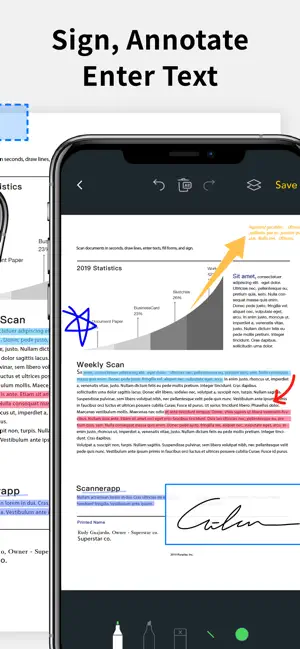
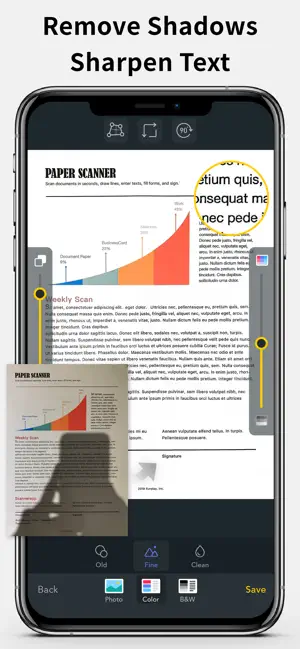
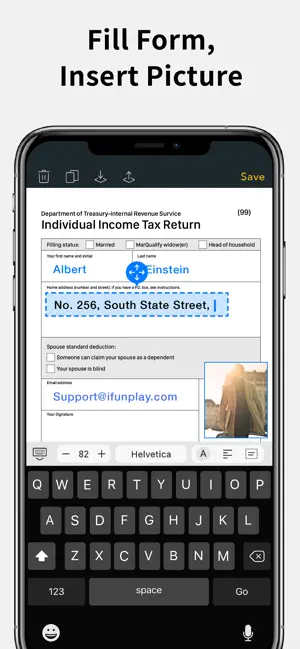
Scan and OCR documents in seconds, draw lines, edit texts, fill forms, collage, and sign. Share as PDF / JPEG by email, WiFi file sharing, cloud storages, smb, webdav, and fax. Powerful Scanning & OCR • Instantly scan paper documents, whiteboards, business cards, books, posters, and receipts with sharp clarity. • Auto-detect document edges to correct perspective distortion. • Enhance readability by removing background shadows and sharpening text in “Color” or “B&W” mode. • Adjust brightness and saturation in “Photo” mode. • Edit text, draw lines, and insert images. • Extract text from scanned images using OCR and export as TXT or DOCX. • Smart Formatting – The OCR function detects and restores font styles and colors on a line-by-line basis. • Business Card Scanner – Instantly digitize business cards, extract contact details using OCR, and save them directly to your phone's address book. Photo Collage & Multi-Page Printing • Merge multiple pages into a single sheet—perfect for printing double-sided ID cards on A4/Letter paper. Save, Print & Organize • Save scans as JPEG or export as PDF. • Print wirelessly with AirPrint-supported printers. • Organize scans into folders, browse with thumbnail previews, and search by file name, OCR text, or notes. • Add annotations, signatures, and password protection for documents. Convenient Faxing • Send and receive faxes anywhere—no fax machine needed. • Receive push notifications for fax status updates. • Fax to 100+ countries (cost based on page count and recipient country). • Subscribe to a fax number for incoming faxes or disable fax reception when not needed. Seamless File Sharing & Export • Support exporting searchable PDFs • Transfer files between devices effortlessly. • Share as JPEG/PDF via email or open in other apps. • Save to Photos, iCloud Drive, Google Drive, Dropbox, OneDrive, Evernote, WebDAV, and more. • Access files from a PC using a web browser over WiFi. • Export to Reminders and sync with Apple, Google, or Outlook calendars. Easy File Import • Import JPEG images from other apps for cropping and enhancement. • Import PDFs as scanned pages. • Import files from cloud storage services. Effortlessly manage and digitize your documents—anytime, anywhere! Subscription Plans Unlock premium features with Bronze, Silver, or Gold plans, including: • Cloud Backup & Restore: Access previous versions of your documents anytime • Flexible subscription options: Monthly or annual plans available • Subscription renews automatically unless auto-renew is turned off at least 24 hours before the end of the current period • Account will be charged for renewal within 24 hours before the end of the current period. The cost depends on the selected plan • Subscriptions may be managed by the user, and auto-renewal may be turned off by going to the user's Account Settings after purchase • Any unused portion of the free trial will be forfeited when the user purchases a subscription or cancel it Terms of Service: https://ifunplay.com/legal.html
Ratings & reviews
4.8
905 ratings
What’s new
Version 18.7.5 · Updated October 16, 2026
This update includes stability improvements and bug fixes.
App privacy
The developer, IFUNPLAY CO., LTD., reported these privacy practices to Apple.
Data Used to Track You
The following data may be used to track you across apps and websites owned by other companies:
- Identifiers: Device ID
Data Not Linked to You
The following data, which may be collected but is not linked to your identity, may be used for the following purposes:
- Identifiers: Device ID
- Usage Data: Product Interaction, Other Usage Data
Used for: Third-Party Advertising, Analytics
Alternatives to Scanner App - Scan & Edit PDF
Looking for apps like Scanner App - Scan & Edit PDF? Here are 6 similar apps on the App Store. The highest rated is Plan Calendar -Make a Schedule (5.0/5), and all 6 are free to download.
-
 GS1 Operator
-
 Plan Calendar -Make a Schedule
5.0
Plan Calendar -Make a Schedule
5.0
-
 One Scan: PDF Doc Scanner
4.7
One Scan: PDF Doc Scanner
4.7
-
 Scanner Vault: PDF & OCR Scan
4.6
Scanner Vault: PDF & OCR Scan
4.6
-
 InstaPDF - Scan, Edit & Share
4.9
InstaPDF - Scan, Edit & Share
4.9
-
 Nova Scanner-Scan PDF Document
4.6
Nova Scanner-Scan PDF Document
4.6
| App | Rating | Price | Last updated | Compare |
|---|---|---|---|---|
| Scanner App - Scan & Edit PDF | 4.8 / 5 (905 ratings) | Free | October 16, 2026 | |
| GS1 Operator | – | Free | Mar 3, 2025 | Compare |
| Plan Calendar -Make a Schedule | 5.0 / 5 (22) | Free | Oct 15, 2026 | Compare |
| One Scan: PDF Doc Scanner | 4.7 / 5 (11,766) | Free | Oct 7, 2026 | Compare |
| Scanner Vault: PDF & OCR Scan | 4.6 / 5 (15,467) | Free | Dec 17, 2025 | Compare |
| InstaPDF - Scan, Edit & Share | 4.9 / 5 (1,066) | Free | Sep 26, 2025 | Compare |
| Nova Scanner-Scan PDF Document | 4.6 / 5 (819) | Free | Jan 14, 2026 | Compare |