

Nova Scanner-Scan PDF Document
Beesoft Apps Business iPhoneiPadiPod touch
Nova Scanner-Scan PDF Document is a free Business app for iPhone and iPad by Beesoft Apps. Rated 4.6/5 from 819 ratings. Requires iOS 15.0.
- Rating
- 4.6
- 819 ratings
- Price
- Free
- on the App Store
- Size
- 133 MB
- Age 4+
- Updated
- Jan 14
- 2026 · v3.1.0
Screenshots


About Nova Scanner-Scan PDF Document
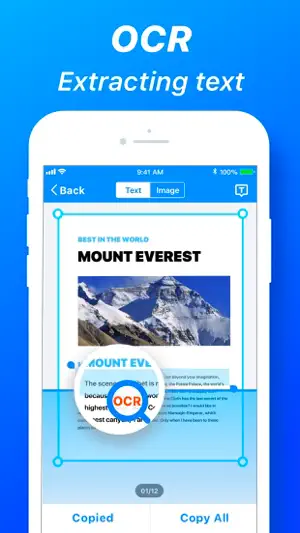
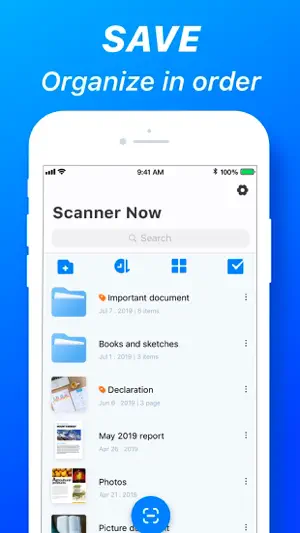
Want a scanner in your pocket? SOLUTION: Scanner Now - extracts all the features of a real scanner into your iPhone. With Scanner Now, all you need to do is just take photos of your pages, documents, receipts, whiteboard, anything page like, leave the rest to the app, and have a coffee! Scanner Now is a handy scanner app that will turn your iOS device into a powerful mobile scanner. Easily scan, save, and share any documents in PDF or JPEG. More than just a PDF scanner. Use Scanner Now to turn anything — receipts, notes, documents, photos, business cards, whiteboards — into PDF with text you can reuse from each PDF and photo scan. Designed and developed by polycents! APP FEATURES: Scanner document - Multipage scanning - 3 pre-set page effect, black & white(thresholding), grayscale, colored. - 3-page enhancements - color correction, noise removing, white balance - Page finding - auto-detect border of a page. - Page rotating. Fax document - Cheap fax service - Send fax quickly - Fax history can be queried OCR document - Easily turn an image to text with the OCR function. - Extract text from a scanned document and then edit it as you wish. - Text scanner recognizes all popular languages and can even detect multiple languages within one document. Sign document - Easily sign in any document - Save each of your signatures Documents Management - Docs are arranged by the timeline. - OCR - Grid and list view. - Edit, share, rename, merge, delete documents, and pages. - Pictures from the camera roll, album. - Files from iCloud, Google Drive, Dropbox, OneDrive, Box, Evernote, One Note Documents Share - System based sharing menu. - Export as PDF, JPEG, PNG. - Fax, Email, Printer. Misc - Passcode when launching. - File transferring via Wi-Fi. # Subscription Details # - A free trial period is provided. - Payment will be charged to your iTunes account at confirmation of purchase. - Your subscription will automatically renew unless auto-renew is disabled at least 24 hours before the end of the current subscription period. - Automatic renewals will be charged at the same price you were originally charged for the subscription. - Subscriptions may be managed by the user and auto-renewal may be turned off by going to the user's Account Settings after purchase - Any unused portion of the free trial will be forfeited when the user purchases a subscription The following subscription plans are available (price may vary depending on location): • 12-month subscription with 7-day trial version – US$ 11.99 • 1-month subscription – US$ 1.99 Privacy Policy: https://www.iubenda.com/privacy-policy/55082894 Terms of use: https://polycents.com/terms-%26-conditions-3 Please don’t be hesitate to contact us using the built-in support page or directly email to [email protected] when you meet with any problem.
Ratings & reviews
4.6
819 ratings
What’s new
Version 3.1.0 · Updated January 14, 2026
Hello folks! In this update, we've fixed minor bugs and improvements. We'd love to hear your feedback! If you have any ideas or feature requests for future versions of the app, feel free to let us know. Please reach out to us at [email protected]
App privacy
The developer, Beesoft Apps, reported these privacy practices to Apple.
Data Used to Track You
The following data may be used to track you across apps and websites owned by other companies:
- Identifiers: Device ID
Data Not Linked to You
The following data, which may be collected but is not linked to your identity, may be used for the following purposes:
- Identifiers: Device ID
- Usage Data: Product Interaction
- Diagnostics: Crash Data
Used for: Analytics
Alternatives to Nova Scanner-Scan PDF Document
Looking for apps like Nova Scanner-Scan PDF Document? Here are 6 similar apps on the App Store. The highest rated is Fax It: Faxing. Pay as you go (4.7/5), and all 6 are free to download.
-
 ScanCam: Scanner for iPhone
4.4
ScanCam: Scanner for iPhone
4.4
-
 FaxMe: Fax from iPhone & iPad
2.8
FaxMe: Fax from iPhone & iPad
2.8
-
 Fax It: Faxing. Pay as you go
4.7
Fax It: Faxing. Pay as you go
4.7
-
 Faxeau: Send Fax from Phone
4.5
Faxeau: Send Fax from Phone
4.5
-
 SmartScan Pro: PDF scanner
4.5
SmartScan Pro: PDF scanner
4.5
-
 PDF Scanner:File Scanner App
4.5
PDF Scanner:File Scanner App
4.5
| App | Rating | Price | Last updated | Compare |
|---|---|---|---|---|
| Nova Scanner-Scan PDF Document | 4.6 / 5 (819 ratings) | Free | January 14, 2026 | |
| ScanCam: Scanner for iPhone | 4.4 / 5 (470) | Free | Sep 14, 2026 | Compare |
| FaxMe: Fax from iPhone & iPad | 2.8 / 5 (87) | Free | Feb 26, 2026 | Compare |
| Fax It: Faxing. Pay as you go | 4.7 / 5 (1,827) | Free | Aug 10, 2026 | Compare |
| Faxeau: Send Fax from Phone | 4.5 / 5 (117) | Free | Sep 28, 2026 | Compare |
| SmartScan Pro: PDF scanner | 4.5 / 5 (1,353) | Free | Mar 17, 2025 | Compare |
| PDF Scanner:File Scanner App | 4.5 / 5 (53) | Free | Oct 19, 2026 | Compare |