

Plan Calendar -Make a Schedule
naoki otsu Productivity iPhoneiPadiPod touch
Plan Calendar -Make a Schedule is a free Productivity app for iPhone and iPad by naoki otsu. Rated 5.0/5 from 22 ratings. Requires iOS 15.1.
- Rating
- 5.0
- 22 ratings
- Price
- Free
- on the App Store
- Size
- 52 MB
- Age 4+
- Updated
- Oct 15
- 2026 · v6.19.1
Screenshots
About Plan Calendar -Make a Schedule
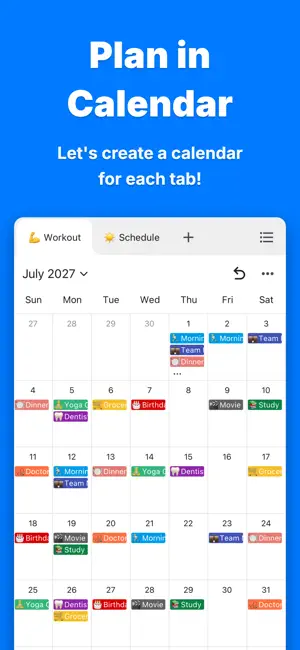
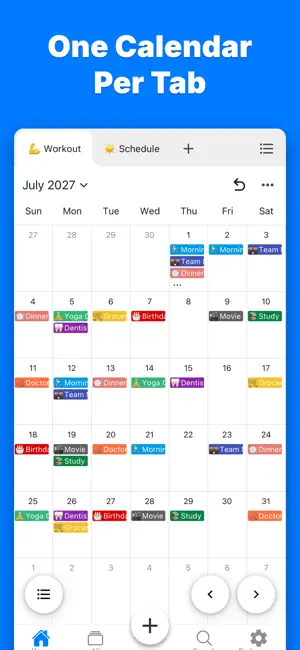
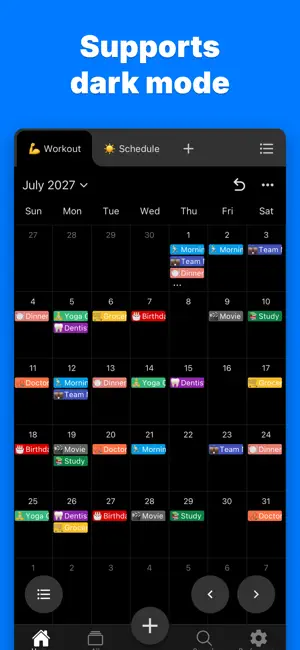
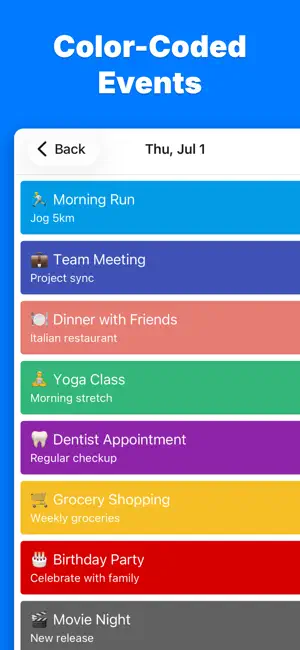
Create your plans on a monthly calendar and check your schedule anytime! Packed with powerful features including one-tap event creation, unlimited tabs, color-coded events, event search, backup & restore, dark mode support, and much more. ◆ One-Tap Event Creation Just tap a date on the monthly calendar to instantly add an event! ◆ Unlimited Tabs Split and manage your calendars by category with tabs! Create separate calendars for work, personal life, hobbies, and more! ◆ Color-Coded Events Color-code your events from a rich palette of colors! Recognize their importance and type at a glance! ◆ Swipe to Change Months No more tedious tapping to switch months. Just swipe to move between months intuitively. ◆ Event Search Search and find all your events in an instant! Pinpoint the schedule you need from even the largest amount of data in a flash! ◆ Backup and Restore Switch devices with peace of mind! Your data is backed up automatically and restored instantly on a new device! ◆ Light and Dark Mode Support A beautiful dark mode that's easy on the eyes! ◆ Offline Support No internet connection required! Access it anytime, anywhere! ◆ Notifications Get notified with your own custom message at the time you set! Never miss an important plan! ◆ Biometric Authentication Protect the app with Face ID or fingerprint authentication. Safeguard your privacy so only you can see your data. ◆ CSV Export Easily export all your data as a CSV file! Perfect for backups or analysis with AI. ◆ Tab Notes Add notes freely to each tab! Check important information for every category anytime! ◆ No Login Required No annoying sign-up process needed! Get started right after downloading! ◆ Robust Security Your data is completely private! Nothing is ever sent externally! It's stored safely on your device only! ◆ Support If you have any questions, please feel free to contact us through the in-app inquiry form or at the email address below. [email protected] Privacy Policy: https://naokiotsu.com/privacy-policy
Ratings & reviews
5.0
22 ratings
What’s new
Version 6.19.1 · Updated October 15, 2026
- The latest version includes new features, bug fixes, and performance improvements. Thank you for always using our app. We will continue to develop it with the valuable feedback from everyone. If you have any requests or encounter any issues, please feel free to contact us through "Send Feedback" in the app settings or at [email protected].
App privacy
The developer, naoki otsu, reported these privacy practices to Apple.
Data Used to Track You
The following data may be used to track you across apps and websites owned by other companies:
- Usage Data: Advertising Data, Other Usage Data
Data Linked to You
The following data, which may be collected and linked to your identity, may be used for the following purposes:
- Usage Data: Advertising Data, Other Usage Data
Used for: Third-Party Advertising, Analytics
Alternatives to Plan Calendar -Make a Schedule
Looking for apps like Plan Calendar -Make a Schedule? Here are 6 similar apps on the App Store. The highest rated is Basic Calendar (4.8/5), and all 6 are free to download.
-
 GS1 Operator
-
 CalCal|Simple Calendar
4.5
-
 Calendar Z
4.3
-
 Supercal Calendar
4.4
-
 Basic Calendar
4.8
-
 Simple Calendar: Widget Cal
4.4
| App | Rating | Price | Last updated | Compare |
|---|---|---|---|---|
| Plan Calendar -Make a Schedule | 5.0 / 5 (22 ratings) | Free | October 15, 2026 | |
| GS1 Operator | – | Free | Mar 3, 2025 | Compare |
| CalCal|Simple Calendar | 4.5 / 5 (4) | Free | Oct 19, 2026 | Compare |
| Calendar Z | 4.3 / 5 (722) | Free | Jan 23, 2026 | Compare |
| Supercal Calendar | 4.4 / 5 (49) | Free | Apr 6, 2026 | Compare |
| Basic Calendar | 4.8 / 5 (5) | Free | Apr 20, 2026 | Compare |
| Simple Calendar: Widget Cal | 4.4 / 5 (74) | Free | Jul 7, 2026 | Compare |