

StarVoice: Voice Recorder
志红 刘 Utilities iPhoneiPadiPod touch
StarVoice: Voice Recorder is a free Utilities app for iPhone and iPad by 志红 刘. Rated 4.5/5 from 11 ratings. Requires iOS 15.6. Updated November 6, 2026.
- Rating
- 4.5
- 11 ratings
- Price
- Free
- on the App Store
- Size
- 93 MB
- Age 9+
- Updated
- Nov 6
- 2026 · v3.1.0
Screenshots


About StarVoice: Voice Recorder
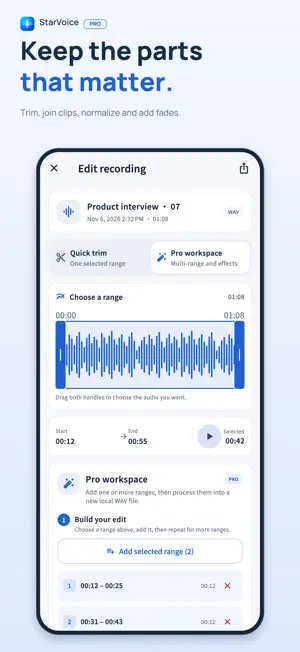
Record the conversation. Keep the ideas. StarVoice combines an audio recorder with local editing and on-device AI. Capture meetings, interviews, lectures and voice memos, then turn your recordings into text and useful notes. No StarVoice account is required. LOCAL AI, INCLUDED IN LIFETIME PRO • Transcribe new or existing recordings after you finish recording. • Generate summaries and structured meeting minutes from a transcript. • Turn key points into a mind map you can zoom, pan and export as PNG. • Review and edit text, copy complete results, and export TXT or Markdown. Open a recording's three-dot menu and choose Local AI. If a recording has no transcript, StarVoice transcribes it before generating a summary, minutes or mind map. Edit the transcript and regenerate when you want to refine the source. ON-DEVICE PROCESSING Recordings, transcripts and generated results are stored locally in the app. AI processing runs on your device; StarVoice does not upload your recordings to an AI service for transcription or generation. AI models download separately when you choose to use them. After installation, the AI tools can work offline. Basic recording and playback do not require model downloads. AI tasks run with the app in the foreground and save progress when interrupted. Available model choices depend on device memory and storage; larger models have additional requirements. Review AI-generated content for accuracy. RECORD AND EDIT • Record in efficient M4A, with pause and resume controls. • Trim one selected range and save a new recording. • Play back recordings, mark favorites and search your library. • Share individual audio files through the system share menu. MORE WITH LIFETIME PRO One purchase unlocks all four local AI tools, lossless PCM WAV recording, professional presets, custom recording parameters, multi-range editing, normalization, fades, compatible WAV merging, folders, tags, batch export and a device-authentication app lock. No subscription is required. Existing Lifetime Pro customers can restore their purchase. AI models require an internet connection for their initial download. App Store purchases and purchase restoration also require a connection. Microphone access is requested when recording. StarVoice supports iPhone and iPad running iOS or iPadOS 15.6 or later; some AI models need more memory than basic recording. Questions or suggestions: [email protected] Privacy Policy: https://hero2022.yuque.com/docs/share/523405cc-3f9c-4cd2-9ec1-42cd08f9b360 Terms of Service: https://hero2022.yuque.com/docs/share/e81eb627-6640-4476-8c17-d830a7570bc4
Ratings & reviews
4.5
11 ratings
What’s new
Version 3.1.0 · Updated November 6, 2026
Add local AI translation and AI noise reduction, and optimize part of the interface.
App privacy
The developer, 志红 刘, reported these privacy practices to Apple.
Data Not Collected
The developer does not collect any data from this app.
Alternatives to StarVoice: Voice Recorder
Looking for apps like StarVoice: Voice Recorder? Here are 6 similar apps on the App Store. The highest rated is Photos+ - Clean Up Storage (5.0/5), and 4 of the 6 are free to download.
-
 Photos+ - Clean Up Storage
5.0
-
 Alarm Pro: Shift Alarm Clock
4.5
-
 Photo Cleaner: Delete & Swipe
5.0
-
 Typin - A minimal input app
4.7
-
 Typeless Keyboard: AI Snippets
3.8
-
 Privacy Vault - Photo & Video
| App | Rating | Price | Last updated | Compare |
|---|---|---|---|---|
| StarVoice: Voice Recorder | 4.5 / 5 (11 ratings) | Free | November 6, 2026 | |
| Photos+ - Clean Up Storage | 5.0 / 5 (1) | Free | Jan 29, 2026 | Compare |
| Alarm Pro: Shift Alarm Clock | 4.5 / 5 (15) | Free | Nov 4, 2026 | Compare |
| Photo Cleaner: Delete & Swipe | 5.0 / 5 (2) | Free | Nov 4, 2026 | Compare |
| Typin - A minimal input app | 4.7 / 5 (3) | 1.99 USD | Sep 17, 2026 | Compare |
| Typeless Keyboard: AI Snippets | 3.8 / 5 (6) | Free | Sep 17, 2026 | Compare |
| Privacy Vault - Photo & Video | – | 2.99 USD | Mar 7, 2026 | Compare |