

Privacy Vault - Photo & Video
NAICAI LI Utilities iPhoneiPadiPod touch
Privacy Vault - Photo & Video is a paid Utilities app for iPhone and iPad by NAICAI LI. Requires iOS 17.0. Updated March 7, 2026.
- Price
- 2.99 USD
- on the App Store
- Size
- 22 MB
- Age 4+
- Updated
- Mar 7
- 2026 · v1.3.3
Screenshots
About Privacy Vault - Photo & Video
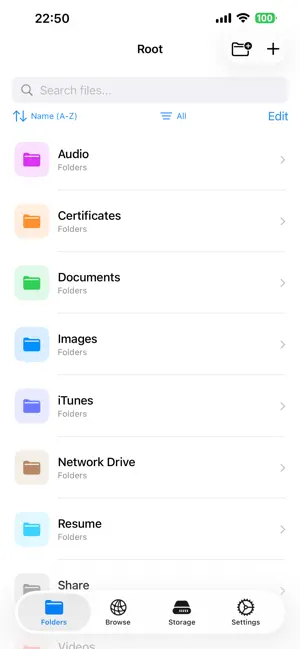
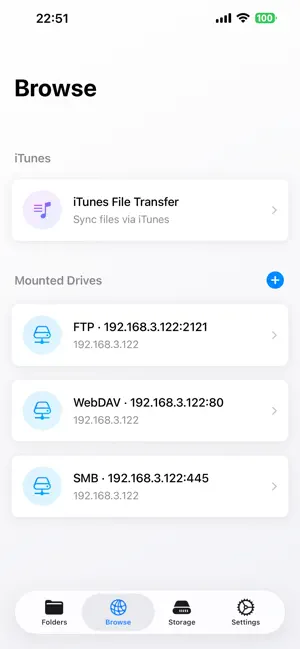
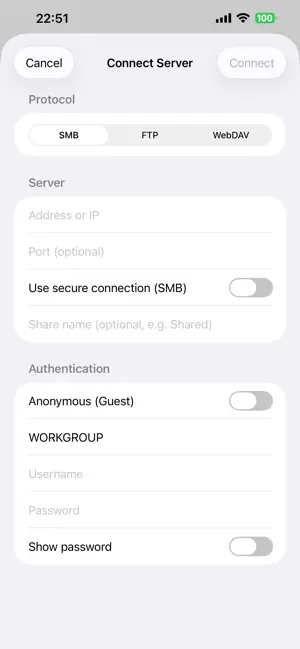
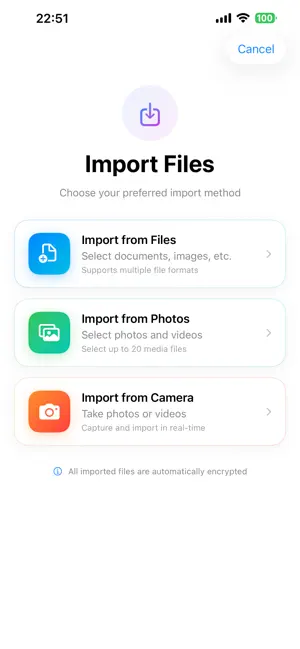
## Your Digital Privacy Guardian Privacy Vault is a professional-grade private file management application designed specifically for iOS. It employs military-grade AES-GCM encryption technology to provide bank-level security protection for your sensitive files. ## Core Functions ### Military-Grade File Encryption * AES-GCM Encryption Algorithm: Military-grade encryption standard using a 256-bit key. * PBKDF2-SHA256 Key Derivation: 100,000 iterations to ensure password security. * Random Salt Generation: Generates a 32-byte random salt for each encryption, preventing rainbow table attacks. * Individual File Passwords: Each file can have an independent password for double protection. ### Multiple Unlocking Methods * Face ID / Touch ID: Biometric unlocking. * Numeric Password: Supports strong password strategy verification. * Smart Authentication: Automatically selects the best unlocking method based on device capabilities. ### Comprehensive File Management * Multi-Format Support: Supports all formats including images, videos, documents, and audio. * Folder Management: Create, rename, move, and delete folders. * Batch Operations: Batch encryption, decryption, move, and rename. * Smart Search: Multi-condition search and tag system. ### Convenient Import Function * File Import: Supports importing all file types. * **Photo Import:** Batch import of multiple photos and videos. * **Photo Import:** Directly capture and save photos to the vault. * **Keep Original Names:** Automatically preserves original filenames. ### Secure Preview System * **Encrypted File Preview:** Preview encrypted content by entering a password. * **Multi-Format Support:** Preview images, videos, PDFs, and audio. * **Temporary Decryption:** Automatically cleans up temporary files after previewing. * **QuickLook Integration:** System-level preview experience. ### NAS Network Storage Support * **Multi-Protocol Support:** Supports three mainstream network storage protocols: SMB, FTP, and WebDAV. * **Quick Connection:** One-click connection to home NAS, enterprise file servers, and cloud storage services. * **Secure Transfer:** Supports encrypted connections (SMB encryption, FTP over SSL/TLS, HTTPS). * **File Synchronization:** Supports downloading files from the NAS to the local vault or uploading encrypted files to the NAS. * **Online Browsing:** Directly browse NAS files and preview them without downloading. * **Password Management:** Automatically saves connection passwords to the Keychain for security and convenience. * **Multi-Server Management:** Supports simultaneous connection to multiple NAS devices. Server Switching, Fast ### Personalization * Theme System: Multiple preset themes and custom colors * Interface Enhancement: Modern UI design, smooth animations * Storage Monitoring: Real-time disk space usage * Statistics: File count, encryption status statistics ## Security Features * Local Storage: All data is stored locally, never uploaded to third-party servers * Sandbox Protection: Strictly adheres to iOS sandbox security mechanisms * Memory Protection: Sensitive data is immediately cleared after use * Background Lock: App automatically locks for protection when entering the background ## Applicable Scenarios * Personal Privacy: Protection of private photos, videos, and documents * Business Documents: Encryption of contracts, agreements, and financial statements * Learning Materials: Management of important notes, certificates, and documents * Creative Works: Protection of design drafts, code, and creative documents ## Why Choose Us * Professional-Grade Encryption: Uses bank-grade AES-GCM encryption algorithm * Multiple Protections: Biometric identification, digital passwords * User-Friendly: Modern interface, simple and intuitive operation * Privacy First: Local storage, never uploaded to third-party servers * Continuous updates: Regular updates and continuous optimization of the user experience.
What’s new
Version 1.3.3 · Updated March 7, 2026
• OneDrive: Connect to Microsoft OneDrive to browse, upload, download, and manage files in the cloud • SFTP: Connect to SFTP servers to manage remote files; password can be saved • Extract: Support for ZIP, TAR, 7z, GZip, TAR.GZ, and TGZ; extract to current folder or choose a destination • Connection: Protocol options are now grouped as “Cloud” and “Server” for clearer selection • Improvements: Better experience and stability for Dropbox and batch uploads
App privacy
The developer, NAICAI LI, reported these privacy practices to Apple.
Data Not Collected
The developer does not collect any data from this app.
Alternatives to Privacy Vault - Photo & Video
Looking for apps like Privacy Vault - Photo & Video? Here are 6 similar apps on the App Store. The highest rated is Dayvella (5.0/5), and 5 of the 6 are free to download.
-
 Private Diary Everyday
-
 Dayvella
5.0
Dayvella
5.0
-
 Photos+ - Clean Up Storage
5.0
Photos+ - Clean Up Storage
5.0
-
 Dos Notes
-
 Gallery Cleaner: Screenshots
5.0
Gallery Cleaner: Screenshots
5.0
-
 Video Compressor - ClipZip
4.9
Video Compressor - ClipZip
4.9
| App | Rating | Price | Last updated | Compare |
|---|---|---|---|---|
| Privacy Vault - Photo & Video | – | 2.99 USD | March 7, 2026 | |
| Private Diary Everyday | – | Free | Apr 15, 2026 | Compare |
| Dayvella | 5.0 / 5 (1) | Free | Sep 28, 2026 | Compare |
| Photos+ - Clean Up Storage | 5.0 / 5 (1) | Free | Jan 29, 2026 | Compare |
| Dos Notes | – | 1.99 USD | Mar 21, 2026 | Compare |
| Gallery Cleaner: Screenshots | 5.0 / 5 (2) | Free | Feb 9, 2026 | Compare |
| Video Compressor - ClipZip | 4.9 / 5 (7) | Free | Dec 2, 2025 | Compare |