

Typin - A minimal input app
礼芳 杨 Utilities iPhoneiPadiPod touch
Typin - A minimal input app is a paid Utilities app for iPhone and iPad by 礼芳 杨. Rated 5.0/5 from 2 ratings. Requires iOS 15. Updated September 17, 2026.
- Rating
- 5.0
- 2 ratings
- Price
- 1.99 USD
- on the App Store
- Size
- 22 MB
- Age 4+
- Updated
- Sep 17
- 2026 · v1.12.0
Screenshots
About Typin - A minimal input app
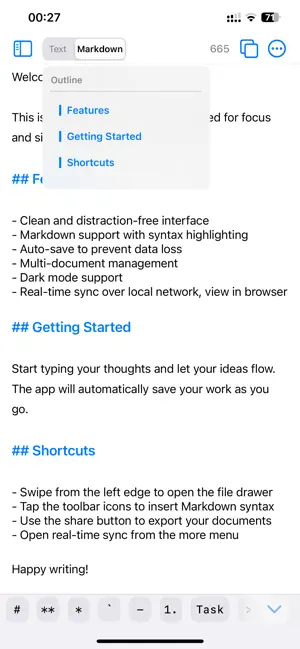
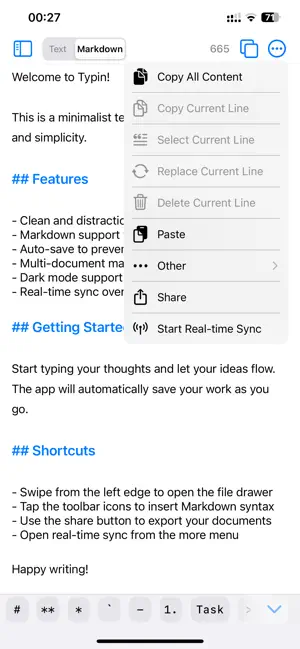
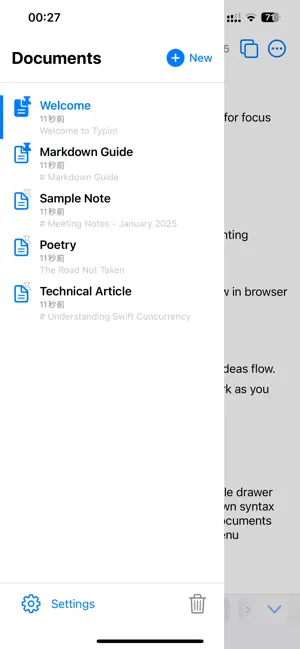
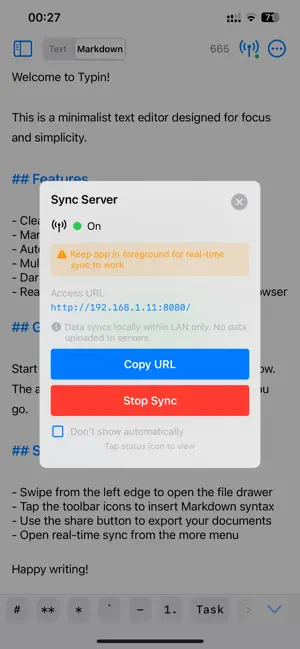
Typin is a lightweight, focused writing and notes app for developers, writers, and anyone who captures ideas on the go. Write quickly in plain text, or switch to Markdown with real-time rendering to make structure instantly clear and readable. Supports LAN real-time sync to continue editing on your computer browser. Core Features Editing & Input * Dual Mode: Plain Text / Markdown with one-tap switching, remembers your preference * Markdown Syntax Highlighting: headings, bold/italic, code, lists, quotes clearly distinguished * Markdown Quick Toolbar: insert common symbols with one tap, long-press for hints * Heading Jump: quickly navigate to any heading in Markdown mode * Smarter Lists: press Enter to continue lists automatically * Gestures for Formatting: swipe left/right to adjust heading levels and list indentation * Smart Copy: copy all when unfocused, show options when focused, copy selection when text selected * Rich Text Operations: copy current line, delete current line, paste and replace, clear document Real-Time Sync * LAN Real-Time Sync: access and edit on your computer browser * Optional password authentication to keep your data secure * Real-time sync status: connection status at a glance * Web client supports multiple languages and light/dark modes Multi-Document Management * Drawer-style document list for quick switching * Pin documents to keep important ones at top * Trash: recover accidentally deleted documents * Support rename, delete, share operations * Smart sorting by modification time and pin status Personalization * Adjustable Font Size: Small / Medium / Large / Extra Large * Line Spacing: Compact / Standard / Relaxed * Theme Mode: Light / Dark / Follow System * Markdown Button Display: Icon / Text * Configurable auto-save interval Other Features * Auto-Save & Save Status Indicator: write with peace of mind * Export & Share: supports .md / .txt formats * Keyboard Control: dismiss keyboard or jump to bottom * Toolbar floats up when keyboard appears, editing area adapts automatically * In-app language switching: supports Simplified Chinese, Traditional Chinese, English, Japanese, Korean, German, French
What’s new
Version 1.12.0 · Updated September 17, 2026
Added file import via AirDrop and share sheet Added custom app icons Sync feature: Added Markdown preview on the web page Improved experience and launch speed
App privacy
The developer, 礼芳 杨, reported these privacy practices to Apple.
Data Not Collected
The developer does not collect any data from this app.
Alternatives to Typin - A minimal input app
Looking for apps like Typin - A minimal input app? Here are 6 similar apps on the App Store. The highest rated is Pinger - Network Monitor (5.0/5), and 4 of the 6 are free to download.
-
 ThreadSplit: Tweet Splitter
-
 Pinger - Network Monitor
5.0
Pinger - Network Monitor
5.0
-
 CoverTrace: Redact ID & SSN
5.0
CoverTrace: Redact ID & SSN
5.0
-
 Drop That Due
-
 FastCut-快剪
-
 PhotoSync - Backup to PC
3.4
PhotoSync - Backup to PC
3.4
| App | Rating | Price | Last updated | Compare |
|---|---|---|---|---|
| Typin - A minimal input app | 5.0 / 5 (2 ratings) | 1.99 USD | September 17, 2026 | |
| ThreadSplit: Tweet Splitter | – | Free | Aug 19, 2026 | Compare |
| Pinger - Network Monitor | 5.0 / 5 (1) | 2.99 USD | Jul 16, 2026 | Compare |
| CoverTrace: Redact ID & SSN | 5.0 / 5 (3) | Free | Oct 29, 2026 | Compare |
| Drop That Due | – | Free | Jun 25, 2026 | Compare |
| FastCut-快剪 | – | Free | Jun 23, 2026 | Compare |
| PhotoSync - Backup to PC | 3.4 / 5 (5) | 0.99 USD | Sep 18, 2026 | Compare |