

PhotoSync - Backup to PC
绍龙 朱 Utilities iPhoneiPadiPod touchMac
PhotoSync - Backup to PC is a free Utilities app for iPhone and iPad by 绍龙 朱. Rated 3.4/5 from 5 ratings. Requires iOS 16.0. Updated September 18, 2026.
- Rating
- 3.4
- 5 ratings
- Price
- Free
- on the App Store
- Size
- 25 MB
- Age 4+
- Updated
- Sep 18
- 2026 · v1.0.7
Screenshots

About PhotoSync - Backup to PC
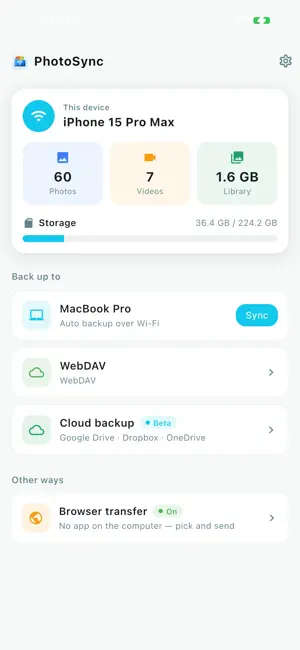
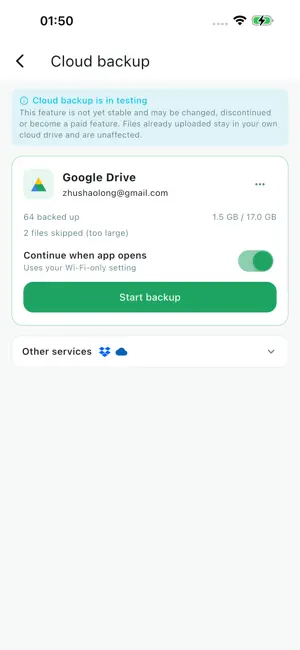
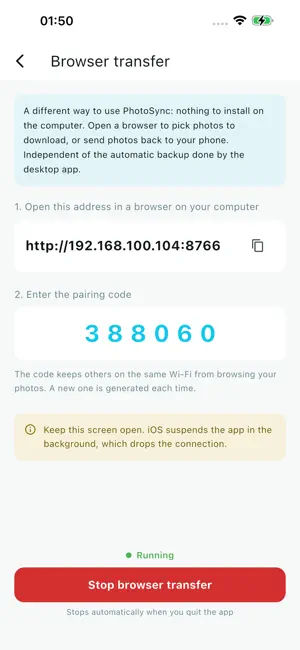
PhotoSync backs up the photos and videos on your phone to your own computer over Wi-Fi — no cable, no account, no middleman. Or send them straight to your own cloud drive. WHY PHOTOSYNC · Private by design. Photos move between your own devices and your own accounts. We run no server and never see them. · No setup. Open the app on both ends and they find each other, like AirDrop. · Only what's new. The second backup takes seconds. · Built for big libraries. Thousands of photos and tens of GB of video, with resumable transfers — a dropped connection won't make you start over. CLOUD BACKUP (optional) Back up to your own Google Drive, Dropbox or OneDrive. Photos go straight from your phone to your account. Free for 7 days . Everything above stays free. NO APP ON THAT COMPUTER? Open a browser and pick photos off your phone — works on any computer on the same Wi-Fi. HOW IT WORKS 1. Open PhotoSync on your computer. 2. Open it on your phone; it finds the computer automatically. 3. Tap Sync. Photos land on your computer, sorted into folders by album. Your phone and computer need to be on the same Wi-Fi. Terms of Use (EULA): https://www.apple.com/legal/internet-services/itunes/dev/stdeula/ Privacy Policy: https://sfss5362.github.io/photosync/privacy.html
Ratings & reviews
3.4
5 ratings
What’s new
Version 1.0.7 · Updated September 18, 2026
· Cloud backup is now free — back up to Google Drive, Dropbox or OneDrive without a subscription · New: back up to your own WebDAV server · Pricing is now a one-time purchase; there are no subscriptions
App privacy
The developer, 绍龙 朱, reported these privacy practices to Apple.
Data Linked to You
The following data, which may be collected and linked to your identity, may be used for the following purposes:
- Financial Info: Payment Info
- Identifiers: User ID
Used for: Analytics, App Functionality
Alternatives to PhotoSync - Backup to PC
Looking for apps like PhotoSync - Backup to PC? Here are 6 similar apps on the App Store. The highest rated is VRLink (5.0/5), and 4 of the 6 are free to download.
-
 VRLink
5.0
VRLink
5.0
-
 QuickCast Pro
-
 SideTVs
5.0
SideTVs
5.0
-
 FileXip
3.7
FileXip
3.7
-
 Typin - A minimal input app
5.0
Typin - A minimal input app
5.0
-
 Pinger - Network Monitor
5.0
Pinger - Network Monitor
5.0
| App | Rating | Price | Last updated | Compare |
|---|---|---|---|---|
| PhotoSync - Backup to PC | 3.4 / 5 (5 ratings) | Free | September 18, 2026 | |
| VRLink | 5.0 / 5 (3) | Free | Sep 26, 2026 | Compare |
| QuickCast Pro | – | Free | Aug 13, 2026 | Compare |
| SideTVs | 5.0 / 5 (1) | Free | Sep 5, 2026 | Compare |
| FileXip | 3.7 / 5 (7) | Free | Sep 26, 2026 | Compare |
| Typin - A minimal input app | 5.0 / 5 (2) | 1.99 USD | Sep 17, 2026 | Compare |
| Pinger - Network Monitor | 5.0 / 5 (1) | 2.99 USD | Jul 16, 2026 | Compare |