

PhotoRex - Edit Dates in Bulk
Aidaluu Inc. Utilities iPhoneiPadiPod touchMac
PhotoRex - Edit Dates in Bulk is a free Utilities app for iPhone and iPad by Aidaluu Inc. Rated 4.5/5 from 2 ratings. Requires iOS 17.6.
- Rating
- 4.5
- 2 ratings
- Price
- Free
- on the App Store
- Size
- 3 MB
- Age 4+
- Updated
- Oct 22
- 2026 · v3.6
Screenshots


About PhotoRex - Edit Dates in Bulk
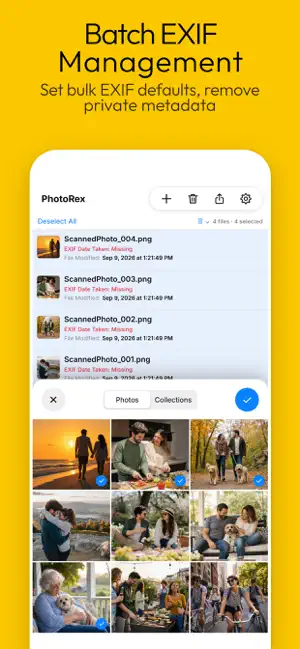
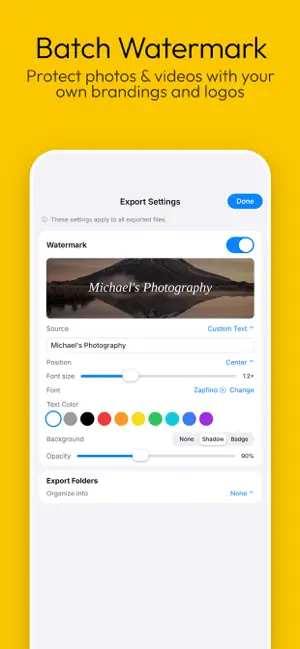
PhotoRex fixes dates and helps you quickly make bulk edits to your photos and videos. Proudly made in Canada, PhotoRex is free to download with a one‑time purchase, no subscriptions, no ads, and no data collection. Bulk edit dates • Set an exact date and time across a whole selection • Pull dates straight from filenames with flexible patterns (auto-detect included) • Read visible dates from any image - scanned documents, surveillance captures, old photos with a burned-in camera date-stamp, receipts, tickets, and more - using on-device OCR • Shift by a fixed offset, spread files evenly apart, or convert between time zones with daylight-saving handling Bulk rename and organize • By date, by sequential counter, or with custom templates using {name}, {date}, and {counter} tokens • Add prefixes and suffixes, preview every result before applying • Auto-organize photos and videos into dated folders (Year / Month / Day) Bulk edit camera metadata • Set default values for EXIF fields: Make, Model, Artist, Copyright, Lens Model, and more • Set bulk EXIF defaults in Export Settings to stamp an entire batch with the same copyright, artist name, or camera info • Remove GPS location, or strip all EXIF and device metadata before sharing Bulk watermark photos and videos • Custom text, the photo's date, or your own logo image Bulk crop, rotate, resize & convert • Center-crop to common aspect ratios or trim exact pixel margins • Rotate images • Convert between PNG, JPG, and HEIC • Cap image dimensions and set JPEG quality to shrink files for email or upload Always non-destructive PhotoRex creates new copies with your changes and leaves your originals completely untouched. Works on iPhone, iPad, and Mac. Free mode limits the number of files that can be processed at a time. Use in-app purchase to remove limitations.
What’s new
Version 3.6 · Updated October 22, 2026
Space Apart now follows your list order. Space Apart spreads your selected files evenly across time, with a set interval between each one. It's useful when many files share the same timestamp, such as scans, burst shots, or screenshots, and you want them to keep a clear, predictable order in other apps and photo libraries. Choose an interval (say, 1 minute), and the first file keeps the earliest time while each next file is that much later. Bug fixes and improvements. As always, your feedback helps shape every update. If you have suggestions or run into anything unexpected, we’d love to hear from you, you can reach us anytime at aidaluu.com.
App privacy
The developer, Aidaluu Inc., reported these privacy practices to Apple.
Data Not Collected
The developer does not collect any data from this app.
Alternatives to PhotoRex - Edit Dates in Bulk
Looking for apps like PhotoRex - Edit Dates in Bulk? Here are 6 similar apps on the App Store. The highest rated is Smart Renamer: Batch Rename (5.0/5), and 5 of the 6 are free to download.
-
 Photos Renamer
1.0
Photos Renamer
1.0
-
 EXIF.ER: Photo & Video Renamer
-
 Media Time Machine
-
 Smart Renamer: Batch Rename
5.0
Smart Renamer: Batch Rename
5.0
-
 Rename Photos
1.0
Rename Photos
1.0
-
 Media MetaX
3.0
Media MetaX
3.0
| App | Rating | Price | Last updated | Compare |
|---|---|---|---|---|
| PhotoRex - Edit Dates in Bulk | 4.5 / 5 (2 ratings) | Free | October 22, 2026 | |
| Photos Renamer | 1.0 / 5 (3) | Free | Oct 15, 2026 | Compare |
| EXIF.ER: Photo & Video Renamer | – | Free | Oct 16, 2026 | Compare |
| Media Time Machine | – | Free | Sep 24, 2024 | Compare |
| Smart Renamer: Batch Rename | 5.0 / 5 (1) | Free | Sep 2, 2026 | Compare |
| Rename Photos | 1.0 / 5 (1) | 1.99 USD | Sep 17, 2026 | Compare |
| Media MetaX | 3.0 / 5 (1) | Free | Oct 15, 2026 | Compare |