

Smart Renamer: Batch Rename
ANTON NOVOSELOV Utilities iPhoneiPadiPod touch
Smart Renamer: Batch Rename is a free Utilities app for iPhone and iPad by ANTON NOVOSELOV. Rated 5.0/5 from 1 ratings. Requires iOS 17.6.
- Rating
- 5.0
- 1 ratings
- Price
- Free
- on the App Store
- Size
- 16 MB
- Age 4+
- Updated
- Sep 2
- 2026 · v1.0.5
Screenshots


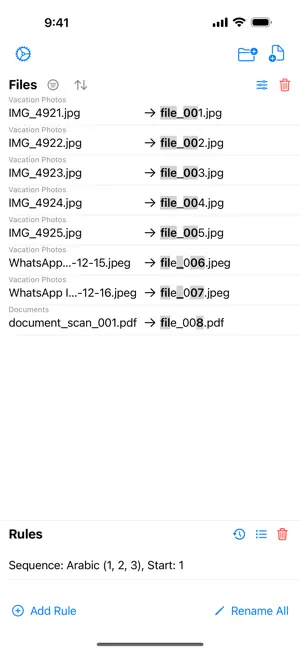
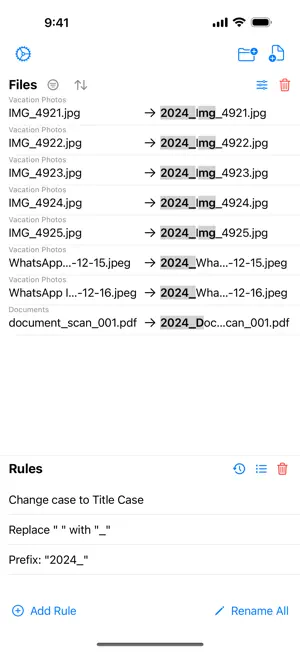
About Smart Renamer: Batch Rename
Take full control of your file organization with SmartRenamer, the ultimate batch renaming utility for iOS and iPadOS. Built for professionals and power users, SmartRenamer offers a fast, reliable, and powerful way to manage large collections of files. Whether you're organizing thousands of photos, music libraries, or preparing documents for a project, SmartRenamer provides the tools to get the job done with precision. CORE FEATURES • Basic Renaming: Search and Replace, Insert, Delete, Prefix, Suffix, and dedicated Extension handling. • Intelligent Numbering: Add order with Arabic, Roman numerals, or Alphabetical sequencing. Group sequences by parent folder, extension, or date properties! • Visual Box Editor: Build complex templates interactively using our new drag-and-drop Visual Block Editor. Easily combine text, variables, accurate generating Dates, and unique UUIDs. • Drag & Drop File Support: Quickly add your files and reorder them manually by seamlessly dragging and dropping content on macOS and iPadOS. ADVANCED CAPABILITIES • Specialized Transformations: Case Conversion (UPPERCASE, camelCase, snake_case), URL decoding, Unicode cleanup, and web-safe slugification. • Dynamic Variables: Access metadata like {name}, {ext}, {parent}, {size}, plus {date_created} and {date_modified} with standard DateFormatter patterns. • Pipe Filters: Chain transformations dynamically (e.g., {parent | lower}_{name}). • Refined Filtering: Filter files seamlessly using advanced OR logic and powerful Ignore Case functionality directly from a streamlined pop-up sheet. • Regex Power: Harness the full power of Regular Expressions with a built-in guide for complex pattern matching. ULTIMATE CONTROL & SAFETY • Live Diff Preview: See exact insertions (green) and deletions (red strikethrough) before applying changes. • Conflict Resolution: Intelligent detection handles name collisions gracefully to ensure data safety. • Undo Support: Made a mistake? Seamlessly revert back any batch operation with a single tap. • History & Presets: Save your favorite adjustments as reusable presets, and restore any previous configuration. • iCloud Sync: Keep your presets and history perfectly synced across all your devices securely without a hitch. • Accessibility First: Fully supports Dynamic Type, VoiceOver, and Dark Mode variants natively. UNLOCK SMART RENAMER PRO Upgrade to unlock the ultimate naming potential: unlimited active batch sizes, dynamic variables mapping, advanced compose block creation, sequence grouping functionalities, and robust Regex find & replace options. SmartRenamer is the last file renamer you'll ever need. Organize smarter, not harder.
What’s new
Version 1.0.5 · Updated September 2, 2026
Bug fixes
App privacy
The developer, ANTON NOVOSELOV, reported these privacy practices to Apple.
Data Not Collected
The developer does not collect any data from this app.
Alternatives to Smart Renamer: Batch Rename
Looking for apps like Smart Renamer: Batch Rename? Here are 6 similar apps on the App Store. The highest rated is Batch Rename Files (4.7/5), and all 6 are free to download.
-
 RenameKit - File & Photo
-
 Batch Rename Files
4.7
-
 EXIF.ER: Photo & Video Renamer
-
 Aligna - File Renamer
-
 Leading Zeros - File Renamer
-
 Photos Renamer
1.0
| App | Rating | Price | Last updated | Compare |
|---|---|---|---|---|
| Smart Renamer: Batch Rename | 5.0 / 5 (1 rating) | Free | September 2, 2026 | |
| RenameKit - File & Photo | – | Free | May 9, 2026 | Compare |
| Batch Rename Files | 4.7 / 5 (3) | Free | Sep 11, 2026 | Compare |
| EXIF.ER: Photo & Video Renamer | – | Free | Oct 16, 2026 | Compare |
| Aligna - File Renamer | – | Free | Oct 11, 2026 | Compare |
| Leading Zeros - File Renamer | – | Free | Sep 11, 2026 | Compare |
| Photos Renamer | 1.0 / 5 (3) | Free | Oct 15, 2026 | Compare |