

LifeBoard: Daily AI planner
Saransh Sharma Productivity iPhoneiPadiPod touch
LifeBoard: Daily AI planner is a free Productivity app for iPhone and iPad by Saransh Sharma. Requires iOS 26.0. Updated September 17, 2026.
- Price
- Free
- on the App Store
- Size
- 216 MB
- Age 4+
- Updated
- Sep 17
- 2026 · v2.2.1
Screenshots
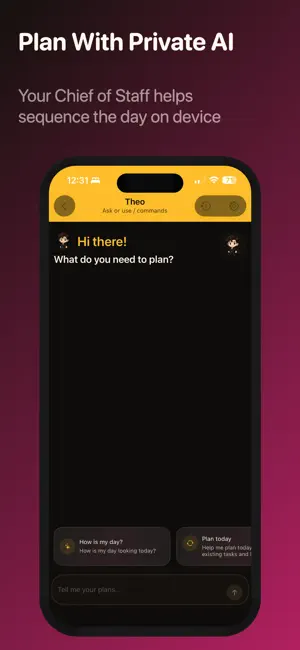


About LifeBoard: Daily AI planner
LIFEBOARD - LifeBoard is a private execution system for people who want a calmer, clearer way to plan the day. → See tasks, habits, and schedule context in one readable Home timeline. → Ask your chief-of-staff assistant for help deciding what fits, what matters, and what can wait. - Organize your day without turning it into another noisy productivity project. → LifeBoard combines fast capture, bounded focus, habit tracking, read-only calendar awareness, and actionable analytics across Today, Week, and Systems. - Built for overloaded minds, LifeBoard helps you: → Choose the next move. → Recover after interruption. → Keep momentum through imperfect days. → Use private AI planning with proposal review, visible undo, and explicit control. - LifeBoard brings your day into one flow: → Tasks → Recurring habits → Fixed commitments → Busy blocks → Open gaps → Gentle guidance - LifeBoard is not a calendar clone and not a guilt machine. → It is a calmer way to follow through. PLANNING BENEFITS - Plan with confidence using: → Task fit hints → Free-gap awareness → Quick views that keep decisions lightweight - Reflect with momentum analytics that turn progress into better planning — not more pressure. - Habits are first-class in LifeBoard. → Track positive and negative habits. → Keep streaks visible. → Recover honestly after misses. → Build consistency without perfection pressure. CHIEF-OF-STAFF AI - Your chief of staff helps you understand the day before changing it. → Ask questions. → Review proposals. → Confirm important edits. → Keep meaningful mutations behind trust-first controls. - Private by design, LifeBoard supports: → Local-first AI behavior → Explicit privacy controls → Readable assistant settings - Keep your planning personal without disappearing into vague AI magic. RECOVERY AND MOMENTUM - LifeBoard stays useful when the week gets messy. → Resume cues, quick capture, due pressure, and recovery framing help you get moving again without starting from zero. - If you want structure without noise, LifeBoard gives you a single home for what matters today. → Capture quickly. → Choose clearly. → Start sooner. → Finish the day knowing what carried forward and why. PRODUCT SUMMARY - Use LifeBoard as your personal execution OS: → One calm timeline → One trusted assistant → One system for tasks, habits, and real day constraints - Finally, a planner that understands real workload. → LifeBoard helps you work with your day — not against it. KEY FEATURES HOME TIMELINE - See your day in one calm narrative instead of piecing it together from separate apps. LIGHTNING CAPTURE - Put it somewhere trustworthy before it disappears. QUICK VIEWS - Shrink the backlog into a decision-sized slice. TASK FIT HINTS - Know whether this task actually fits before you commit to it. READ-ONLY CALENDAR CONTEXT - Stay aware of fixed reality without giving up control. BUSY BLOCKS AND OPEN GAPS - See pressure and opportunity at a glance. HABITS - Build consistency without pretending every day is perfect. RECOVERY-AWARE STREAKS - Bounce back fast after misses instead of abandoning the system. CHIEF-OF-STAFF AI - Ask for a plan without handing over the wheel. PROPOSAL REVIEW + UNDO - Trust the assistant because you can inspect and reverse meaningful changes. TODAY / WEEK / SYSTEMS - Turn reflection into next-step clarity. WIDGETS AND WATCH SURFACES - Keep your next move visible outside the app.
What’s new
Version 2.2.1 · Updated September 17, 2026
Bug fixes
App privacy
The developer, Saransh Sharma, reported these privacy practices to Apple.
Data Not Linked to You
The following data, which may be collected but is not linked to your identity, may be used for the following purposes:
- Usage Data: Product Interaction, Other Usage Data
- Diagnostics: Crash Data, Performance Data, Other Diagnostic Data
Used for: Analytics
Alternatives to LifeBoard: Daily AI planner
Looking for apps like LifeBoard: Daily AI planner? Here are 6 similar apps on the App Store. The highest rated is Today, Satan! (5.0/5), and all 6 are free to download.
-
 RemindBud: Tasks & Expiry
-
 BlastList
-
 Today, Satan!
5.0
Today, Satan!
5.0
-
 OrbitCal
-
 Tickwise
-
 This 60: To-Dos in Your Repo
| App | Rating | Price | Last updated | Compare |
|---|---|---|---|---|
| LifeBoard: Daily AI planner | – | Free | September 17, 2026 | |
| RemindBud: Tasks & Expiry | – | Free | Mar 5, 2026 | Compare |
| BlastList | – | Free | Apr 19, 2026 | Compare |
| Today, Satan! | 5.0 / 5 (1) | Free | Jul 23, 2025 | Compare |
| OrbitCal | – | Free | Apr 29, 2026 | Compare |
| Tickwise | – | Free | May 7, 2026 | Compare |
| This 60: To-Dos in Your Repo | – | Free | Oct 17, 2026 | Compare |