

Scanner App - Scan PDF & Docs
TAPSUITE YAZILIM HIZMETLERI ANONIM SIRKETI Business iPhoneiPadiPod touch
Scanner App - Scan PDF & Docs is a free Business app for iPhone and iPad by TAPSUITE YAZILIM HIZMETLERI ANONIM SIRKETI. Rated 4.6/5 from 39,553 ratings.
- Rating
- 4.6
- 39.5K ratings
- Price
- Free
- on the App Store
- Size
- 224 MB
- Age 4+
- Updated
- Oct 27
- 2026 · v3.2.2
Screenshots


About Scanner App - Scan PDF & Docs
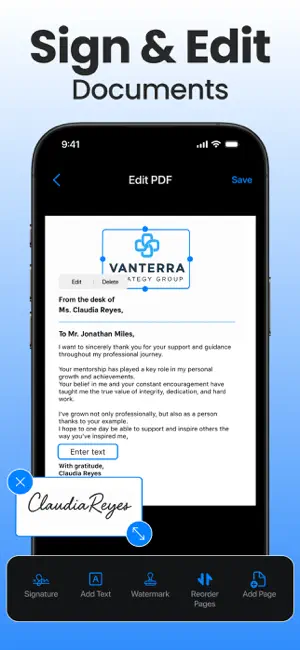
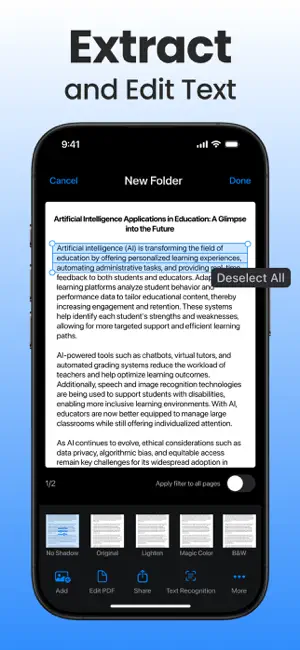
Looking for a Scanner App? Discover an all-in-one Scanner App and PDF converter! Turn your mobile device into a portable scanner that automatically recognizes text (OCR) and lets you scan documents, create PDFs, and convert photos into PDF files in seconds. Say goodbye to bulky copy machines and embrace a paper-free life with this fast and convenient scanner app. If you’re wondering how to scan documents with iPhone or turn a photo into a PDF, this app makes it simple to convert pictures and images into PDF files. Keep your scanned documents organized and easily accessible. FEATURES PDF & DOCUMENT SCANNER APP This scanner app uses your device’s camera to digitize all kinds of paper documents: receipts, notes, invoices, whiteboard discussions, business cards, certificates. OPTIMIZE SCAN QUALITY Enjoy smart cropping and auto-enhancing features that help improve the clarity, colors, and readability of your photo scans, making document conversions look professional. VARIOUS SCANNING MODES Document Scanner: Scan physical paper documents using automatic edge detection and convert them into PDF files. ID Card & Passport Scanner: Quickly and easily scan ID documents with this dedicated mode. Camera Scanning: Use your camera to scan documents in real time and convert photos or pictures into PDF files. PDF CONVERTER Create PDFs from documents and images with convenient conversion tools. Photo to PDF: Capture photos and convert them into PDF files. Image to PDF: Upload images and convert them into PDFs. Picture to PDF: Take pictures and save them as PDFs. Scan to PDF: Scan paper documents and save them in PDF format. Supported formats: PDF, JPG, DOC, DOCX, TXT, XLS, XLSM, XLSX, CSV, PPT, PPTM, PPTX. Convert JPG images, photos, and pictures into PDF files with just a few taps. SIGN & STAMP ON THE GO Draw, scan, or import your signature or stamp directly into the app. With just a few taps, you can sign and convert documents into PDF files, ready to share. SHARE PDF/JPEG FILES Easily export and share PDFs, JPEGs, or Word files via social media, email, and more. BATCH SCANNING BRILLIANCE Scan multiple pages or documents simultaneously with our efficient batch scanning mode, boosting productivity and saving you time. BUILT-IN PDF EDITOR Polish your scans with our built-in editor, offering features like cropping, brightness adjustment, contrast tuning, text extraction, text editing, and more. DOCUMENT MANAGEMENT Keep your scanned documents organized and easily accessible within the app. UNLIMITED ACCESS MEMBERSHIP SUBSCRIPTION: ‣ Subscribe for unlimited access to all features of the Scanner app. ‣ Payment is charged to your iTunes Account upon purchase confirmation. ‣ Subscription renews automatically unless auto-renew is turned off at least 24 hours before the end of the current period. Cancel anytime via: https://support.apple.com/en-us/HT202039 ‣ Account will be charged for renewal within 24 hours prior to the end of the current period. ‣ Privacy Policy: https://www.fastscanapp.com/privacy ‣ Terms of Use: https://www.fastscanapp.com/terms [email protected]
Ratings & reviews
4.6
39.5K ratings
What’s new
Version 3.2.2 · Updated October 27, 2026
Thank you for using Scanner App! This version includes: Improvements and bug fixes that make it faster than ever to scan, sign, edit, and convert photo to PDF. All in one easy-to-use app! We're always working to improve your experience. If you enjoy using Scanner, please leave us a review!
App privacy
The developer, TAPSUITE YAZILIM HIZMETLERI ANONIM SIRKETI, reported these privacy practices to Apple.
Data Used to Track You
The following data may be used to track you across apps and websites owned by other companies:
- Identifiers: User ID, Device ID
- Usage Data: Product Interaction, Advertising Data
- Diagnostics: Crash Data, Performance Data
Data Not Linked to You
The following data, which may be collected but is not linked to your identity, may be used for the following purposes:
- Identifiers: User ID, Device ID
- Usage Data: Advertising Data, Product Interaction
- Diagnostics: Crash Data, Performance Data, Other Diagnostic Data
- User Content: Photos or Videos
Used for: Developer’s Advertising or Marketing, Analytics, Product Personalization, App Functionality
Alternatives to Scanner App - Scan PDF & Docs
Looking for apps like Scanner App - Scan PDF & Docs? Here are 6 similar apps on the App Store. The highest rated is PDF Scanner App, OCR: Docutain (4.8/5), and all 6 are free to download.
-
 PDF Scanner App, OCR: Docutain
4.8
PDF Scanner App, OCR: Docutain
4.8
-
 PDF Scanner・Document Scanner
4.6
PDF Scanner・Document Scanner
4.6
-
 My Scanner: Scan to PDF & Edit
4.7
My Scanner: Scan to PDF & Edit
4.7
-
 PDF Converter - PDF Editor・
4.4
PDF Converter - PDF Editor・
4.4
-
 PDF Scanner App: TapScanner
4.7
PDF Scanner App: TapScanner
4.7
-
 Image to PDF Converter · Edit
4.6
Image to PDF Converter · Edit
4.6
| App | Rating | Price | Last updated | Compare |
|---|---|---|---|---|
| Scanner App - Scan PDF & Docs | 4.6 / 5 (39,553 ratings) | Free | October 27, 2026 | |
| PDF Scanner App, OCR: Docutain | 4.8 / 5 (206) | Free | Aug 3, 2026 | Compare |
| PDF Scanner・Document Scanner | 4.6 / 5 (2,116) | Free | Oct 19, 2026 | Compare |
| My Scanner: Scan to PDF & Edit | 4.7 / 5 (20,503) | Free | Oct 31, 2026 | Compare |
| PDF Converter - PDF Editor・ | 4.4 / 5 (6,021) | Free | Oct 29, 2026 | Compare |
| PDF Scanner App: TapScanner | 4.7 / 5 (26,977) | Free | Oct 26, 2026 | Compare |
| Image to PDF Converter · Edit | 4.6 / 5 (307) | Free | Sep 1, 2026 | Compare |