

PDF Converter - PDF Editor・
Techgear Inc Business iPhoneiPadiPod touchMac
PDF Converter - PDF Editor・ is a free Business app for iPhone and iPad by Techgear Inc. Rated 4.4/5 from 6,012 ratings. Requires iOS 15.0.
- Rating
- 4.4
- 6K ratings
- Price
- Free
- on the App Store
- Size
- 468 MB
- Age 17+
- Updated
- Oct 29
- 2026 · v4.4.7
Screenshots


About PDF Converter - PDF Editor・
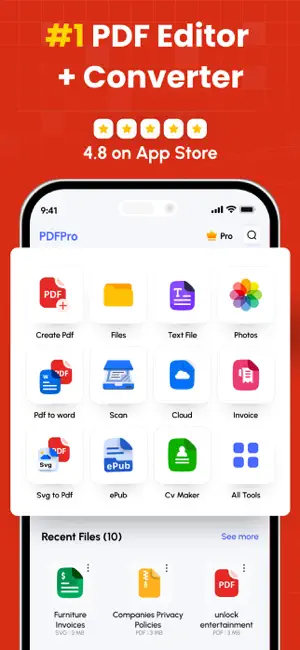
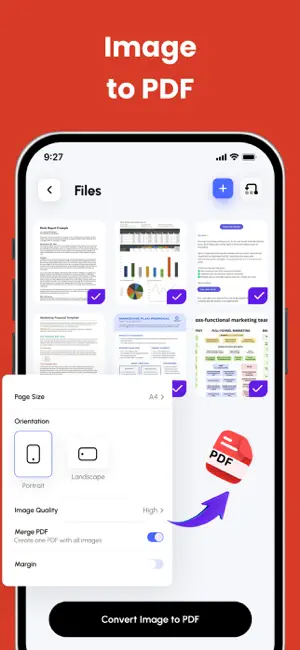
PDF Converter & Editor: Your Complete PDF Toolkit File Management: Every tool you need to use PDFs, at your fingertips. Merge, split, compress, convert, rotate, unlock, and watermark PDFs with ease. Import files from cloud services like Drive, Box, and OneDrive. PDF Editor: Edit PDFs by adding text, shapes, comments, and highlights. A secure and simple tool for all your PDF editing needs. Enhance your PDF experience with our comprehensive PDF Annotation and Reader app. Whether you need to annotate documents for work, study, or personal use, or simply read PDFs with ease, our app has you covered. Key Features: * Annotation Tools: Highlight important text, add comments, draw shapes, and underline or strike through text to mark up your PDFs effectively. * Reader Mode: Switch to Reader Mode for a distraction-free reading experience. Adjust settings such as font size, background color, and brightness to suit your preferences. * Advanced Annotation: Use advanced tools like text box, sticky notes, and freehand drawing to customise your annotations and make your PDFs more interactive. * Document Management: Organise your PDF library with ease. Create folders, rename files, and move documents between folders for efficient file management. * Search and Navigation: Find specific content within your PDFs quickly using the search feature. Navigate through documents easily with page thumbnails and bookmarks. Additional Features: * PDF Form Filling: Fill out PDF forms directly within the app, saving time and paper. * Digital Signatures: Sign documents electronically with ease. Add, edit, or remove digital signatures as needed. * File Protection: Keep your PDFs secure with password protection and encryption. Key Features: Merge PDF: Combine multiple PDF files into one. Split PDF: Divide PDFs into smaller files. Compress PDF: Reduce PDF file size for easy sharing. CONVERT TO PDF JPG to PDF WORD to PDF POWERPOINT to PDF EXCEL to PDF HTML to PDF Additional Features: Invoice maker CV Maker AI PDF Summary CONVERT FROM PDF PDF to JPG PDF to WORD PDF to POWERPOINT PDF to EXCEL Experience the convenience of managing and editing PDFs with our comprehensive PDF Converter and Editor app. Easily merge, split, compress, and convert PDF files, and edit them with our intuitive PDF editor. Download now and unlock the full potential of your PDF files! Subscription Terms & Details Enjoy unlimited access to all features for $29.99/year, with a 3-day free trial. Payment will be charged to your iTunes account once the purchase is confirmed. Your subscription will automatically renew unless auto-renew is turned off at least 24 hours before the end of the current period. You can manage your subscription and disable auto-renewal at any time via your Account Settings. Your account will be charged for renewal within 24 hours prior to the end of the current subscription period. If you start a free trial and decide to subscribe, any remaining trial time will be forfeited. Privacy Policy: https://thepdfedit.com/privacy-policy Terms of Use: https://thepdfedit.com/terms-and-conditions
Ratings & reviews
4.4
6K ratings
What’s new
Version 4.4.7 · Updated October 29, 2026
- Added full iPhone Duo support with an improved experience across the app. - Added Siri support for PDF tools, Resume Maker, and Invoice Maker. - Introducing Mega Scan to capture large documents in one sweep. - Translate documents in 50+ languages with local and AI-powered translation. - Import files directly from the Files app into more tools. - Improved UI, plan selection, and app icon options.
App privacy
The developer, Techgear Inc, reported these privacy practices to Apple.
Data Used to Track You
The following data may be used to track you across apps and websites owned by other companies:
- Identifiers: Device ID
- Usage Data: Advertising Data
Data Linked to You
The following data, which may be collected and linked to your identity, may be used for the following purposes:
- Identifiers: Device ID
- Usage Data: Advertising Data
Used for: Developer’s Advertising or Marketing
Data Not Linked to You
The following data, which may be collected but is not linked to your identity, may be used for the following purposes:
- Usage Data: Product Interaction
- Diagnostics: Crash Data, Performance Data
Used for: Analytics
Alternatives to PDF Converter - PDF Editor・
Looking for apps like PDF Converter - PDF Editor・? Here are 6 similar apps on the App Store. The highest rated is Photos PDF : Scanner Converter (4.9/5), and all 6 are free to download.
-
 Image to PDF Converter · Edit
4.6
Image to PDF Converter · Edit
4.6
-
 Photos PDF : Scanner Converter
4.9
Photos PDF : Scanner Converter
4.9
-
 PDF Converter, Image to PDF
4.4
PDF Converter, Image to PDF
4.4
-
 PDF Photos
4.8
PDF Photos
4.8
-
 PDF Reader & PDF Editor
4.7
PDF Reader & PDF Editor
4.7
-
 PDF Scanner・Document Scanner
4.6
PDF Scanner・Document Scanner
4.6
| App | Rating | Price | Last updated | Compare |
|---|---|---|---|---|
| PDF Converter - PDF Editor・ | 4.4 / 5 (6,012 ratings) | Free | October 29, 2026 | |
| Image to PDF Converter · Edit | 4.6 / 5 (307) | Free | Sep 1, 2026 | Compare |
| Photos PDF : Scanner Converter | 4.9 / 5 (68,002) | Free | Oct 29, 2026 | Compare |
| PDF Converter, Image to PDF | 4.4 / 5 (515) | Free | Oct 23, 2026 | Compare |
| PDF Photos | 4.8 / 5 (13,696) | Free | Oct 23, 2026 | Compare |
| PDF Reader & PDF Editor | 4.7 / 5 (831) | Free | Sep 20, 2026 | Compare |
| PDF Scanner・Document Scanner | 4.6 / 5 (2,103) | Free | Oct 19, 2026 | Compare |