

My Scanner: Scan to PDF & Edit
Dream App Studio UAB Business iPhoneiPadiPod touch
My Scanner: Scan to PDF & Edit is a free Business app for iPhone and iPad by Dream App Studio UAB. Rated 4.7/5 from 20,147 ratings. Requires iOS 16.0.
- Rating
- 4.7
- 20.1K ratings
- Price
- Free
- on the App Store
- Size
- 360 MB
- Age 4+
- Updated
- Sep 18
- 2026 · v10.5
Screenshots


About My Scanner: Scan to PDF & Edit
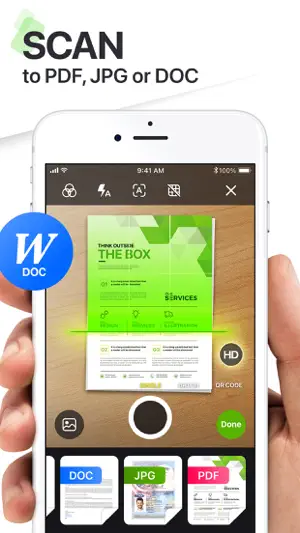
Meet My Scanner – your intelligent all-in-one document and productivity companion. Whether you're scanning receipts, editing PDFs, or creating content with AI, My Scanner transforms your device into a powerhouse for getting things done—faster, smarter, and paper-free. SCAN. EDIT. WRITE. SOLVE. ALL IN ONE PLACE. Designed for professionals, students, and everyday users alike, My Scanner delivers the tools you need to take control of your documents and solve your office and educational tasks - all from your iPhone or iPad. ULTRA-FAST PDF SCANNER • Scan documents, books, notes, or whiteboards in seconds • Smart edge detection & auto-enhancement for crystal-clear quality • Export as high-resolution PDFs or JPGs ADVANCED PDF EDITOR • Add text, highlight, underline, or draw directly on your PDFs • Fill out forms, add e-signatures, or annotate effortlessly • Rearrange, merge, split, and organize pages with drag-and-drop simplicity BUILT-IN AI WRITING ASSISTANT • Write smarter with your personal AI writing companion • Draft emails, create essays, brainstorm ideas, summarize text & more • Rewrite, correct grammar, and even generate content tailored to your style • Available 24/7—no typing limits, no creative blocks SECURE & PRIVATE • Keep your documents safe with Face ID, Touch ID, or passcode protection • Offline scanning and editing to protect your privacy MORE SMART TOOLS & UTILITIES - AR Ruler: Instantly measure objects or distances using augmented reality - Object Counter: Use your camera to count multiple items in real time - ID Photo Maker: Create compliant ID photos in seconds—passport, visa & more - Math & Science Solver: Scan handwritten or printed equations and get instant solutions - Invoice Creator: Generate professional invoices on the go - Tax Form Filler: Easily complete and export tax documents - Text Extractor (OCR): Pull editable text from any image or scanned page - E-Sign Documents: Sign contracts and official documents digitally and securely - PDF Converter: Quickly convert PDFs to and from various formats including Word, Excel, PowerPoint, images, and more — all without leaving the app WHY USERS LOVE MY SCANNER • Combines powerful scanning with intelligent AI writing • Replaces multiple apps with one seamless productivity tool • Works offline for scanning & editing, with full privacy control • Sleek, intuitive interface that gets out of your way Whether you're in the office, classroom, or on the go, My Scanner is your trusted partner for document management and writing assistance. Download now and experience the freedom of smart productivity. Your documents, your words—enhanced by AI. Created with passion by Dream App Studio team. The app contains the following subscription options: Weekly subscription Monthly subscription Quarterly subscription Annual subscription Subscription automatically renews unless auto-renew is turned off at least 24-hours prior to the end of the current period. The cost of renewal is equal to the value that “Apple’s App Store Matrix” determines as the equivalent of the subscription price in $USD. Payment will be charged to iTunes Account at confirmation of purchase. Any unused portion of a free trial period, if offered, will be forfeited when the user purchases a subscription to that publication. Subscriptions may be managed by the user and auto-renewal may be turned off by going to the user’s Account Settings after purchase. Privacy Policy: http://dreamappstudio.com/privacy_policy.html Terms of Service: http://www.dreamappstudio.com/terms_of_use.html
Ratings & reviews
4.7
20.1K ratings
What’s new
Version 10.5 · Updated September 18, 2026
We’re excited to bring you improvements in this update: • Performance & Stability Improvements We’ve made the app faster, more reliable, and fixed various bugs to ensure a smoother scanning and editing experience. We regularly update My Scanner to make it even better. Thanks for being with us!
App privacy
The developer, Dream App Studio UAB, reported these privacy practices to Apple.
Data Used to Track You
The following data may be used to track you across apps and websites owned by other companies:
- Identifiers: Device ID
Data Linked to You
The following data, which may be collected and linked to your identity, may be used for the following purposes:
- Identifiers: Device ID
- Purchases: Purchase History
- Usage Data: Advertising Data, Product Interaction
Used for: Third-Party Advertising, Developer’s Advertising or Marketing, Analytics, Product Personalization, App Functionality
Data Not Linked to You
The following data, which may be collected but is not linked to your identity, may be used for the following purposes:
- Diagnostics: Crash Data, Other Diagnostic Data
Used for: Analytics, App Functionality
Alternatives to My Scanner: Scan to PDF & Edit
Looking for apps like My Scanner: Scan to PDF & Edit? Here are 6 similar apps on the App Store. The highest rated is Scan Now: PDF Document Scanner (4.8/5), and all 6 are free to download.
-
 Scan Now: PDF Document Scanner
4.8
Scan Now: PDF Document Scanner
4.8
-
 eScan: PDF Scanner App
4.6
eScan: PDF Scanner App
4.6
-
 Scan to PDF: Converter Scanner
4.7
Scan to PDF: Converter Scanner
4.7
-
 PDF Scanner App, OCR: Docutain
4.8
PDF Scanner App, OCR: Docutain
4.8
-
 PDF Scanner・Document Scanner
4.6
PDF Scanner・Document Scanner
4.6
-
 Scanner – Scan PDF, ID & Docs
4.7
Scanner – Scan PDF, ID & Docs
4.7
| App | Rating | Price | Last updated | Compare |
|---|---|---|---|---|
| My Scanner: Scan to PDF & Edit | 4.7 / 5 (20,147 ratings) | Free | September 18, 2026 | |
| Scan Now: PDF Document Scanner | 4.8 / 5 (2,032) | Free | May 14, 2026 | Compare |
| eScan: PDF Scanner App | 4.6 / 5 (3,896) | Free | Nov 18, 2025 | Compare |
| Scan to PDF: Converter Scanner | 4.7 / 5 (24,284) | Free | Sep 24, 2026 | Compare |
| PDF Scanner App, OCR: Docutain | 4.8 / 5 (203) | Free | Aug 3, 2026 | Compare |
| PDF Scanner・Document Scanner | 4.6 / 5 (1,989) | Free | Sep 23, 2026 | Compare |
| Scanner – Scan PDF, ID & Docs | 4.7 / 5 (222,608) | Free | Sep 21, 2026 | Compare |