

CapCut: Photo & Video Editor
Bytedance Pte. Ltd Photo & Video iPhoneiPadiPod touchMac
CapCut: Photo & Video Editor is a free Photo & Video app for iPhone and iPad by Bytedance Pte. Ltd. Rated 4.6/5 from 1,125,042 ratings. Requires iOS 15.0.
- Rating
- 4.6
- 1.1M ratings
- Price
- Free
- on the App Store
- Size
- 790 MB
- Age 12+
- Updated
- Oct 22
- 2026 · v19.8.1
Screenshots
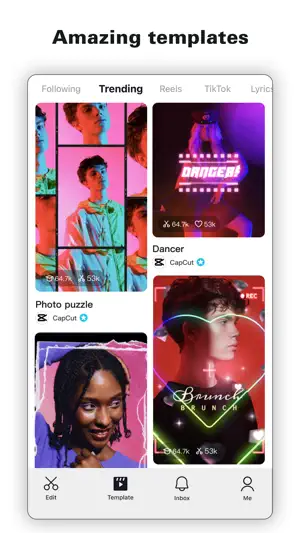

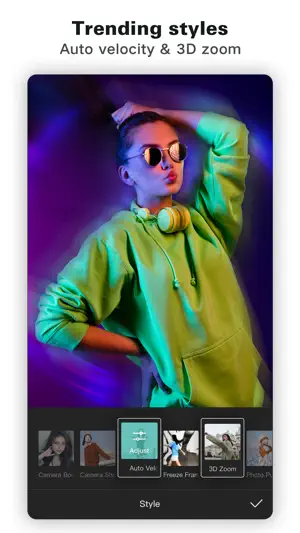
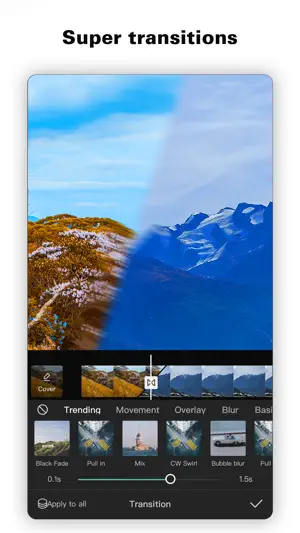
About CapCut: Photo & Video Editor
CapCut offers easy-to-use video editing functions, in-APP fonts and effects, advanced features such as keyframe animation, smooth slow-motion, chroma key, and stabilization, to help you capture and snip moments. Create fancy videos with other unique features: auto captions, text-to-speech, motion tracking, and background removal. Show your personality and go viral on TikTok, YouTube, Instagram, WhatsApp, and Facebook! FEATURES Basic video editing • Trim and shorten clips and split or merge videos. • Adjust video speed from 0.1x to 100x, and apply speed curves to clips. • Animate video clips with incredible zoom in/out effects. • Highlight the best moments with the freeze feature. • Explore transition options with awesome effects on and between clips. Advanced video editor • Keyframe video animation is available for all settings. • Edit videos to create smooth slow-motion with the optical flow feature and speed curve tool. • Use the chroma key to remove specific colors from videos. • Easy to arrange and preview clips on multi-track timeline. • The stabilizing feature keeps video footage steady. Intelligent features • Auto captions: automate speech recognition and subtitles in videos. • Text-to-speech: apply text-to-speech in multiple languages and voices. • Background removal: automatically remove backgrounds. Text & Stickers • Add text to videos with different fonts and styles, choose unique text templates. Fonts can be imported locally. • Subtitles can be added to the timeline of video tracks and can be moved and adjusted in one step. Trending Effects & Filters • Match video content with diverse filters that are updated weekly with the latest trends. • Edit videos with hundreds of trending effects, including Glitch, Blur, 3D, etc. • Add movie-style video filters or adjust video brightness, contrast, etc. Music & Sound Effects • Add millions of music clips and sound effects to videos. • Extract audio, clips, and recordings from videos. Easy to Share • Custom video export resolution, HD video editor supports 4K 60fps exports and smart HDR. • Adjust the format and share with your friends on social media platforms. CapCut is an all-in-one video editor and video maker application with everything you need to create stunning, high-quality videos. Beginners can get started with CapCut in a matter of seconds, while advanced users can enjoy all the functions they need to edit videos. Terms of Service — https://www.capcut.com/clause/terms-of-service Privacy Policy — https://www.capcut.net/clause/privacy Contact Us Any questions about CapCut? Please contact us at [email protected]. Facebook: https://www.facebook.com/capcutapp Instagram: https://www.instagram.com/capcutapp YouTube: https://www.youtube.com/capcutofficial TikTok: https://www.tiktok.com/@capcut
Ratings & reviews
4.6
1.1M ratings
What’s new
Version 19.8.1 · Updated October 22, 2026
- Fixed some known issues and improved the trimming experience. We thank you for supporting CapCut and look forward to creating beautiful moments together.
App privacy
The developer, Bytedance Pte. Ltd, reported these privacy practices to Apple.
Data Used to Track You
The following data may be used to track you across apps and websites owned by other companies:
- Identifiers: Device ID
Data Linked to You
The following data, which may be collected and linked to your identity, may be used for the following purposes:
- Identifiers: Device ID, User ID
- User Content: Customer Support, Photos or Videos, Audio Data, Other User Content
- Usage Data: Product Interaction
- Diagnostics: Crash Data, Performance Data, Other Diagnostic Data
- Contact Info: Other User Contact Info
Used for: Developer’s Advertising or Marketing, Analytics, App Functionality, Other Purposes
Alternatives to CapCut: Photo & Video Editor
Looking for apps like CapCut: Photo & Video Editor? Here are 6 similar apps on the App Store. The highest rated is YouCut - AI Video Editor (4.8/5), and all 6 are free to download.
-
 Picsart AI Photo Editor, Video
4.7
Picsart AI Photo Editor, Video
4.7
-
 TrimCut - Video Editor
4.2
TrimCut - Video Editor
4.2
-
 YouCut - AI Video Editor
4.8
YouCut - AI Video Editor
4.8
-
 VivaCut - AI Video Editor
4.5
VivaCut - AI Video Editor
4.5
-
 Alight Motion
4.4
Alight Motion
4.4
-
 InShot - Video Editor
4.8
InShot - Video Editor
4.8
| App | Rating | Price | Last updated | Compare |
|---|---|---|---|---|
| CapCut: Photo & Video Editor | 4.6 / 5 (1,125,042 ratings) | Free | October 22, 2026 | |
| Picsart AI Photo Editor, Video | 4.7 / 5 (1,196,359) | Free | Oct 6, 2026 | Compare |
| TrimCut - Video Editor | 4.2 / 5 (71) | Free | Oct 26, 2026 | Compare |
| YouCut - AI Video Editor | 4.8 / 5 (23,438) | Free | Aug 19, 2026 | Compare |
| VivaCut - AI Video Editor | 4.5 / 5 (222,418) | Free | Jun 11, 2026 | Compare |
| Alight Motion | 4.4 / 5 (79,747) | Free | Oct 2, 2026 | Compare |
| InShot - Video Editor | 4.8 / 5 (2,516,290) | Free | Oct 1, 2026 | Compare |