
CastScreen: TV & Kodi Mirror
Tools Contains ads
Cast your Android screen to Kodi! Fast, HD screen mirroring via Wi-Fi & DLNA.
- Downloads
- 280+
- on Google Play
- Price
- Free
- No in-app purchases
- Updated
- May 23
- 2026 · v1.1.6
Screenshots
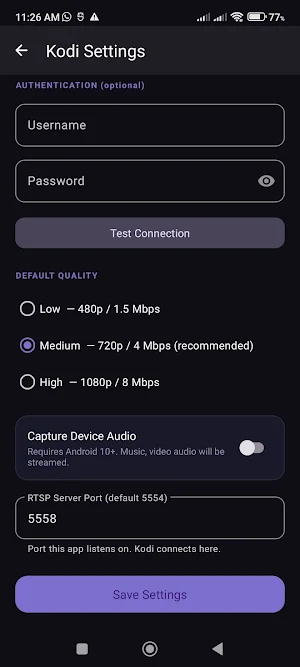


About CastScreen: TV & Kodi Mirror
Mirror Share Your Screen to Kodi and DLNA UPNP TV Instantly!
Experience the most reliable screen sharing/mirroring solution for Android. Cast Screen allows you to broadcast your entire phone display directly to any Kodi media center wirelessly. Whether you want to stream movies, share family photos, or give a presentation, enjoy a high-quality, low-latency experience without expensive dongles or HDMI cables.
Why Choose CastScreen for Kodi?
While other casting apps only let you share specific video files, Cast Screen offers full real-time display mirroring. Using professional-grade RTSP and RTP protocols, we ensure your stream remains stable and perfectly synced on the big screen.
🚀 Key Features:
• Real-time Screen Mirroring: Cast apps, mobile games, and web browsers to your Kodi TV instantly.
• Full HD Streaming: Support for high-resolution output ensures a crystal-clear viewing experience.
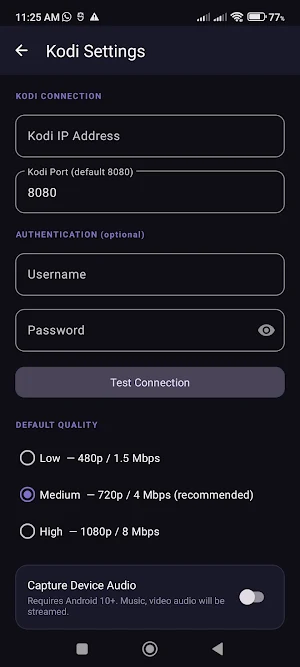
• Optimized for Kodi: Built specifically to integrate with Kodi’s built-in DLNA and UPnP receivers.
• Low Latency Performance: Minimal lag ensures speed between your phone and the TV.
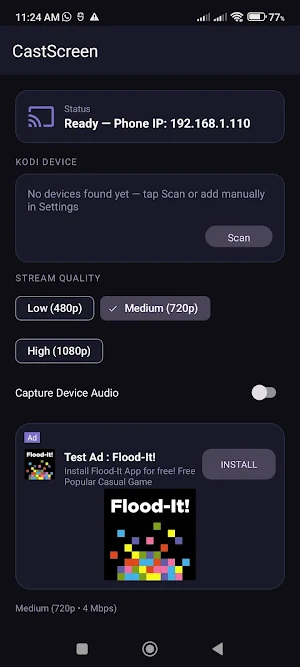
• Fast Device Discovery: Automatically scan your Wi-Fi to find Kodi players in seconds.
• Battery Saver Mode: Optimized video encoding to reduce battery drain during long screen sharing sessions.
🏠 Best Use Cases:
• Home Theater: Turn your TV into a giant smartphone for viewing photos and home videos.
• Mobile Gaming: Play your favorite Android games on the big screen with ease.
• Work & School: Mirror presentations, PDFs, and spreadsheets wirelessly during meetings.
🛠️ Quick Setup Guide:
1. Connect: Ensure your phone and Kodi device are on the same Wi-Fi network (5GHz recommended).
2. Enable Kodi UPnP: Go to Settings > Network > UPnP/DLNA and enable "Allow remote control via UPnP".
3. Scan: Open Cast Screen app and tap the Scan button.
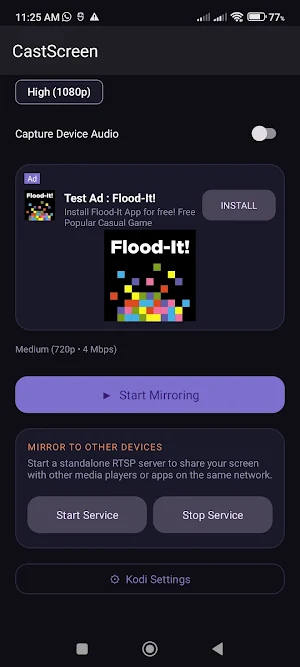
4. Cast: Select your device and start wireless mirroring.
🔒 Privacy & Local Security:
Your data is safe. Unlike other cloud casting apps, CastScreen operates entirely within your local home network. No data is ever sent to external servers, ensuring your screen stream stays private and secure.
Note: This app is a third-party utility and is not officially affiliated with or endorsed by the XBMC Foundation / Kodi.
Experience the most reliable screen sharing/mirroring solution for Android. Cast Screen allows you to broadcast your entire phone display directly to any Kodi media center wirelessly. Whether you want to stream movies, share family photos, or give a presentation, enjoy a high-quality, low-latency experience without expensive dongles or HDMI cables.
Why Choose CastScreen for Kodi?
While other casting apps only let you share specific video files, Cast Screen offers full real-time display mirroring. Using professional-grade RTSP and RTP protocols, we ensure your stream remains stable and perfectly synced on the big screen.
🚀 Key Features:
• Real-time Screen Mirroring: Cast apps, mobile games, and web browsers to your Kodi TV instantly.
• Full HD Streaming: Support for high-resolution output ensures a crystal-clear viewing experience.
• Optimized for Kodi: Built specifically to integrate with Kodi’s built-in DLNA and UPnP receivers.
• Low Latency Performance: Minimal lag ensures speed between your phone and the TV.
• Fast Device Discovery: Automatically scan your Wi-Fi to find Kodi players in seconds.
• Battery Saver Mode: Optimized video encoding to reduce battery drain during long screen sharing sessions.
🏠 Best Use Cases:
• Home Theater: Turn your TV into a giant smartphone for viewing photos and home videos.
• Mobile Gaming: Play your favorite Android games on the big screen with ease.
• Work & School: Mirror presentations, PDFs, and spreadsheets wirelessly during meetings.
🛠️ Quick Setup Guide:
1. Connect: Ensure your phone and Kodi device are on the same Wi-Fi network (5GHz recommended).
2. Enable Kodi UPnP: Go to Settings > Network > UPnP/DLNA and enable "Allow remote control via UPnP".
3. Scan: Open Cast Screen app and tap the Scan button.
4. Cast: Select your device and start wireless mirroring.
🔒 Privacy & Local Security:
Your data is safe. Unlike other cloud casting apps, CastScreen operates entirely within your local home network. No data is ever sent to external servers, ensuring your screen stream stays private and secure.
Note: This app is a third-party utility and is not officially affiliated with or endorsed by the XBMC Foundation / Kodi.
What’s new
Version 1.1.6 · Updated May 23, 2026
Expanded compatibility to support screen casting on RTSP-enabled DLNA and UPnP devices along with stability improvement
Alternatives to CastScreen: TV & Kodi Mirror
Looking for apps like CastScreen: TV & Kodi Mirror? Here are 5 similar Android apps on Google Play. The highest rated is mrProfile Scheduler (3.7/5), and all 5 are free to download.
-
Mriga FTP - Client & Server
-
MrigaSSH: SSH Client, Terminal
-
CastLink - DLNA/UPnP TV Cast
-
AeroSurge - Run Escape Tsunami
-
mrProfile Scheduler 3.7
| App | Rating | Price | Installs | Last updated | Compare |
|---|---|---|---|---|---|
| CastScreen: TV & Kodi Mirror | – | Free | 100+ | May 23, 2026 | |
| Mriga FTP - Client & Server | – | Free | 10+ | – | Compare |
| MrigaSSH: SSH Client, Terminal | – | Free | 10+ | – | Compare |
| CastLink - DLNA/UPnP TV Cast | – | Free | 1,000+ | – | Compare |
| AeroSurge - Run Escape Tsunami | – | Free | 10+ | Mar 23, 2026 | Compare |
| mrProfile Scheduler | 3.7 / 5 | Free | 500+ | Oct 13, 2018 | Compare |