

Sticky Notes + Widget
Productivity In-app purchases Contains ads
Sticky Notes Memo & Widget — Organize notes, ideas, and tasks
- Downloads
- 1K+
- on Google Play
- Price
- Free
- In-app purchases
- Updated
- Sep 24
- 2026 · v1.4.0
Screenshots
About Sticky Notes + Widget
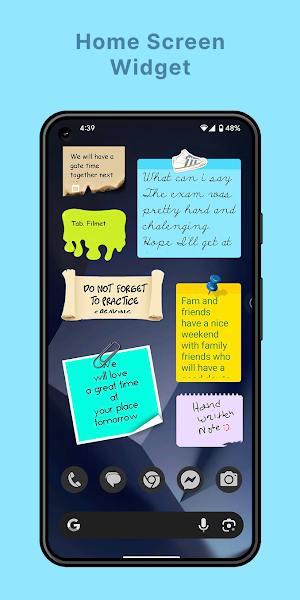
Stay organized with a colorful and intuitive sticky notes & drawing memo app designed for speed and convenience. Capture ideas instantly, sketch freely, and keep everything visible right from your home screen.
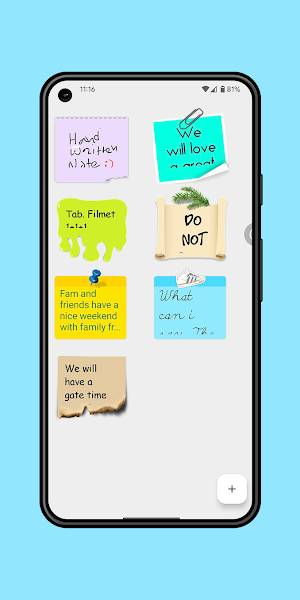
Add resizable widgets for notes, giving you quick access without opening the app. Scroll through long notes directly on the widget or edit them anytime with ease.
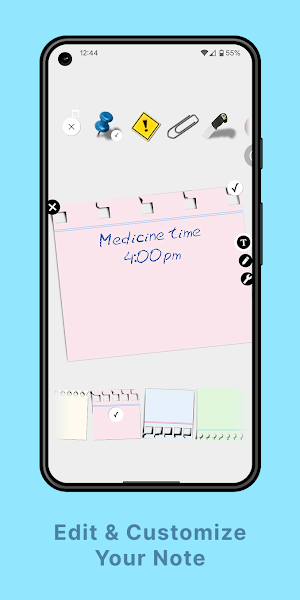
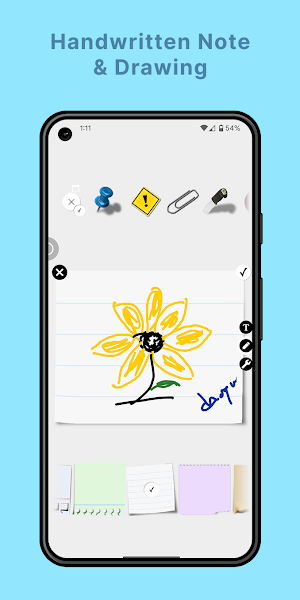
Whether you prefer typing or drawing, the app adapts to your workflow. Write notes using custom fonts or create hand-drawn memos with your finger or stylus.
Key Features
• Create text notes and drawing memos
• Resizable home screen widgets for notes
• Scroll long notes directly on widgets
• Local backup & restore for data safety
• Drag & drop reordering
• Automatic sorting options
• Powerful search
• Reminder notifications for important events
• Password protection for private notes
• Customize notes with rotation & transparency
• Custom fonts for personalized notes
• Share notes as text or drawings
Designed to be simple, flexible, and visually pleasing — perfect for daily tasks, ideas, reminders, and creativity.
Privacy First
We respect your privacy.
No data collection. No tracking.
How to Add Widgets
To place a sticky note on your home screen:
Tap and hold an empty area on your home screen → Select Widgets → Choose Sticky Notes.
Add resizable widgets for notes, giving you quick access without opening the app. Scroll through long notes directly on the widget or edit them anytime with ease.
Whether you prefer typing or drawing, the app adapts to your workflow. Write notes using custom fonts or create hand-drawn memos with your finger or stylus.
Key Features
• Create text notes and drawing memos
• Resizable home screen widgets for notes
• Scroll long notes directly on widgets
• Local backup & restore for data safety
• Drag & drop reordering
• Automatic sorting options
• Powerful search
• Reminder notifications for important events
• Password protection for private notes
• Customize notes with rotation & transparency
• Custom fonts for personalized notes
• Share notes as text or drawings
Designed to be simple, flexible, and visually pleasing — perfect for daily tasks, ideas, reminders, and creativity.
Privacy First
We respect your privacy.
No data collection. No tracking.
How to Add Widgets
To place a sticky note on your home screen:
Tap and hold an empty area on your home screen → Select Widgets → Choose Sticky Notes.
What’s new
Version 1.4.0 · Updated September 24, 2026
- Premium: Enjoy an ad-free experience - Drag-and-drop to reorder notes - Multi-select & delete multiple notes - Faster, more reliable widget updates
User reviews

Simple and beautiful app - Just what I need, thank you!

The great and nice app

perfect app for the job. needs no training, no up selling or ads. Great widget (love the batman pin)

Appreciate developer.

Awesome keep notes ever Use Butterfly 🦋 and Enjoy ♥️

It helps me a lot in my daily life. Instead of sticking notes on tables, the fridge, or doors, I can now keep my notes on my phone screen.
Alternatives to Sticky Notes + Widget
Looking for apps like Sticky Notes + Widget? Here are 6 similar Android apps on Google Play. The highest rated is Wondr Note: Fun Notes & Tools (4.6/5), and all 6 are free to download.
-
FilterBox Notification Manager 4.1
-
Twos: Remember & Share Things 4.2
-
Planner Pro - Daily Calendar 4.2
-
DayDew - Daily Journal, Diary 3.3
-
Daypad - Simple Time Tracker 4.3
-
Wondr Note: Fun Notes & Tools 4.6
| App | Rating | Price | Installs | Last updated | Compare |
|---|---|---|---|---|---|
| Sticky Notes + Widget | – | Free | 1,000+ | Sep 24, 2026 | |
| FilterBox Notification Manager | 4.1 / 5 | Free | 100,000+ | – | Compare |
| Twos: Remember & Share Things | 4.2 / 5 | Free | 1,000+ | Sep 6, 2022 | Compare |
| Planner Pro - Daily Calendar | 4.2 / 5 | Free | 1,000,000+ | Jul 30, 2026 | Compare |
| DayDew - Daily Journal, Diary | 3.3 / 5 | Free | 10,000+ | Sep 3, 2026 | Compare |
| Daypad - Simple Time Tracker | 4.3 / 5 | Free | 5,000+ | May 26, 2026 | Compare |
| Wondr Note: Fun Notes & Tools | 4.6 / 5 | Free | 100,000+ | Apr 14, 2026 | Compare |
Similar apps on Google Play
- FilterBox Notification Manager
- Twos: Remember & Share Things
- Planner Pro - Daily Calendar
- DayDew - Daily Journal, Diary
- Daypad - Simple Time Tracker
- Wondr Note: Fun Notes & Tools
- Easy Diary
- Notes
- Inkpad Notepad & To do list
- Nozbe: Tasks & Projects
- Humanity Schedule by TCP
- Rocketbook
- Time Clock: Easy Tracker
- touchnotes
- Weekly Planner - Diary, Notes
- Color Notes, Notebook, Notepad
- Nested Folder Notes - Folino
- MeisterTask - Task Management
- To-Do List & Planner: Taskito
- Listok: To do list & Notes
- jtx Board | journals & tasks
- Notes : Color Folders & To-dos
- UpNote - notes, diary, journal
- ColorNote Notepad Notes
- Tasks: To Do List & Reminders
- SCRIBZEE®
- Notepad - Notes and Tasks
- Listta: to-do list & planner