
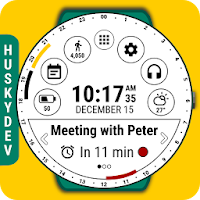
Calendar Watch Face (by HuskyDEV)
Personalization In-app purchases Contains ads
Stay informed about your daily agenda and enjoy all other cool features
- Rating
- 3.6
- 975 ratings
- Downloads
- 134K+
- on Google Play
- Price
- Free
- In-app purchases
- Updated
- Aug 25
- 2025 · v1.27
Screenshots


About Calendar Watch Face (by HuskyDEV)
Calendar Watch Face is fully compatible with Android Wear 2.0 and is compatible with all Android Wear watches
The Calendar Watch Face has ability to:
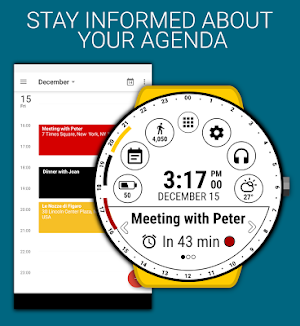
• Show events from your Google Calendar (for the next 24h PREMIUM)
• Display upcoming events using arcs (round displays) or lines (square displays)
• Display all type of events (today, multiday, all-day)
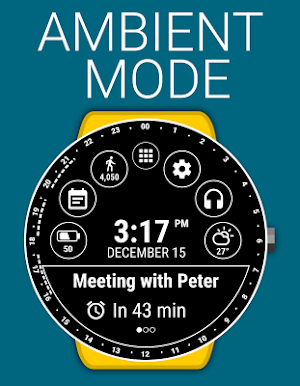
• Show upcoming event in the bottom message bar with ability to browse between events
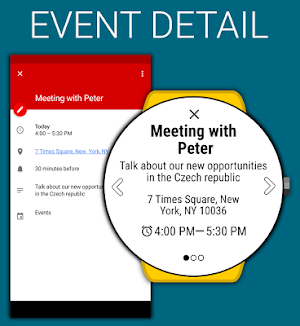
• Open event detail by touching on the event in the bottom message bar
• Set five styles of arcs or lines
★ Android Wear 2.0 integrated features
• external complication support
• fully standalone
• iPhone compatible
You can also set 6 indicators to predefined views, actions or watch app shortcut. Calendar Watch Face is built for using every day, it simplified many use cases such as launching programs, setting brightness and listening music.
The application is absolutely free and it has core options, but you can purchase the PREMIUM version with a lot of features and options.
FREE version includes:
★ Show upcoming event from the Google Calendar with ability to view event detail
★ Own launcher
★ Own remote music control
★ Ability to change screen brightness from launcher
★ Weather forecast for current day
★ Detailed information of watch battery and phone battery
★ Google Fit data for current day
PREMIUM version includes:
★ All features from FREE version
★ Show all events from the Google Calendar for the next 24h with ability to view all events detail
★ Set 6 indicators with predefined views, actions or watch app shortcut
★ More than 15 language translations
★ Watch battery history chart
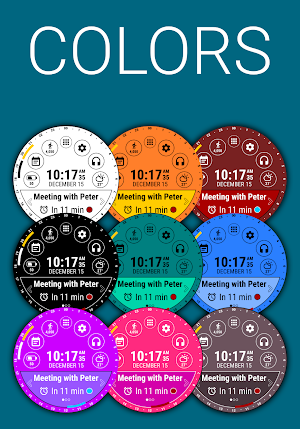
★ Endless color combinations
★ Ability to set background color
★ Ability to set message bar color
★ Ability to set message bar border color
★ Ability to set text and icon color
★ Weather forecast for upcoming hours and days
★ Detailed Google Fit data for current day and last 7 days
★ Choosing from four battery indicator types
★ Choosing from three Google Fit indicator types
★ Ability to change Keep watches screen awake interval
★ Ability to change Weather update interval
★ Ability to change Weather provider
The configuration of the application also contains:
★ Time and date format according to phone settings (12/24)
★ Enable touch feedback
★ Ability to change temperature units
★ Ability to change wind speed units
★ Information about last weather update
Common synchronization problem solution:
If the Application does not appear on your watch please do the following:
- uninstall the face application from the phone
- disconnect watch from phone
- restart watch
- connect watch and phone again
- install Calendar Watch Face once again
The Calendar Watch Face has ability to:
• Show events from your Google Calendar (for the next 24h PREMIUM)
• Display upcoming events using arcs (round displays) or lines (square displays)
• Display all type of events (today, multiday, all-day)
• Show upcoming event in the bottom message bar with ability to browse between events
• Open event detail by touching on the event in the bottom message bar
• Set five styles of arcs or lines
★ Android Wear 2.0 integrated features
• external complication support
• fully standalone
• iPhone compatible
You can also set 6 indicators to predefined views, actions or watch app shortcut. Calendar Watch Face is built for using every day, it simplified many use cases such as launching programs, setting brightness and listening music.
The application is absolutely free and it has core options, but you can purchase the PREMIUM version with a lot of features and options.
FREE version includes:
★ Show upcoming event from the Google Calendar with ability to view event detail
★ Own launcher
★ Own remote music control
★ Ability to change screen brightness from launcher
★ Weather forecast for current day
★ Detailed information of watch battery and phone battery
★ Google Fit data for current day
PREMIUM version includes:
★ All features from FREE version
★ Show all events from the Google Calendar for the next 24h with ability to view all events detail
★ Set 6 indicators with predefined views, actions or watch app shortcut
★ More than 15 language translations
★ Watch battery history chart
★ Endless color combinations
★ Ability to set background color
★ Ability to set message bar color
★ Ability to set message bar border color
★ Ability to set text and icon color
★ Weather forecast for upcoming hours and days
★ Detailed Google Fit data for current day and last 7 days
★ Choosing from four battery indicator types
★ Choosing from three Google Fit indicator types
★ Ability to change Keep watches screen awake interval
★ Ability to change Weather update interval
★ Ability to change Weather provider
The configuration of the application also contains:
★ Time and date format according to phone settings (12/24)
★ Enable touch feedback
★ Ability to change temperature units
★ Ability to change wind speed units
★ Information about last weather update
Common synchronization problem solution:
If the Application does not appear on your watch please do the following:
- uninstall the face application from the phone
- disconnect watch from phone
- restart watch
- connect watch and phone again
- install Calendar Watch Face once again
What’s new
Version 1.27 · Updated August 25, 2025
Target SDK has been updated to version 35 for mobile
User reviews

Very happy that I can show my next calendar event readable, other faces use such tiny text! I've been using for 2 weeks now and it's my only watch face I'm using.

Good functional watch face.

Excellent

Best watch face I've used by far. Happy to pay for premium definitely a keeper. This picture does it no justice with a black background and white text.

Tons of features for your watch. My go to watch face purses all the info at my fingertips.

It's really helpful!
Alternatives to Calendar Watch Face (by HuskyDEV)
Looking for apps like Calendar Watch Face (by HuskyDEV)? Here are 6 similar Android apps on Google Play. The highest rated is Real Weather Watch Face (4.5/5), and all 6 are free to download.
-
Classic Watch Face 3.8
-
Christmas Watch Face 4.1
-
Black Classic Watch Face 4.0
-
Minimal Watch Face by HuskyDEV
-
Wear brightness control 3.8
-
Real Weather Watch Face 4.5
| App | Rating | Price | Installs | Last updated | Compare |
|---|---|---|---|---|---|
| Calendar Watch Face (by HuskyDEV) | 3.6 / 5 | Free | 100,000+ | Aug 25, 2025 | |
| Classic Watch Face | 3.8 / 5 | Free | 500,000+ | Aug 26, 2025 | Compare |
| Christmas Watch Face | 4.1 / 5 | Free | 50,000+ | Aug 26, 2025 | Compare |
| Black Classic Watch Face | 4.0 / 5 | Free | 500,000+ | Aug 26, 2025 | Compare |
| Minimal Watch Face by HuskyDEV | – | Free | 10,000+ | Aug 22, 2025 | Compare |
| Wear brightness control | 3.8 / 5 | Free | 100,000+ | Nov 25, 2016 | Compare |
| Real Weather Watch Face | 4.5 / 5 | Free | 10,000+ | Aug 22, 2025 | Compare |
Similar apps on Google Play
- Classic Watch Face
- Christmas Watch Face
- Black Classic Watch Face
- Calendar Watch Face
- Minimal Watch Face by HuskyDEV
- Wear brightness control
- Real Weather Watch Face
- Photo Watch Face by HuskyDEV
- EveryDay Watch Face
- Color Watch Face (by HuskyDEV)
- Atlas Watch Face
- Spin Watch Face (by HuskyDEV)
- Digi Watch Face (by HuskyDEV)
- Info Watch Face
- Thermo Watch Face by HuskyDEV
- Winter Watch Face by HuskyDev