
System & Apps Cache Analyser
Tools Contains ads
Analyse app cache, system temp files, & junk logs to reclaim your storage space.
- Downloads
- 100+
- on Google Play
- Price
- Free
- No in-app purchases
- Updated
- Feb 27
- 2026 · v1.2
Screenshots

About System & Apps Cache Analyser
Deeply analyze your device storage and identify hidden junk files with Cache Analyser!
Is your phone running slow or out of space? Cache Analyser is a powerful, lightweight utility designed to give you a transparent view of how your storage is being consumed. It performs a deep scan of your device to identify application caches, system temporary files, and obsolete logs that clutter your memory.
Why Cache Analyser? On modern Android versions, security restrictions prevent apps from silently deleting data from other applications. Unlike "magic" cleaners that often do nothing, Cache Analyser provides a detailed, honest breakdown of your storage usage and guides you through the safest way to reclaim your space manually.
Key Features:
•
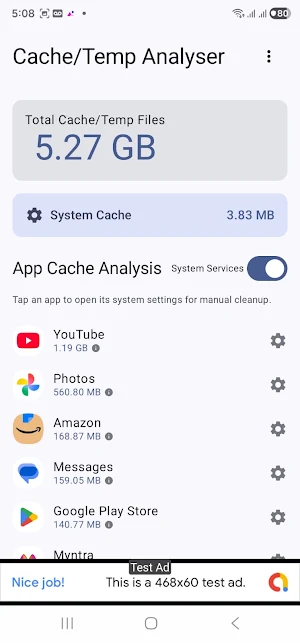
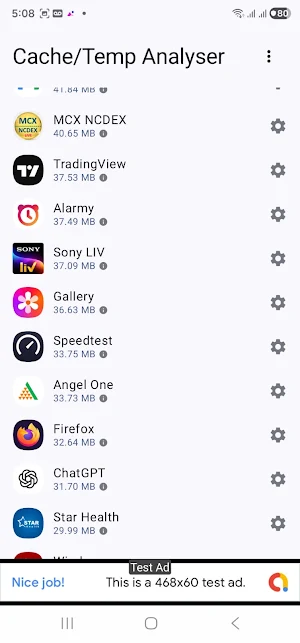
Comprehensive Cache Analysis: Get a detailed list of every app on your device and exactly how much cache memory they are using.
•
System Temp File Discovery: Find hidden .tmp, .log, and .bak files, as well as system-wide temporary data that often goes unnoticed.
•
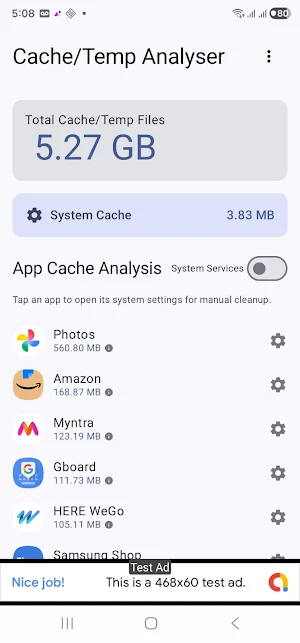
System Services Toggle: Want to see everything? Toggle the "System Services" view to analyze core Android components alongside your installed apps.
•
Smart Sorting: Identify "space hogs" instantly. Apps are automatically sorted by their cache size, showing you exactly where you can save the most space.
•
One-Tap Settings Shortcut: Save time! Tap any app in the list to jump directly to its system info page where you can clear its cache with a single tap.
•
Real-time Dashboard: See your total "Cleanup Potential" in one clear view, updated instantly as you analyze different areas.
•
Privacy First: We value your data. This app is a read-only analyser that only looks for temporary file patterns. It never accesses your personal photos, videos, or documents.
Permissions Explained: To provide an accurate analysis, the app requires:
1. Usage Stats Access: Needed to calculate the exact cache size of each installed application.
2. All Files Access (MANAGE_EXTERNAL_STORAGE): Required to find temporary files and logs hidden across your public storage directories.
Take control of your device storage today. Download Cache Analyser and see what’s really taking up your space!
Is your phone running slow or out of space? Cache Analyser is a powerful, lightweight utility designed to give you a transparent view of how your storage is being consumed. It performs a deep scan of your device to identify application caches, system temporary files, and obsolete logs that clutter your memory.
Why Cache Analyser? On modern Android versions, security restrictions prevent apps from silently deleting data from other applications. Unlike "magic" cleaners that often do nothing, Cache Analyser provides a detailed, honest breakdown of your storage usage and guides you through the safest way to reclaim your space manually.
Key Features:
•
Comprehensive Cache Analysis: Get a detailed list of every app on your device and exactly how much cache memory they are using.
•
System Temp File Discovery: Find hidden .tmp, .log, and .bak files, as well as system-wide temporary data that often goes unnoticed.
•
System Services Toggle: Want to see everything? Toggle the "System Services" view to analyze core Android components alongside your installed apps.
•
Smart Sorting: Identify "space hogs" instantly. Apps are automatically sorted by their cache size, showing you exactly where you can save the most space.
•
One-Tap Settings Shortcut: Save time! Tap any app in the list to jump directly to its system info page where you can clear its cache with a single tap.
•
Real-time Dashboard: See your total "Cleanup Potential" in one clear view, updated instantly as you analyze different areas.
•
Privacy First: We value your data. This app is a read-only analyser that only looks for temporary file patterns. It never accesses your personal photos, videos, or documents.
Permissions Explained: To provide an accurate analysis, the app requires:
1. Usage Stats Access: Needed to calculate the exact cache size of each installed application.
2. All Files Access (MANAGE_EXTERNAL_STORAGE): Required to find temporary files and logs hidden across your public storage directories.
Take control of your device storage today. Download Cache Analyser and see what’s really taking up your space!
What’s new
Version 1.2 · Updated February 27, 2026
Cache and Temp Files Analyser: First Release.
Alternatives to System & Apps Cache Analyser
Looking for apps like System & Apps Cache Analyser? Here are 6 similar Android apps on Google Play. All of them are free to download.
-
SmartPlay - HD Video Player
-
Edge Sidebar Launcher
-
Hidden Files Detector Cleaner
-
FineCoder: Apps for Everyone
-
Fake GPS Location & Simulator
-
WiFi FTP File Transfer / Share
| App | Rating | Price | Installs | Last updated | Compare |
|---|---|---|---|---|---|
| System & Apps Cache Analyser | – | Free | 100+ | Feb 27, 2026 | |
| SmartPlay - HD Video Player | – | Free | 10,000+ | Oct 10, 2026 | Compare |
| Edge Sidebar Launcher | – | Free | 10,000+ | Jul 28, 2026 | Compare |
| Hidden Files Detector Cleaner | – | Free | 500+ | Oct 1, 2026 | Compare |
| FineCoder: Apps for Everyone | – | Free | 1,000+ | Sep 24, 2026 | Compare |
| Fake GPS Location & Simulator | – | Free | 100+ | Sep 28, 2026 | Compare |
| WiFi FTP File Transfer / Share | – | Free | 100+ | Oct 4, 2026 | Compare |