

SmartPlay - HD Video Player
Video Players & Editors Contains ads
Premium local video player with sleek UI, gesture controls & all-format support.
- Downloads
- 23.5K+
- on Google Play
- Price
- Free
- No in-app purchases
- Updated
- Oct 10
- 2026 · v1.8
Screenshots


About SmartPlay - HD Video Player
SmartPlay - HD Video Player:
Unlock the ultimate video viewing experience with SmartPlay, the most intuitive and powerful HD video player for Android. Whether you’re watching your favorite movies, saved clips, or viral videos, SmartPlay provides a silky-smooth interface and advanced features that put you in total control.
Why Choose SmartPlay?
🎬 ALL FORMATS SUPPORTED: Play every video format with ease! From standard MP4 and WebM to high-definition MKV, AVI, MOV, and FLV. SmartPlay handles them all without the need for extra codecs.
🚀 SILKY SMOOTH PERFORMANCE: Experience a flicker-free interface with professional-grade navigation. Our "Smart Scrubber" seek bar lets you find exactly the right scene with real-time video updates as you slide.
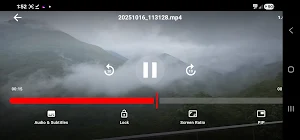
📺 PICTURE-IN-PICTURE (PiP) MODE: Don’t stop the fun! Keep your video playing in a floating window while you chat, browse the web, or check emails. True multitasking at its finest.
🖐️ INTUITIVE GESTURE CONTROLS Control your viewing experience with simple swipes:
• Left Side: Slide up/down for Brightness.
• Right Side: Slide up/down for Volume.
• Scrubbing: Real-time seeking to pinpoint your favorite moments.
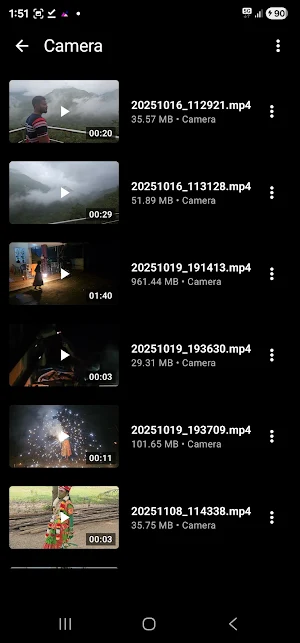
📂 ADVANCED STORAGE DISCOVERY: SmartPlay automatically scans your internal storage and external devices.
• External Support: Full support for SD Cards and USB OTG drives.
• Folder Browser: Prefer manual control? Use our built-in file manager to navigate your storage directly.
🔒 PRIVACY & ORGANIZATION
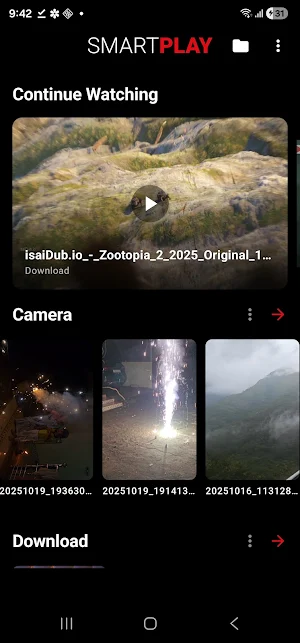
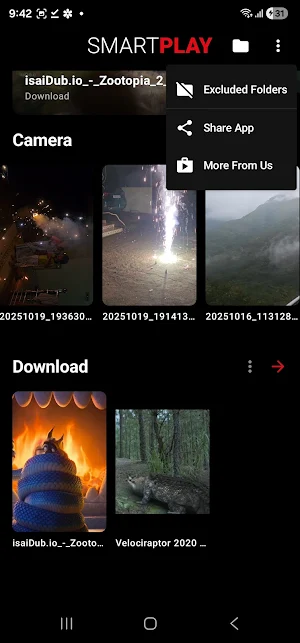
• Excluded Folders: Hide specific folders from your main library to keep things private and organized.
• Continue Watching: Pick up exactly where you left off with our "Continue Watching" dashboard for your most recent videos.
✨ PREMIUM PLAYER FEATURES:
• Playback Speed: Watch at your own pace (0.5x to 2.0x).
• Audio & Subtitles: Seamlessly switch between different audio languages and subtitle tracks.
• Screen Ratio: Toggle between Fit, Fill, and Zoom modes to match your display.
• Screen Lock: Prevent accidental touches while you watch.
• Modern Design: A stunning, premium dark-themed interface built with the latest Material 3 guidelines.
User-Friendly & Integration-Ready:
• "Open With" Support: Set SmartPlay as your default player or use it to open videos directly from other apps and file managers.
• Non-Intrusive Ads: Enjoy your content with non-disruptive, adaptive banner ads.
• Lightweight: Optimized to run smoothly on all devices from Android 7.0 onwards.
Download SmartPlay today and transform your device into a professional-grade cinema!
Unlock the ultimate video viewing experience with SmartPlay, the most intuitive and powerful HD video player for Android. Whether you’re watching your favorite movies, saved clips, or viral videos, SmartPlay provides a silky-smooth interface and advanced features that put you in total control.
Why Choose SmartPlay?
🎬 ALL FORMATS SUPPORTED: Play every video format with ease! From standard MP4 and WebM to high-definition MKV, AVI, MOV, and FLV. SmartPlay handles them all without the need for extra codecs.
🚀 SILKY SMOOTH PERFORMANCE: Experience a flicker-free interface with professional-grade navigation. Our "Smart Scrubber" seek bar lets you find exactly the right scene with real-time video updates as you slide.
📺 PICTURE-IN-PICTURE (PiP) MODE: Don’t stop the fun! Keep your video playing in a floating window while you chat, browse the web, or check emails. True multitasking at its finest.
🖐️ INTUITIVE GESTURE CONTROLS Control your viewing experience with simple swipes:
• Left Side: Slide up/down for Brightness.
• Right Side: Slide up/down for Volume.
• Scrubbing: Real-time seeking to pinpoint your favorite moments.
📂 ADVANCED STORAGE DISCOVERY: SmartPlay automatically scans your internal storage and external devices.
• External Support: Full support for SD Cards and USB OTG drives.
• Folder Browser: Prefer manual control? Use our built-in file manager to navigate your storage directly.
🔒 PRIVACY & ORGANIZATION
• Excluded Folders: Hide specific folders from your main library to keep things private and organized.
• Continue Watching: Pick up exactly where you left off with our "Continue Watching" dashboard for your most recent videos.
✨ PREMIUM PLAYER FEATURES:
• Playback Speed: Watch at your own pace (0.5x to 2.0x).
• Audio & Subtitles: Seamlessly switch between different audio languages and subtitle tracks.
• Screen Ratio: Toggle between Fit, Fill, and Zoom modes to match your display.
• Screen Lock: Prevent accidental touches while you watch.
• Modern Design: A stunning, premium dark-themed interface built with the latest Material 3 guidelines.
User-Friendly & Integration-Ready:
• "Open With" Support: Set SmartPlay as your default player or use it to open videos directly from other apps and file managers.
• Non-Intrusive Ads: Enjoy your content with non-disruptive, adaptive banner ads.
• Lightweight: Optimized to run smoothly on all devices from Android 7.0 onwards.
Download SmartPlay today and transform your device into a professional-grade cinema!
What’s new
Version 1.8 · Updated October 10, 2026
App Updated and Improved.
Alternatives to SmartPlay - HD Video Player
Looking for apps like SmartPlay - HD Video Player? Here are 6 similar Android apps on Google Play. All of them are free to download.
-
Battery Saver: RAM Monitor
-
WakeUp Challenge Alarm
-
Hidden Files Detector Cleaner
-
Video Watermark Logo Encoder
-
Edge Sidebar Launcher
-
Images to PDF Maker: JPG 2 PDF
| App | Rating | Price | Installs | Last updated | Compare |
|---|---|---|---|---|---|
| SmartPlay - HD Video Player | – | Free | 10,000+ | Oct 10, 2026 | |
| Battery Saver: RAM Monitor | – | Free | 1,000+ | – | Compare |
| WakeUp Challenge Alarm | – | Free | 500+ | Oct 18, 2026 | Compare |
| Hidden Files Detector Cleaner | – | Free | 500+ | Oct 1, 2026 | Compare |
| Video Watermark Logo Encoder | – | Free | 10+ | Sep 29, 2026 | Compare |
| Edge Sidebar Launcher | – | Free | 10,000+ | Jul 28, 2026 | Compare |
| Images to PDF Maker: JPG 2 PDF | – | Free | 10+ | Sep 29, 2026 | Compare |