
Files Vault: Secure Your Files
Tools Contains ads
A hidden vault for your sensitive files and photos. Locked by biometrics.
- Downloads
- 49+
- on Google Play
- Price
- Free
- No in-app purchases
- Updated
- Oct 3
- 2026 · v1.1
Screenshots


About Files Vault: Secure Your Files
Keep your private files hidden and organized with the ultimate Secure Vault.
Files Vault is a professional-grade file organizer designed to protect your sensitive data. Using your device's secure internal storage, it creates a hidden space for your photos, videos, and documents that is completely invisible to other apps and the system gallery.
🔒 UNCOMPROMISED SECURITY: Access your vault with ease and peace of mind. Files Vault uses the most secure biometric authentication (Fingerprint or Face Unlock) and provides a system PIN/Pattern fallback for devices without biometric sensors. Your privacy is our priority—your files never leave your device.
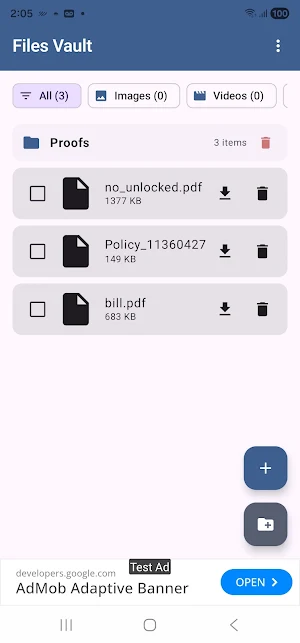
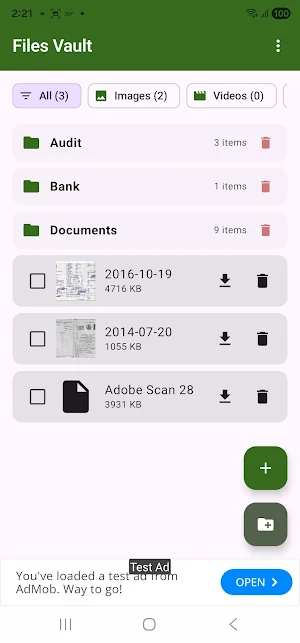
📂 SMART ORGANIZATION: Don’t just hide your files—manage them. Create custom folders to categorize your sensitive information. Whether it's "Personal Photos," "Work Documents," or "Private Videos," everything stays exactly where you want it.
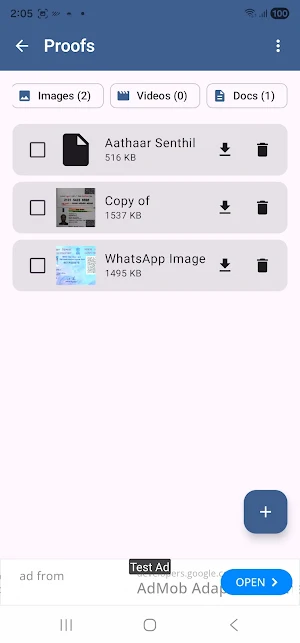
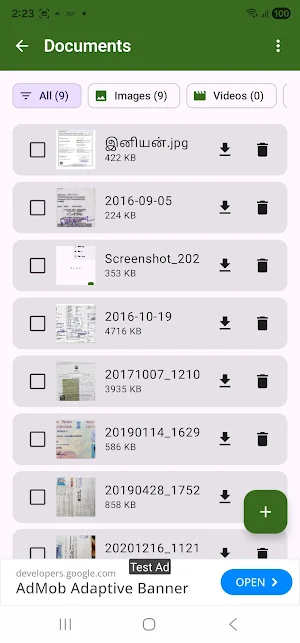
🖼️ VISUAL GALLERY EXPERIENCE: Browse your hidden media with high-quality thumbnails. Our built-in image viewer lets you swipe through your photos full-screen within the secure environment, eliminating the need to use external apps.
🚀 POWERFUL MANAGEMENT TOOLS:
• Bulk Actions: Save time by selecting multiple files to delete or move out of the vault at once.
• Restore Anytime: Easily move files back to your public storage whenever you need them.
• File Type Filters: Quickly find what you’re looking for with one-tap filters for Images, Videos, and Documents.
✨ PERSONALIZED FOR YOU: Make the app yours with multiple Material 3 color themes (Purple, Blue, Green, Orange) and a full Dark Mode support that ensures your comfort in any lighting.
KEY FEATURES:
• Invisible Storage: Files are stored internally, invisible to system file managers.
• Biometric Lock: Secure your data with your fingerprint or face.
• In-App Image Viewer: Browse your private gallery securely.
• Bulk Management: Multi-select for fast delete and export.
• Folder Support: Organize your vault into custom categories.
• Persistent Themes: The app remembers your preferred look and feel.
• Always Updated: Integrated Google Play auto-updates for the latest security features.
Protect your privacy today. Download Files Vault and keep your sensitive files under lock and key.
Files Vault is a professional-grade file organizer designed to protect your sensitive data. Using your device's secure internal storage, it creates a hidden space for your photos, videos, and documents that is completely invisible to other apps and the system gallery.
🔒 UNCOMPROMISED SECURITY: Access your vault with ease and peace of mind. Files Vault uses the most secure biometric authentication (Fingerprint or Face Unlock) and provides a system PIN/Pattern fallback for devices without biometric sensors. Your privacy is our priority—your files never leave your device.
📂 SMART ORGANIZATION: Don’t just hide your files—manage them. Create custom folders to categorize your sensitive information. Whether it's "Personal Photos," "Work Documents," or "Private Videos," everything stays exactly where you want it.
🖼️ VISUAL GALLERY EXPERIENCE: Browse your hidden media with high-quality thumbnails. Our built-in image viewer lets you swipe through your photos full-screen within the secure environment, eliminating the need to use external apps.
🚀 POWERFUL MANAGEMENT TOOLS:
• Bulk Actions: Save time by selecting multiple files to delete or move out of the vault at once.
• Restore Anytime: Easily move files back to your public storage whenever you need them.
• File Type Filters: Quickly find what you’re looking for with one-tap filters for Images, Videos, and Documents.
✨ PERSONALIZED FOR YOU: Make the app yours with multiple Material 3 color themes (Purple, Blue, Green, Orange) and a full Dark Mode support that ensures your comfort in any lighting.
KEY FEATURES:
• Invisible Storage: Files are stored internally, invisible to system file managers.
• Biometric Lock: Secure your data with your fingerprint or face.
• In-App Image Viewer: Browse your private gallery securely.
• Bulk Management: Multi-select for fast delete and export.
• Folder Support: Organize your vault into custom categories.
• Persistent Themes: The app remembers your preferred look and feel.
• Always Updated: Integrated Google Play auto-updates for the latest security features.
Protect your privacy today. Download Files Vault and keep your sensitive files under lock and key.
What’s new
Version 1.1 · Updated October 3, 2026
Secure your files with Files Vault: App Improved.
Alternatives to Files Vault: Secure Your Files
Looking for apps like Files Vault: Secure Your Files? Here are 6 similar Android apps on Google Play. All of them are free to download.
-
Edge Sidebar Launcher
-
Hidden Files Detector Cleaner
-
Fake GPS Location & Simulator
-
System & Apps Cache Analyser
-
WiFi File Transfer: PC / Mac
-
Documents Hub: PDF Organizer
| App | Rating | Price | Installs | Last updated | Compare |
|---|---|---|---|---|---|
| Files Vault: Secure Your Files | – | Free | 10+ | Oct 3, 2026 | |
| Edge Sidebar Launcher | – | Free | 10,000+ | Jul 28, 2026 | Compare |
| Hidden Files Detector Cleaner | – | Free | 500+ | Oct 1, 2026 | Compare |
| Fake GPS Location & Simulator | – | Free | 100+ | Sep 28, 2026 | Compare |
| System & Apps Cache Analyser | – | Free | 100+ | Sep 24, 2026 | Compare |
| WiFi File Transfer: PC / Mac | – | Free | 50+ | Oct 3, 2026 | Compare |
| Documents Hub: PDF Organizer | – | Free | 10+ | Oct 3, 2026 | Compare |