
9 Flip Launcher for Z Flip
Personalization In-app purchases
Cover screen launcher for Galaxy Z Flip. Do more without unfolding.
- Rating
- 4.4
- 39 ratings
- Downloads
- 3.9K+
- on Google Play
- Price
- Free
- In-app purchases
- Updated
- Oct 21
- 2026 · v9.9.9
Screenshots
About 9 Flip Launcher for Z Flip
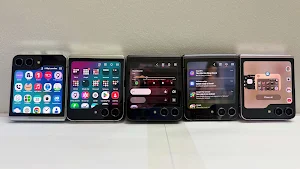
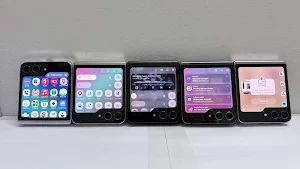
9 Flip Launcher is a cover screen launcher for Samsung Galaxy Z Flip. Open apps, manage notifications, control media, access shortcuts, and personalize your cover screen without constantly unfolding your phone.
You bought a flip phone for convenience. But many everyday actions still require opening the main screen: launching an app, checking a notification, changing music, or reaching a shortcut.
9 Flip Launcher helps transform your Galaxy Z Flip cover screen into a practical app launcher and control center for daily use. It is designed for the moments when opening the phone feels unnecessary.
Easy Setup
- No root required
- No ADB commands
- No Shizuku
Install the app, grant the permissions you choose, and start using your cover screen in minutes.
Use your cover screen for:
- App shortcuts and favorite apps
- Recent apps and quick app switching
- Notifications and supported notification actions
- Media controls and playback management
- Cover-screen gestures
- Quick controls and phone settings shortcuts
- Layout, icon, wallpaper, and launcher personalization
The goal is simple: make the Galaxy Z Flip cover screen feel closer to the main screen for the actions you use every day.
Why it helps
- Open apps with fewer steps
- Check important notifications without opening your phone
- Control music and media directly from the cover screen
- Keep useful shortcuts close while walking, commuting, working, or using one hand
- Personalize your cover screen experience around your daily workflow
Built for Galaxy Z Flip users
9 Flip Launcher is designed for Samsung Galaxy Z Flip cover screens and compatible Android flip phones where device software allows.
Whether you need a cover screen launcher, notification hub, media controller, app launcher, or shortcut center, 9 Flip Launcher helps you get more from your cover screen.
Some features may vary depending on Android version, Samsung software version, device model, and permissions you choose to enable.
Free and Premium
You can start using 9 Flip Launcher for free. Some advanced features include limited free uses. When those uses run out, the app shows a clear notice and offers Premium.
Premium unlocks supported advanced cover-screen features such as repeated shortcut actions, notification opens, media controls, quick actions, layout options, and personalization.
Privacy and safety
- No ads
- No sale of your personal data
- No unnecessary advertising tracking
- Permissions are used only for the cover-screen features you enable
- Permission explanations are shown before supported features require access
9 Flip Launcher may request permissions such as Accessibility Service, Notification Access, overlay permission, installed apps access, media access, or billing access depending on the features you enable.
These permissions are used to support cover-screen launcher functionality, app shortcuts, notifications, media controls, gestures, personalization, and purchases.
9 Flip Launcher is built for practical everyday use. If you use a Samsung Galaxy Z Flip or another compatible flip phone and want a more capable cover screen launcher, 9 Flip Launcher is designed for you.
You bought a flip phone for convenience. But many everyday actions still require opening the main screen: launching an app, checking a notification, changing music, or reaching a shortcut.
9 Flip Launcher helps transform your Galaxy Z Flip cover screen into a practical app launcher and control center for daily use. It is designed for the moments when opening the phone feels unnecessary.
Easy Setup
- No root required
- No ADB commands
- No Shizuku
Install the app, grant the permissions you choose, and start using your cover screen in minutes.
Use your cover screen for:
- App shortcuts and favorite apps
- Recent apps and quick app switching
- Notifications and supported notification actions
- Media controls and playback management
- Cover-screen gestures
- Quick controls and phone settings shortcuts
- Layout, icon, wallpaper, and launcher personalization
The goal is simple: make the Galaxy Z Flip cover screen feel closer to the main screen for the actions you use every day.
Why it helps
- Open apps with fewer steps
- Check important notifications without opening your phone
- Control music and media directly from the cover screen
- Keep useful shortcuts close while walking, commuting, working, or using one hand
- Personalize your cover screen experience around your daily workflow
Built for Galaxy Z Flip users
9 Flip Launcher is designed for Samsung Galaxy Z Flip cover screens and compatible Android flip phones where device software allows.
Whether you need a cover screen launcher, notification hub, media controller, app launcher, or shortcut center, 9 Flip Launcher helps you get more from your cover screen.
Some features may vary depending on Android version, Samsung software version, device model, and permissions you choose to enable.
Free and Premium
You can start using 9 Flip Launcher for free. Some advanced features include limited free uses. When those uses run out, the app shows a clear notice and offers Premium.
Premium unlocks supported advanced cover-screen features such as repeated shortcut actions, notification opens, media controls, quick actions, layout options, and personalization.
Privacy and safety
- No ads
- No sale of your personal data
- No unnecessary advertising tracking
- Permissions are used only for the cover-screen features you enable
- Permission explanations are shown before supported features require access
9 Flip Launcher may request permissions such as Accessibility Service, Notification Access, overlay permission, installed apps access, media access, or billing access depending on the features you enable.
These permissions are used to support cover-screen launcher functionality, app shortcuts, notifications, media controls, gestures, personalization, and purchases.
9 Flip Launcher is built for practical everyday use. If you use a Samsung Galaxy Z Flip or another compatible flip phone and want a more capable cover screen launcher, 9 Flip Launcher is designed for you.
What’s new
Version 9.9.9 · Updated October 21, 2026
• Enjoy cassette-style music with Tape, in the app or widget. • Make it yours with a tap: change the cassette skin or background style. • Keep the screen on as you listen by opening Tape from Media Control. • Widgets fit and rotate better on your cover screen. • Continued optimization for One UI 9. • Share suggestions via “Contact the developer” in the app.
User reviews

Update as of August 19, 2026: I love that there is a dedicated notification panel for this launcher. I only noticed recently that it seems I can't control the brightness from the samsung notification panel. Also, the floating icon disappears once I am inside the Flip 9 launcher. I have to go to recent tabs just to e...

love this app well done to the developer love the things it can do for the flip phone

within the first 5 minutes this felt better than coverscreen os and I was ready to buy the app and unlock all features and so i did. super great for my z flip 7. I use it basically every day.
Frequently asked questions
What is 9 Flip Launcher?
A cover screen launcher for Samsung Galaxy Z Flip to open apps, manage notifications and control media without unfolding the phone.
Does it need root or ADB?
No root, ADB commands or Shizuku are required.
Alternatives to 9 Flip Launcher for Z Flip
Looking for apps like 9 Flip Launcher for Z Flip? Here are 6 similar Android apps on Google Play. The highest rated is Borealis - Icon Pack (4.8/5), and 5 of the 6 are free to download.
-
AI Morph: AI Video & Photo 4.3
-
Pie Launcher version 2026 4.6
-
Doodle: Live Wallpapers 4.5
-
GlossGenius: Booking, Payments 3.8
-
Invitation Maker & Card Design 4.4
-
Borealis - Icon Pack 4.8
| App | Rating | Price | Installs | Last updated | Compare |
|---|---|---|---|---|---|
| 9 Flip Launcher for Z Flip | 4.4 / 5 | Free | 1,000+ | Oct 21, 2026 | |
| AI Morph: AI Video & Photo | 4.3 / 5 | Free | 10,000,000+ | Nov 6, 2026 | Compare |
| Pie Launcher version 2026 | 4.6 / 5 | Free | 1,000,000+ | Sep 29, 2026 | Compare |
| Doodle: Live Wallpapers | 4.5 / 5 | Free | 100,000+ | Oct 31, 2024 | Compare |
| GlossGenius: Booking, Payments | 3.8 / 5 | Free | 100,000+ | Oct 29, 2026 | Compare |
| Invitation Maker & Card Design | 4.4 / 5 | Free | 100,000+ | Oct 23, 2026 | Compare |
| Borealis - Icon Pack | 4.8 / 5 | 4.49 USD | 100,000+ | Oct 24, 2026 | Compare |
Similar apps on Google Play
- AI Morph: AI Video & Photo
- Pie Launcher version 2026
- Doodle: Live Wallpapers
- GlossGenius: Booking, Payments
- Invitation Maker & Card Design
- Borealis - Icon Pack
- Likcut
- Hexis
- Clarify: Focus & Task Manager
- Hookle: Social Media Manager
- Encompass One
- 1800Flowers: Flowers & Gifts
- Croux
- Gaggle Paragliding, Ultralight
- Dermstore: Shop Pro Skin Care
- Figma: view. comment. mirror.
- xTiles: notes, tasks, projects
- TORRID
- Happiness Project
- Thrive Market: Shop Healthy
- PNC Mobile
- Pipedrive – Sales CRM
- Grove Collaborative
- Beauty Society
- Grounds
- AIO Launcher
- theCut: Find & Book Barbers
- SECU
- Warby Parker
- Thermomix Cookidoo App
- Agorify
- KOL Kollectin Shopping
- JJ's House:Wedding&Formal Wear
- CostPal: Price Tracker
- Socie
- Nordstrom Rack
- Woot! Deals and Shenanigans
- GNC
- Meermin Shoes US
- BMO Digital Banking
- Fresh Clean Threads
- Newegg - Tech Shopping Online
- Adobe Firefly: AI Generator
- AllModern