

Shopping Manager Classic
A. Grauf Shopping In-app purchases
Plan once, shop smarter. Private, offline shopping list with price compare.
- Downloads
- 10+
- on Google Play
- Price
- Free
- In-app purchases
- Updated
- Aug 11
- 2026 · v1.2.1
Screenshots

About Shopping Manager Classic
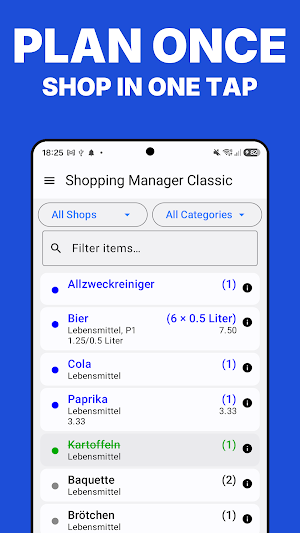
Shopping Manager Classic turns your shopping into a one-tap routine. Enter each product once — with its shop, category, price and unit — and build a personal master list you reuse on every trip. Plan what you need at home, then simply check items off as they go in your cart.
Everything stays on your device. No account, no ads, no tracking — the app doesn't even request internet access.
TWO MODES FOR PLANNING AND SHOPPING
• All mode shows your complete master list for planning and editing.
• Needed mode shows only what you're buying right now — a clean, focused list.
• Tap to check items off one-handed as you shop, then Checkout to reset for next time.
ORGANIZE YOUR WAY
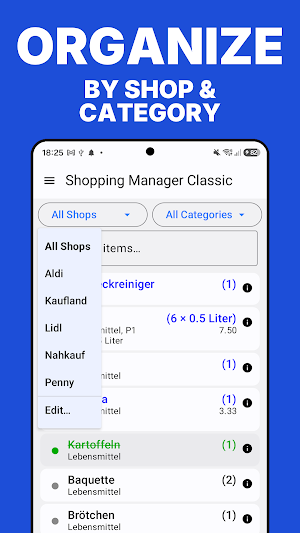
• Sort and group by shop, category, aisle, price, priority and more.
• Drag to reorder shops, categories, databases and units.
• Filter by shop or category, or just start typing to find any item instantly.
• A live header keeps a running count and total as you shop.
COMPARE PRICES
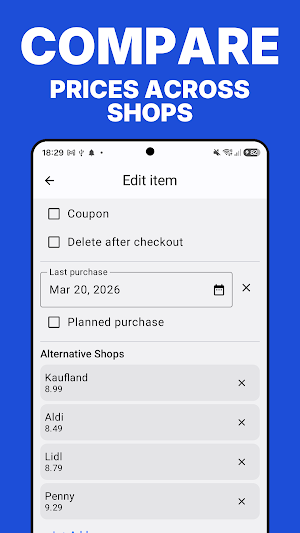
• Store a price per item and per shop.
• Add alternative shops — a red arrow warns you when an item is cheaper elsewhere.
• The Best Buy calculator compares two pack sizes by unit price, so you instantly know the better deal.
POWERFUL EXTRAS
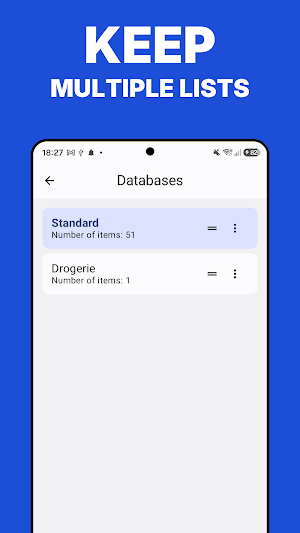
• Multiple separate lists (databases), each with its own items, shops and categories.
• Virtual categories work like reusable templates — group a recipe's ingredients and manage them together.
• Add a photo to any item from the camera or gallery, with a zoomable full-screen viewer.
• Batch actions: change shop or category, assign alternative shops, copy or move items between lists, and more.
• CSV import and export for backups and moving data between lists and devices.
• Send your list by email or SMS.
NOTHING GETS LOST
• Deleted items, shops and categories go to the Trash and can be restored.
• Finished items can be archived and brought back any time.
• Undo is available for most actions.
MAKE IT YOURS
• Light and dark themes, custom colors and adjustable font sizes.
• Choose exactly which item details appear in the list.
• Available in English and German.
Shopping Manager Classic is the modern Android successor to the classic webOS Shopping Manager. Private by design,
fast in the aisle, and built to make every shopping trip effortless.
Everything stays on your device. No account, no ads, no tracking — the app doesn't even request internet access.
TWO MODES FOR PLANNING AND SHOPPING
• All mode shows your complete master list for planning and editing.
• Needed mode shows only what you're buying right now — a clean, focused list.
• Tap to check items off one-handed as you shop, then Checkout to reset for next time.
ORGANIZE YOUR WAY
• Sort and group by shop, category, aisle, price, priority and more.
• Drag to reorder shops, categories, databases and units.
• Filter by shop or category, or just start typing to find any item instantly.
• A live header keeps a running count and total as you shop.
COMPARE PRICES
• Store a price per item and per shop.
• Add alternative shops — a red arrow warns you when an item is cheaper elsewhere.
• The Best Buy calculator compares two pack sizes by unit price, so you instantly know the better deal.
POWERFUL EXTRAS
• Multiple separate lists (databases), each with its own items, shops and categories.
• Virtual categories work like reusable templates — group a recipe's ingredients and manage them together.
• Add a photo to any item from the camera or gallery, with a zoomable full-screen viewer.
• Batch actions: change shop or category, assign alternative shops, copy or move items between lists, and more.
• CSV import and export for backups and moving data between lists and devices.
• Send your list by email or SMS.
NOTHING GETS LOST
• Deleted items, shops and categories go to the Trash and can be restored.
• Finished items can be archived and brought back any time.
• Undo is available for most actions.
MAKE IT YOURS
• Light and dark themes, custom colors and adjustable font sizes.
• Choose exactly which item details appear in the list.
• Available in English and German.
Shopping Manager Classic is the modern Android successor to the classic webOS Shopping Manager. Private by design,
fast in the aisle, and built to make every shopping trip effortless.
What’s new
Version 1.2.1 · Updated August 11, 2026
New: • Barcode scanner: scan a product to put it on your shopping list. For unknown codes the app suggests a product name. • Recipe photos now open fullscreen and can be zoomed. Improved: • Item names are unique per list – making ingredients, barcodes, CSV import and cloud sync more reliable. • Optimised for Android 16. • Help and manual updated; links follow the app language.
Alternatives to Shopping Manager Classic
Looking for apps like Shopping Manager Classic? Here are 5 similar Android apps on Google Play. All of them are free to download.
-
Data Manager Classic
-
Parking Reminder - Car Finder
-
Sound Memory - Pairs & Tones
-
VocabTrain – Vocab Flashcards
-
Secret Notes – Private Notepad
| App | Rating | Price | Installs | Last updated | Compare |
|---|---|---|---|---|---|
| Shopping Manager Classic | – | Free | 10+ | Aug 11, 2026 | |
| Data Manager Classic | – | Free | 50+ | – | Compare |
| Parking Reminder - Car Finder | – | Free | 50+ | Aug 12, 2026 | Compare |
| Sound Memory - Pairs & Tones | – | Free | 100+ | – | Compare |
| VocabTrain – Vocab Flashcards | – | Free | 500+ | – | Compare |
| Secret Notes – Private Notepad | – | Free | 1,000+ | Sep 26, 2026 | Compare |