

Win Nmbr
Tools
Win Nmbr - random integers by range, with history and defaults
- Price
- Free
- No in-app purchases
- Updated
- Sep 4
- 2026 · v1.0
Screenshots


About Win Nmbr
Win Nmbr is a simple random integer generator for everyday choices. Set a range, tap Generate, and Win Nmbr shows a whole number you can use right away.
WHAT YOU CAN DO
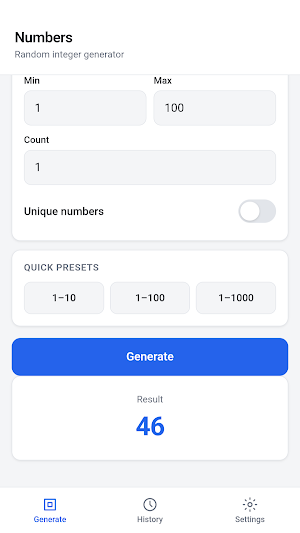
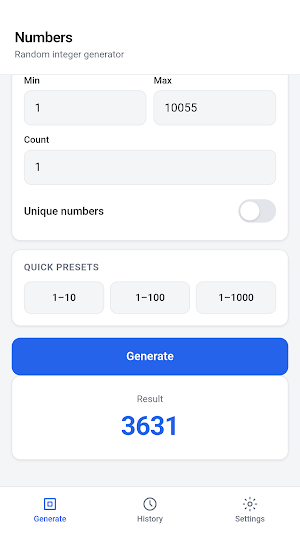
Win Nmbr lets you pick a minimum and a maximum, then draw one or more integers from that range. Need a number from 1 to 10, 1 to 100, or 1 to 1000? Use a quick preset. Need a custom span? Type the limits yourself. You also choose how many numbers to create in one go, from 1 up to 50.
If repeats should not appear, turn on Unique numbers. Win Nmbr then fills the list without repeating a value. If you ask for more unique numbers than the range can hold, the app explains the problem. The same messages appear when a field is empty, when the minimum is higher than the maximum, or when the count is outside the allowed span.
RESULTS YOU CAN READ AT A GLANCE
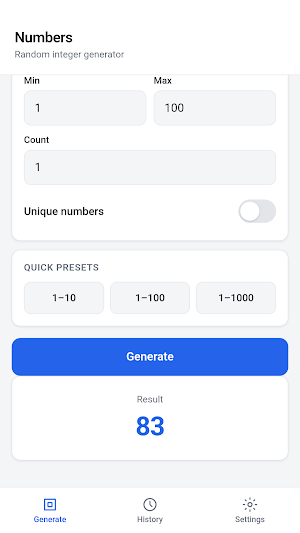
A single draw appears as one large number. Several draws appear as a row of chips, so each value is easy to see. After each tap, Win Nmbr keeps the latest result on the Generate screen until you run the next draw.
HISTORY OF RECENT DRAWS
Every successful generation is stored in History. Each entry shows the time, the range you used, how many numbers you asked for, whether unique mode was on, and the exact list that came up. Scroll to review earlier draws. If you have many entries, tap Load more. When you no longer need the list, tap Clear history. If nothing has been generated yet, History shows a short empty message.
SAVE YOUR USUAL SETTINGS
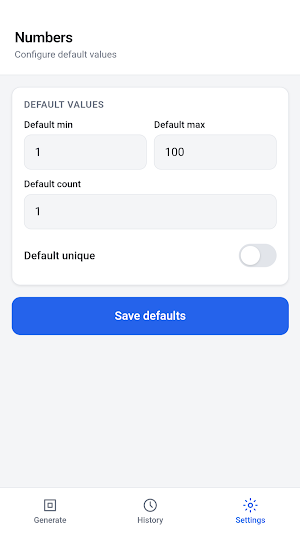
If you often use the same range, open Settings in Win Nmbr. Set a default minimum, a default maximum, a default count, and whether unique mode should start on. Tap Save defaults. The next time you open Generate, those values are already filled in. You can still change them for a one-off draw without losing the saved defaults.
HOW THE APP IS ORGANIZED
Win Nmbr has three sections at the bottom of the screen:
• Generate — set the range, pick a count, use a preset, turn unique mode on or off, and create numbers.
• History — review recent results with time and settings, load more entries, or clear the list.
• Settings — store the values you want to see when you start.
Buttons and fields are large enough for a finger. The top of the screen names the current section so you always know where you are.
WHEN WIN NMBR HELPS
Use Win Nmbr when a group needs a fair pick: a seat, a turn order, a page in a book, a team number, or a day of the month. Teachers can draw a student number. Families can decide who goes first. Friends can pick a random order for a game night.
Win Nmbr works with whole numbers only. It does not create decimals, letters, or names. It does not run contests or keep scores. You set the range, tap Generate, and get integers.
A CALM LAYOUT
Cards hold one task at a time: range, presets, result, history, or defaults. Colors stay light and readable. Win Nmbr is meant for a classroom, a table, or a commute.
WHAT YOU CAN DO
Win Nmbr lets you pick a minimum and a maximum, then draw one or more integers from that range. Need a number from 1 to 10, 1 to 100, or 1 to 1000? Use a quick preset. Need a custom span? Type the limits yourself. You also choose how many numbers to create in one go, from 1 up to 50.
If repeats should not appear, turn on Unique numbers. Win Nmbr then fills the list without repeating a value. If you ask for more unique numbers than the range can hold, the app explains the problem. The same messages appear when a field is empty, when the minimum is higher than the maximum, or when the count is outside the allowed span.
RESULTS YOU CAN READ AT A GLANCE
A single draw appears as one large number. Several draws appear as a row of chips, so each value is easy to see. After each tap, Win Nmbr keeps the latest result on the Generate screen until you run the next draw.
HISTORY OF RECENT DRAWS
Every successful generation is stored in History. Each entry shows the time, the range you used, how many numbers you asked for, whether unique mode was on, and the exact list that came up. Scroll to review earlier draws. If you have many entries, tap Load more. When you no longer need the list, tap Clear history. If nothing has been generated yet, History shows a short empty message.
SAVE YOUR USUAL SETTINGS
If you often use the same range, open Settings in Win Nmbr. Set a default minimum, a default maximum, a default count, and whether unique mode should start on. Tap Save defaults. The next time you open Generate, those values are already filled in. You can still change them for a one-off draw without losing the saved defaults.
HOW THE APP IS ORGANIZED
Win Nmbr has three sections at the bottom of the screen:
• Generate — set the range, pick a count, use a preset, turn unique mode on or off, and create numbers.
• History — review recent results with time and settings, load more entries, or clear the list.
• Settings — store the values you want to see when you start.
Buttons and fields are large enough for a finger. The top of the screen names the current section so you always know where you are.
WHEN WIN NMBR HELPS
Use Win Nmbr when a group needs a fair pick: a seat, a turn order, a page in a book, a team number, or a day of the month. Teachers can draw a student number. Families can decide who goes first. Friends can pick a random order for a game night.
Win Nmbr works with whole numbers only. It does not create decimals, letters, or names. It does not run contests or keep scores. You set the range, tap Generate, and get integers.
A CALM LAYOUT
Cards hold one task at a time: range, presets, result, history, or defaults. Colors stay light and readable. Win Nmbr is meant for a classroom, a table, or a commute.
Alternatives to Win Nmbr
Looking for apps like Win Nmbr? Here are 6 similar Android apps on Google Play. All of them are free to download.






| App | Rating | Price | Installs | Last updated | Compare |
|---|---|---|---|---|---|
| Win Nmbr | – | Free | 0+ | Sep 4, 2026 | |
| STS | – | Free | 1+ | Sep 7, 2026 | Compare |
| Stake Casino | – | Free | 0+ | Sep 7, 2026 | Compare |
| SynotTip | – | Free | 1+ | Sep 7, 2026 | Compare |
| Winline | – | Free | 0+ | Sep 5, 2026 | Compare |
| Mojabet | – | Free | 5+ | Sep 4, 2026 | Compare |
| Melbet | – | Free | 100+ | Sep 4, 2026 | Compare |
Compare Win Nmbr with the top alternatives: ratings, updates, ASO score and keyword gaps →