

Tipico
Tools
Tipico - Log weight, view trends, BMI, goals, stats and streaks
- Price
- Free
- No in-app purchases
- Updated
- Sep 2
- 2026 · v1.0
Screenshots


About Tipico
⚖️ YOUR PERSONAL WEIGHT TRACKER
Tipico is a weight logging app that helps you record measurements over time and review progress through numbers, charts, and summaries. For daily tracking and personal goals, Tipico keeps your records organized on your phone.
📊 HOME DASHBOARD
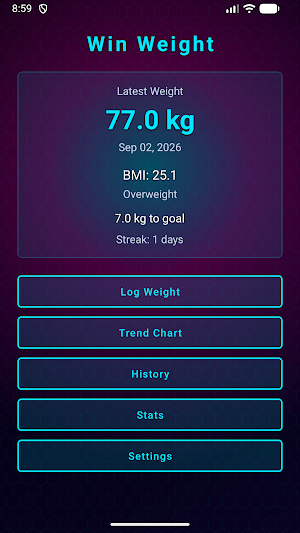
The home screen in Tipico shows your latest recorded weight and entry date. When height is set in settings, BMI and its category appear on the dashboard. If you define a goal weight, Tipico shows how much remains to reach it or displays a goal reached message. A streak counter shows consecutive days with logged entries. The dashboard refreshes each time you return to the home screen.
✏️ LOG WEIGHT
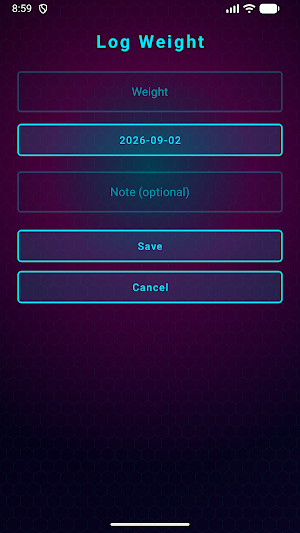
Add an entry in Tipico in a few taps. Enter weight in kilograms or pounds, select a date with the date picker, and add an optional note for context such as morning reading or post-activity check. Future dates are blocked, and values are validated within supported ranges. Edit any previous entry from the history screen to update weight, date, or note.
📈 TREND CHART
The trend chart in Tipico supports 7-day, 30-day, and 90-day views. It draws your weight line with neon styling, marks data points, shows grid lines and date labels, overlays a dashed goal line when a goal is set, and displays total weight change for the selected period. Switch periods anytime to compare short-term shifts with longer trends as you go.
📋 HISTORY
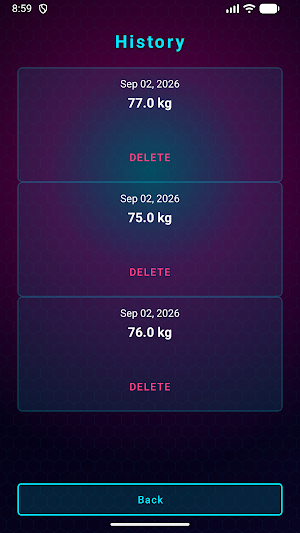
The history screen lists every weight entry in order. Each row shows value, date, and note. Edit an entry to update details or delete it after confirmation. If no entries exist, Tipico prompts you to log your first weight.
📉 STATISTICS
The stats screen in Tipico shows weekly and monthly averages, minimum and maximum recorded weights, total change from first to latest entry, a seven-day moving average, number of days logged, and total entry count. These metrics help you see patterns beyond single daily readings.
🎯 GOAL AND BMI
Set a goal weight in settings and Tipico shows remaining distance on the home screen. Enter height in centimeters to calculate BMI from your latest weight. Categories shown are Underweight, Normal, Overweight, and Obese. BMI in Tipico is for general information only and is not medical advice.
⚙️ SETTINGS
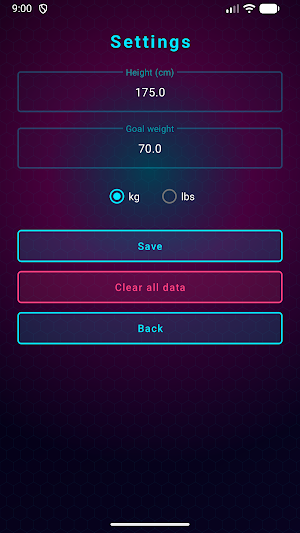
Tipico lets you choose kilograms or pounds for weight display and input. Save height and goal weight anytime. Clear all weight entries with confirmation; height, goal and unit settings stay saved.
🔥 STREAKS
Tipico tracks consecutive calendar days with at least one logged entry, counting backwards from today. The streak is shown on the home dashboard to support consistent logging habits.
🎨 NEON DESIGN
Screens in Tipico use a cyberpunk-inspired look with glowing accents, gradient backgrounds, and high-contrast text. Buttons are large and touch-friendly for comfortable mobile use. Cards and charts use cyan and magenta tones on dark surfaces.
🔒 LOCAL STORAGE
Weight entries are stored in a local database on your device. Height, goal and unit settings are saved locally through app preferences. Logging, charts, history and statistics work without an internet connection once the app is installed.
🚀 GET STARTED
Open Tipico, log your first weight, set height and goal, and review the trend chart as your records grow. Tipico turns daily weigh-ins into a clear view of your personal progress over time. Use Tipico to build a private weight log that you can review anytime.
Tipico is a weight logging app that helps you record measurements over time and review progress through numbers, charts, and summaries. For daily tracking and personal goals, Tipico keeps your records organized on your phone.
📊 HOME DASHBOARD
The home screen in Tipico shows your latest recorded weight and entry date. When height is set in settings, BMI and its category appear on the dashboard. If you define a goal weight, Tipico shows how much remains to reach it or displays a goal reached message. A streak counter shows consecutive days with logged entries. The dashboard refreshes each time you return to the home screen.
✏️ LOG WEIGHT
Add an entry in Tipico in a few taps. Enter weight in kilograms or pounds, select a date with the date picker, and add an optional note for context such as morning reading or post-activity check. Future dates are blocked, and values are validated within supported ranges. Edit any previous entry from the history screen to update weight, date, or note.
📈 TREND CHART
The trend chart in Tipico supports 7-day, 30-day, and 90-day views. It draws your weight line with neon styling, marks data points, shows grid lines and date labels, overlays a dashed goal line when a goal is set, and displays total weight change for the selected period. Switch periods anytime to compare short-term shifts with longer trends as you go.
📋 HISTORY
The history screen lists every weight entry in order. Each row shows value, date, and note. Edit an entry to update details or delete it after confirmation. If no entries exist, Tipico prompts you to log your first weight.
📉 STATISTICS
The stats screen in Tipico shows weekly and monthly averages, minimum and maximum recorded weights, total change from first to latest entry, a seven-day moving average, number of days logged, and total entry count. These metrics help you see patterns beyond single daily readings.
🎯 GOAL AND BMI
Set a goal weight in settings and Tipico shows remaining distance on the home screen. Enter height in centimeters to calculate BMI from your latest weight. Categories shown are Underweight, Normal, Overweight, and Obese. BMI in Tipico is for general information only and is not medical advice.
⚙️ SETTINGS
Tipico lets you choose kilograms or pounds for weight display and input. Save height and goal weight anytime. Clear all weight entries with confirmation; height, goal and unit settings stay saved.
🔥 STREAKS
Tipico tracks consecutive calendar days with at least one logged entry, counting backwards from today. The streak is shown on the home dashboard to support consistent logging habits.
🎨 NEON DESIGN
Screens in Tipico use a cyberpunk-inspired look with glowing accents, gradient backgrounds, and high-contrast text. Buttons are large and touch-friendly for comfortable mobile use. Cards and charts use cyan and magenta tones on dark surfaces.
🔒 LOCAL STORAGE
Weight entries are stored in a local database on your device. Height, goal and unit settings are saved locally through app preferences. Logging, charts, history and statistics work without an internet connection once the app is installed.
🚀 GET STARTED
Open Tipico, log your first weight, set height and goal, and review the trend chart as your records grow. Tipico turns daily weigh-ins into a clear view of your personal progress over time. Use Tipico to build a private weight log that you can review anytime.
Alternatives to Tipico
Looking for apps like Tipico? Here are 6 similar Android apps on Google Play. All of them are free to download.






| App | Rating | Price | Installs | Last updated | Compare |
|---|---|---|---|---|---|
| Tipico | – | Free | 0+ | Sep 2, 2026 | |
| STS | – | Free | 1+ | Sep 7, 2026 | Compare |
| Stake Casino | – | Free | 0+ | Sep 7, 2026 | Compare |
| SynotTip | – | Free | 1+ | Sep 7, 2026 | Compare |
| Winline | – | Free | 0+ | Sep 5, 2026 | Compare |
| Win Nmbr | – | Free | 0+ | – | Compare |
| Mojabet | – | Free | 5+ | Sep 4, 2026 | Compare |
Compare Tipico with the top alternatives: ratings, updates, ASO score and keyword gaps →