
Widget for Coda
Xperiense Productivity
Put your Coda tables on your home screen — view, add, edit & complete rows.
- Downloads
- 10+
- on Google Play
- Price
- $8.99
- No in-app purchases
- Updated
- Jul 31
- 2026 · v1.2.1
Screenshots


About Widget for Coda
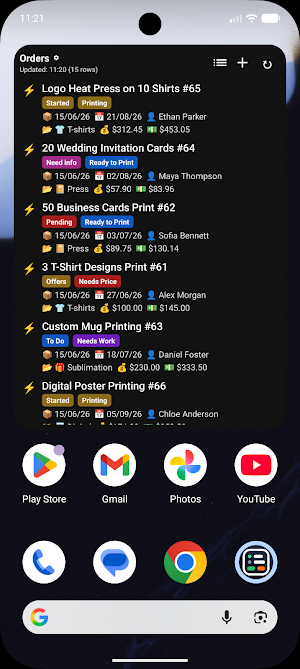
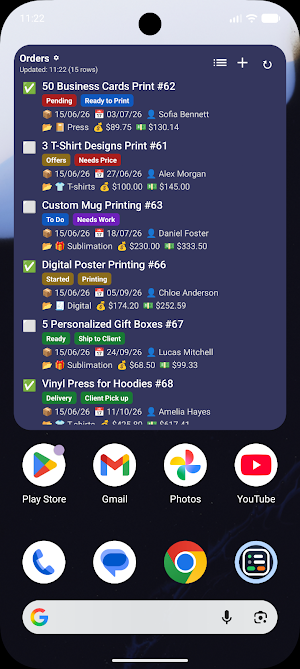
Stop digging through browser tabs. Widget for Coda brings any table out of your Coda doc and onto your home screen — then lets you view, complete, add and edit rows from a fast, native app.
THE ONLY HOME-SCREEN WIDGET FOR CODA
Pin any Coda table to your home screen. It's resizable, always current, and stays in sync in the background. Nothing else puts your doc where you actually look a hundred times a day.
A FULL IN-APP CLIENT, TOO
Behind the widget is a complete native app:
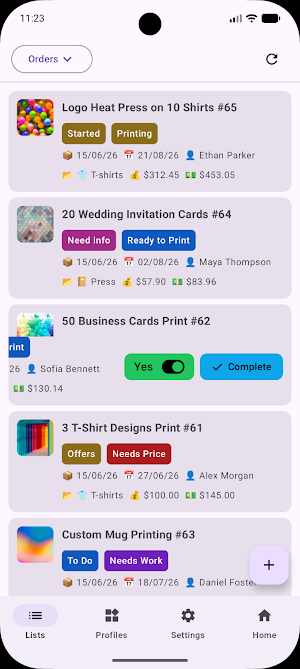
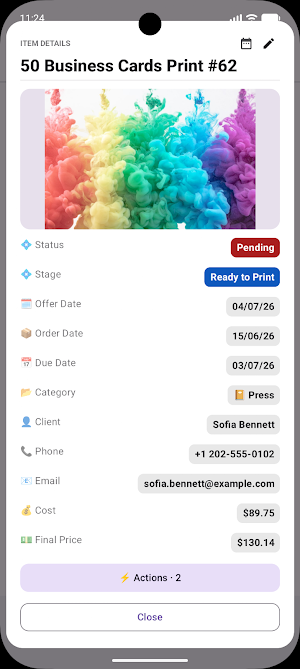
• Browse every row in a fast list that mirrors your widget's layout.
• Add new rows and edit fields — text, numbers, dates, selects and relations — without opening Coda.
• Tap to run your Coda buttons (mark done, snooze, archive) straight from a row, and optionally hide completed items.
• Link related rows with a proper picker, including reverse relations.
MAKE IT YOURS
Colors, palettes, light/dark/system themes, fonts, field order, icons, action buttons, and list-or-grid views. Create multiple profiles with different tables, tokens and looks, and run several widgets at once.
BACKUP & RESTORE
Export your whole setup to a file and import it on a new phone in seconds. Your configuration travels with you.
PRIVATE BY DESIGN
Your API token and your table data stay on your device and talk only to Coda's official API over HTTPS. No analytics, no ads, and no servers of ours — we never receive your data.
PAY ONCE
A one-time purchase with free updates. No subscription, ever. No account to create with us.
HOW IT WORKS
1. Connect — paste a Coda API token (free to generate in your Coda account settings) and pick the doc and table you care about.
2. Shape it — choose which columns and buttons show, set the order, and dial in the look.
3. Pin it — drop the widget on your home screen. Your table is now one glance away.
Works with free Coda plans. You only need a Coda account and an API token.
Widget for Coda is an independent, third-party application. It is not created by, affiliated with, endorsed by, or sponsored by Coda. "Coda" is a trademark of its respective owner.
THE ONLY HOME-SCREEN WIDGET FOR CODA
Pin any Coda table to your home screen. It's resizable, always current, and stays in sync in the background. Nothing else puts your doc where you actually look a hundred times a day.
A FULL IN-APP CLIENT, TOO
Behind the widget is a complete native app:
• Browse every row in a fast list that mirrors your widget's layout.
• Add new rows and edit fields — text, numbers, dates, selects and relations — without opening Coda.
• Tap to run your Coda buttons (mark done, snooze, archive) straight from a row, and optionally hide completed items.
• Link related rows with a proper picker, including reverse relations.
MAKE IT YOURS
Colors, palettes, light/dark/system themes, fonts, field order, icons, action buttons, and list-or-grid views. Create multiple profiles with different tables, tokens and looks, and run several widgets at once.
BACKUP & RESTORE
Export your whole setup to a file and import it on a new phone in seconds. Your configuration travels with you.
PRIVATE BY DESIGN
Your API token and your table data stay on your device and talk only to Coda's official API over HTTPS. No analytics, no ads, and no servers of ours — we never receive your data.
PAY ONCE
A one-time purchase with free updates. No subscription, ever. No account to create with us.
HOW IT WORKS
1. Connect — paste a Coda API token (free to generate in your Coda account settings) and pick the doc and table you care about.
2. Shape it — choose which columns and buttons show, set the order, and dial in the look.
3. Pin it — drop the widget on your home screen. Your table is now one glance away.
Works with free Coda plans. You only need a Coda account and an API token.
Widget for Coda is an independent, third-party application. It is not created by, affiliated with, endorsed by, or sponsored by Coda. "Coda" is a trademark of its respective owner.
What’s new
Version 1.2.1 · Updated July 31, 2026
Initial Public Release with Dynamic Columns.
Alternatives to Widget for Coda
Looking for apps like Widget for Coda? Here are 6 similar Android apps on Google Play. All of them are free to download.





| App | Rating | Price | Installs | Last updated | Compare |
|---|---|---|---|---|---|
| Widget for Coda | – | $8.99 | 10+ | Jul 31, 2026 | |
| GEHU PBL Portal | – | Free | 10+ | Sep 25, 2026 | Compare |
| Note App | – | Free | 0+ | – | Compare |
| GoldRoom | – | Free | 10+ | – | Compare |
| Unburden: Family Organizer | – | Free | 1+ | Oct 12, 2026 | Compare |
| Sentria | – | Free | 10+ | – | Compare |
| OMMON: Hotspot | – | Free | 10+ | Jul 16, 2026 | Compare |
Compare Widget for Coda with the top alternatives: ratings, updates, ASO score and keyword gaps →
Similar apps on Google Play
- GEHU PBL Portal
- Note App
- GoldRoom
- Unburden: Family Organizer
- Sentria
- OMMON: Hotspot
- LLypses
- Urai
- Choice Tray
- INTER@ctive
- Edit PDF: Scan, Annotate & AI
- QuickLLM - AI Model Manager
- PerformaSuite Workforce
- Uniprog Alarm
- Slofy - Less Screentime
- FM360
- AI Document Reader & Scanner
- MagicSlides App
- LA CAGOLE
- Data Masking
- All Around Plumbing
- SnapSolve: AI Fixer
- SyncLyst
- León Enlace 360
- Journal Diary: Mood Tracker