
MeshVault Mobile
Sonny Gilbert Productivity In-app purchases
Download, organise, preview 3d model files, share the library from you phone.
- Downloads
- 332+
- on Google Play
- Price
- Free
- In-app purchases
- Updated
- Oct 19
- 2026 · v2.4.1792412605
Screenshots


About MeshVault Mobile
MeshVault is a free, ad-free, local-first 3D model library for Android. Browse model repositories, preserve useful metadata, preview files, organize your collection, and transfer models to MeshVault PC.
Browse → Download → Preview → Organise → Transfer
Your 3D Library, Mobile & Local
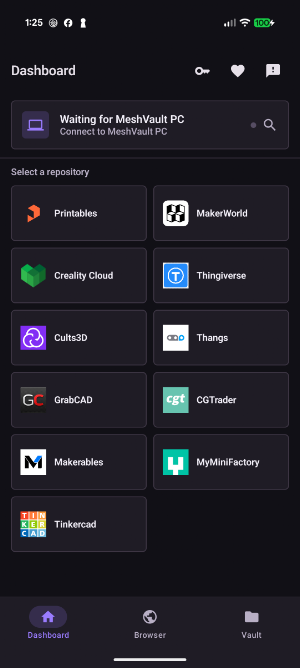
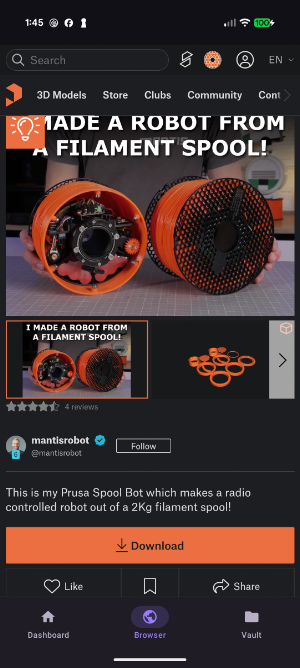
Browse popular 3D model sites directly inside MeshVault and download models wherever you are. When supported, MeshVault captures titles, authors, descriptions, tags, source links, thumbnails, and additional images so your downloads remain recognizable and useful later.
Supported model sites
• Printables
• MakerWorld
• Creality Cloud
• Thingiverse
• Cults3D
• Thangs
• GrabCAD
• CGTrader
• Makerables
• MyMiniFactory
• Tinkercad
Preview Models Before You Print
Inspect supported files with the built-in viewer before moving them into your printing workflow. Preview performance depends on your device and file size.
Supported previews
• 3D models: STL, OBJ, 3MF, STEP, STP, PLY, FBX, DAE, GLB and GLTF
• G-code: Preview layers and toolpaths
• Packages: Inspect archives and preview compatible models stored inside
Organize Your Vault
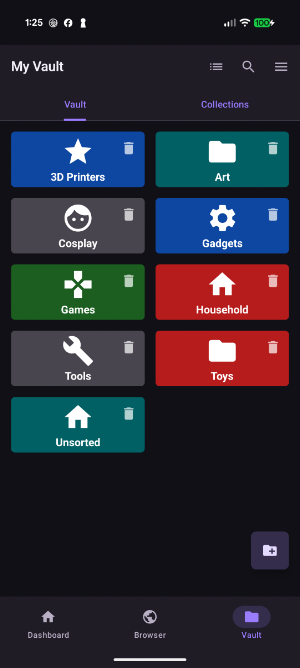
Turn scattered downloads into a visual, searchable library stored on your own device.
• Import existing model files, folders, and archives
• Organize models using folders and tags
• Edit titles, descriptions, source links, and other details
• Keep thumbnails and additional images where available
• Index many common 3D, CAD, slicer, and archive formats
Connect to MeshVault PC
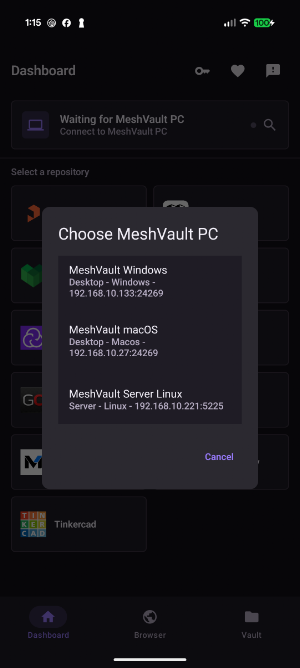
MeshVault for Android is part of the wider MeshVault ecosystem. Connect to MeshVault PC over your local network to:
• Send individual models or larger library transfers to your PC
• Preserve model metadata and images during transfer
• Route new mobile downloads directly to MeshVault for review
• Browse your remote MeshVault library from your phone
• Send compatible models through MeshVault PC to your configured slicer
Local Web Server
Start the built-in Wi-Fi server whenever you want to browse your phone library from another device on your local network. View model details, explore folders, and download files without cables or cloud storage.
Private, Portable and Ad-Free
MeshVault for Android is entirely free and contains no advertising. Your library is stored locally in your selected MeshVault folder, keeping your files portable and under your control. Optional donations help support continued development but never restrict app features.
Keep your 3D printing workflow moving:
Find models anywhere, preserve their metadata, organize them locally, preview supported files, and transfer everything to MeshVault PC when you are ready.
Browse → Download → Preview → Organise → Transfer
Your 3D Library, Mobile & Local
Browse popular 3D model sites directly inside MeshVault and download models wherever you are. When supported, MeshVault captures titles, authors, descriptions, tags, source links, thumbnails, and additional images so your downloads remain recognizable and useful later.
Supported model sites
• Printables
• MakerWorld
• Creality Cloud
• Thingiverse
• Cults3D
• Thangs
• GrabCAD
• CGTrader
• Makerables
• MyMiniFactory
• Tinkercad
Preview Models Before You Print
Inspect supported files with the built-in viewer before moving them into your printing workflow. Preview performance depends on your device and file size.
Supported previews
• 3D models: STL, OBJ, 3MF, STEP, STP, PLY, FBX, DAE, GLB and GLTF
• G-code: Preview layers and toolpaths
• Packages: Inspect archives and preview compatible models stored inside
Organize Your Vault
Turn scattered downloads into a visual, searchable library stored on your own device.
• Import existing model files, folders, and archives
• Organize models using folders and tags
• Edit titles, descriptions, source links, and other details
• Keep thumbnails and additional images where available
• Index many common 3D, CAD, slicer, and archive formats
Connect to MeshVault PC
MeshVault for Android is part of the wider MeshVault ecosystem. Connect to MeshVault PC over your local network to:
• Send individual models or larger library transfers to your PC
• Preserve model metadata and images during transfer
• Route new mobile downloads directly to MeshVault for review
• Browse your remote MeshVault library from your phone
• Send compatible models through MeshVault PC to your configured slicer
Local Web Server
Start the built-in Wi-Fi server whenever you want to browse your phone library from another device on your local network. View model details, explore folders, and download files without cables or cloud storage.
Private, Portable and Ad-Free
MeshVault for Android is entirely free and contains no advertising. Your library is stored locally in your selected MeshVault folder, keeping your files portable and under your control. Optional donations help support continued development but never restrict app features.
Keep your 3D printing workflow moving:
Find models anywhere, preserve their metadata, organize them locally, preview supported files, and transfer everything to MeshVault PC when you are ready.
Alternatives to MeshVault Mobile
Looking for apps like MeshVault Mobile? Here are 6 similar Android apps on Google Play. 5 of the 6 are free to download.
-
Green Energy IoT
-
notifyAI: Notification Manager
-
LifeOS: Agenda, Hábitos e Foco
-
Smart Door
-
MPDA Employees
-
ParaPlan
| App | Rating | Price | Installs | Last updated | Compare |
|---|---|---|---|---|---|
| MeshVault Mobile | – | Free | 100+ | Oct 19, 2026 | |
| Green Energy IoT | – | Free | 10+ | Nov 24, 2022 | Compare |
| notifyAI: Notification Manager | – | 4.99 USD | 100+ | Aug 14, 2026 | Compare |
| LifeOS: Agenda, Hábitos e Foco | – | Free | 10+ | – | Compare |
| Smart Door | – | Free | 10+ | – | Compare |
| MPDA Employees | – | Free | 1+ | Aug 5, 2026 | Compare |
| ParaPlan | – | Free | 10+ | – | Compare |
Compare MeshVault Mobile with the top alternatives: ratings, updates, ASO score and keyword gaps →
Similar apps on Google Play
- Green Energy IoT
- notifyAI: Notification Manager
- LifeOS: Agenda, Hábitos e Foco
- Smart Door
- MPDA Employees
- ParaPlan
- TASTEit: Review & Rating
- Dunly by Rooche Digital
- Power Time
- Boat Maintenance – BoatReady
- PDF Document Scanner
- KinLife: Smart Family Planner
- Chat C&M
- Keen Owner
- EasyHermes
- SyncMyFiles - Autosync App
- Patikas
- Use AI - AI Chat Assistant
- GBR Star
- PageCraft
- Spensa
- Reach Church Management
- VoiceSkip - Speech to Text
- ConsumersCU Events
- STT.ai: AI Transcription