About PDF Document Scanner
PDF Document Scanner turns your phone camera into a portable document scanner. Capture any document — receipts, contracts, notes, whiteboards — and export a clean, flat PDF in seconds.
HOW IT WORKS
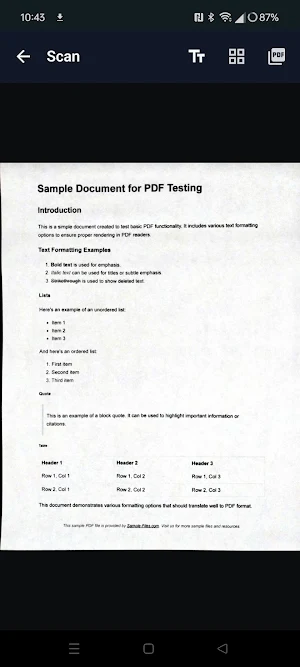
Point your camera at a document and PDF Document Scanner automatically detects the edges and corrects the perspective, so every page comes out flat and straight. Add as many pages as you want, arrange them, then export the whole document as a PDF.
FEATURES
📷 Live Camera Scanning
Capture documents instantly using your device camera. The live viewfinder shows you exactly what you're scanning so you can frame the shot perfectly before capturing.
📐 Automatic Edge Detection & Perspective Correction
The scanner automatically detects the document edges and applies a perspective transform so the final image looks flat — no more trapezoidal distortion from shooting at an angle.
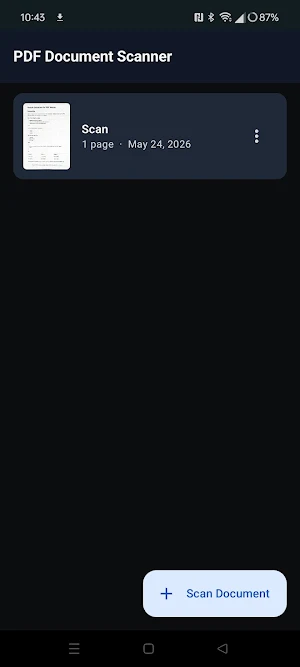
📄 Multi-Page Documents
Scan multiple pages into a single document. Rearrange or delete individual pages in the page manager before exporting.
📤 PDF Export
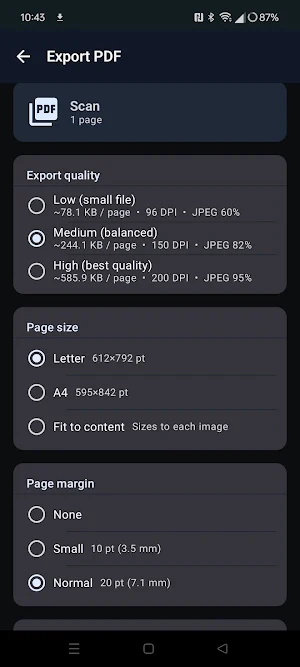
Export any document as a standard PDF. Save it directly to your Downloads folder for easy access via the file manager, email, or any other app.
🔍 Pinch-to-Zoom Preview
Review each page at full resolution using pinch-to-zoom before exporting. Zoom in to check sharpness and framing.
🔒 Fully On-Device
All scanning, edge detection, perspective correction, and PDF rendering is done locally on your device using pure Kotlin — no images or documents are ever sent to a server.
⭐ Pro — Unlock Premium Features
Upgrade to Pro with a single one-time purchase (no subscription) to unlock:
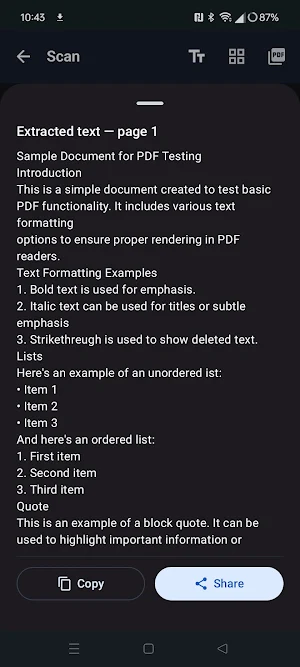
• Offline OCR — Extract text from scanned documents entirely on-device with no internet connection required.
• PDF Compression — Shrink exported file sizes by up to 80% with no visible quality loss.
• High-Quality Export — Export at 200 DPI with maximum JPEG fidelity.
• Remove Ads — Enjoy a clean, distraction-free scanning experience.
PDF Document Scanner details
PDF Document Scanner is a free Productivity app for Android with 1+ installs on Google Play. It was released on May 24, 2026 and last updated on August 20, 2026. It's developed by Kronware. It requires Android 8.0 or later. The app contains ads and offers in-app purchases.
- Category
- Productivity
- Installs
- 1+
- Price
- Free
- In-app purchases
- Yes
- Ads
- Contains ads
- Current version
- 1.0.29
- Requires Android
- 8.0
- Content rating
- Everyone
- Released
- May 24, 2026
- Last updated
- August 20, 2026
- Developer
- Kronware
Alternatives to PDF Document Scanner
Looking for apps like PDF Document Scanner? Here are 5 similar Android apps on Google Play. All of them are free to download.
VaultSeal: Encrypted Vault
Zero-knowledge offline encrypted vault for photos, videos, files and notes.

BlurCut: Censor & Video Editor
Video editor with automatic face censoring, effects & Pro-ready AI tools.

Vidlr: Video Downloader
Browser/Video Downloader. Detect, save & manage MP4 and HLS streams.
QRScan: Barcode & QR Scanner
Fast QR code scanner with history, image scanning, and optional ad-free Pro mode
Media Shredder: Secure Delete
Securely destroy photos & videos with 3-pass overwrite — not just delete.
| App | Rating | Price | Installs | Last updated |
|---|---|---|---|---|
| PDF Document Scanner | – | Free | 1+ | Aug 20, 2026 |
| VaultSeal: Encrypted Vault | – | Free | 5+ | Sep 23, 2026 |
| BlurCut: Censor & Video Editor | – | Free | 50+ | Sep 21, 2026 |
| Vidlr: Video Downloader | – | Free | 100+ | Sep 13, 2026 |
| QRScan: Barcode & QR Scanner | – | Free | 10+ | Aug 19, 2026 |
| Media Shredder: Secure Delete | – | Free | 50+ | Sep 12, 2026 |

