
Cloud Music
Music & Audio In-app purchases Contains ads
Cloud Music Player
- Downloads
- 177+
- on Google Play
- Price
- Free
- In-app purchases
- Updated
- Apr 23
- 2026 · v1.0.2.1
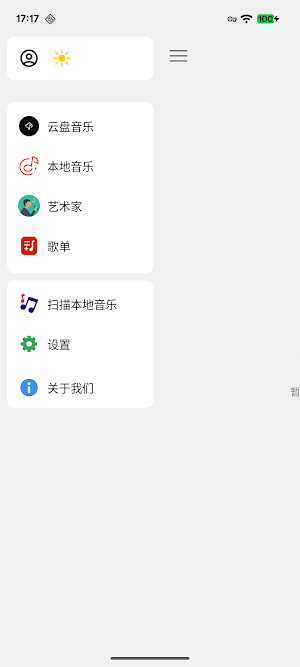
Screenshots

About Cloud Music
I. Core Functions and Experience
1. A Massive Music Library, Listen at Will
• A vast collection of licensed music resources, covering various genres including pop, rock, classical, electronic, and folk, satisfying all your listening needs.
• Supports lossless and Hi-Res audio playback, bringing you the ultimate auditory experience.
2. Powerful Cloud Sync and Storage
• Cloud Drive Function: Supports uploading local music files to the cloud, permanently storing your private music assets.
• Multi-Device Sync: No matter which device you switch to (phone, tablet), your playlists, playback history, and music files will be instantly synchronized, seamlessly switching between them.
II. Music Playback and Management
1. Intelligent Playback System
• Synchronized Lyrics Display: Accurate lyrics synchronization down to the word level, supporting karaoke mode and translated lyrics display.
• Timed Stop Playback: Bedtime mode, automatically stops music at a set time.
• Multiple Playback Modes: Sequential playback, playlist loop, single track loop, shuffle playback.
2. Professional Music Library Management
• Personalized Playlist Creation: Easily create, edit, and share your own personalized music playlists.
• One-Click Collection/Download: Quickly collect your favorite songs and albums, supporting batch downloads to your local device for offline listening.
• Automatic Categorization and Organization: Automatically recognizes the ID3 tags of music files, clearly managing your music by artist, album, folder, and other dimensions.
III. Discovery and Personalized Recommendations
1. Daily Personalized Recommendations
• Based on intelligent algorithms, recommending songs, playlists, and new albums that best suit your taste daily based on your listening history and collection preferences.
2. Real-Time Updated Hot Charts
• Provides music charts from various dimensions, including global, regional, and genre-based rankings, keeping you up-to-date with the latest and hottest music trends.
3. Artist Profiles and Album Details
• Provides detailed artist introductions, all albums, popular singles, and other information, allowing you to learn more about your favorite musicians.
IV. Advanced Features
1. Format Compatibility
• Supports playback of mainstream audio formats such as MP3, AAC, FLAC, OGG, and WAV.
2. Simple and Easy-to-Use Interface
• Adopts a modern design language, with a beautiful and elegant interface, intuitive and convenient operation logic, and provides a smooth user experience.
3. Resource Sharing
• Supports sharing your favorite songs and playlists to mainstream social media platforms.
1. A Massive Music Library, Listen at Will
• A vast collection of licensed music resources, covering various genres including pop, rock, classical, electronic, and folk, satisfying all your listening needs.
• Supports lossless and Hi-Res audio playback, bringing you the ultimate auditory experience.
2. Powerful Cloud Sync and Storage
• Cloud Drive Function: Supports uploading local music files to the cloud, permanently storing your private music assets.
• Multi-Device Sync: No matter which device you switch to (phone, tablet), your playlists, playback history, and music files will be instantly synchronized, seamlessly switching between them.
II. Music Playback and Management
1. Intelligent Playback System
• Synchronized Lyrics Display: Accurate lyrics synchronization down to the word level, supporting karaoke mode and translated lyrics display.
• Timed Stop Playback: Bedtime mode, automatically stops music at a set time.
• Multiple Playback Modes: Sequential playback, playlist loop, single track loop, shuffle playback.
2. Professional Music Library Management
• Personalized Playlist Creation: Easily create, edit, and share your own personalized music playlists.
• One-Click Collection/Download: Quickly collect your favorite songs and albums, supporting batch downloads to your local device for offline listening.
• Automatic Categorization and Organization: Automatically recognizes the ID3 tags of music files, clearly managing your music by artist, album, folder, and other dimensions.
III. Discovery and Personalized Recommendations
1. Daily Personalized Recommendations
• Based on intelligent algorithms, recommending songs, playlists, and new albums that best suit your taste daily based on your listening history and collection preferences.
2. Real-Time Updated Hot Charts
• Provides music charts from various dimensions, including global, regional, and genre-based rankings, keeping you up-to-date with the latest and hottest music trends.
3. Artist Profiles and Album Details
• Provides detailed artist introductions, all albums, popular singles, and other information, allowing you to learn more about your favorite musicians.
IV. Advanced Features
1. Format Compatibility
• Supports playback of mainstream audio formats such as MP3, AAC, FLAC, OGG, and WAV.
2. Simple and Easy-to-Use Interface
• Adopts a modern design language, with a beautiful and elegant interface, intuitive and convenient operation logic, and provides a smooth user experience.
3. Resource Sharing
• Supports sharing your favorite songs and playlists to mainstream social media platforms.
What’s new
Version 1.0.2.1 · Updated April 23, 2026
- Improved UI and user experience - Fixed known issues and enhanced stability - Improved overall performance and smoothness
User reviews

Hands down one of the best music apps I've used. Huge library, smooth syncing across my phone and tablet, and no annoying glitches.
Alternatives to Cloud Music
Looking for apps like Cloud Music? Here are 5 similar Android apps on Google Play. All of them are free to download.
-
LocalSignage: Offline Signage
-
SiteReport: Inspection Reports
-
CaptionMeta: EXIF & IPTC
-
GeoLens: Photo Workflow
-
Pixora - Offline Photo AI
| App | Rating | Price | Installs | Last updated | Compare |
|---|---|---|---|---|---|
| Cloud Music | – | Free | 100+ | Apr 23, 2026 | |
| LocalSignage: Offline Signage | – | Free | 50+ | Sep 21, 2026 | Compare |
| SiteReport: Inspection Reports | – | Free | 50+ | Sep 21, 2026 | Compare |
| CaptionMeta: EXIF & IPTC | – | Free | 10+ | – | Compare |
| GeoLens: Photo Workflow | – | Free | 10+ | Jun 7, 2026 | Compare |
| Pixora - Offline Photo AI | – | Free | 100+ | May 13, 2026 | Compare |
Compare Cloud Music with the top alternatives: ratings, updates, ASO score and keyword gaps →