

My Lists
Widgetal Digital LLC Tools
Simple, private checklists. No account, no ads, nothing leaves your device.
- Downloads
- 1+
- on Google Play
- Price
- Free
- No in-app purchases
- Updated
- Aug 25
- 2026 · v1.2
Screenshots


About My Lists
Make a list, add items, check them off. That is the whole idea. There is no account to create, no sign-in, no ads and no tracking — the app does not even ask for internet access.
WHAT YOU CAN DO
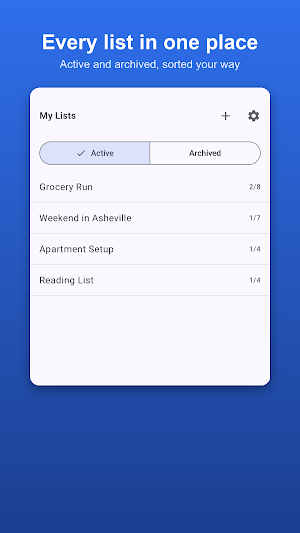
• Keep as many lists as you like, and archive the ones you have finished with instead of deleting them
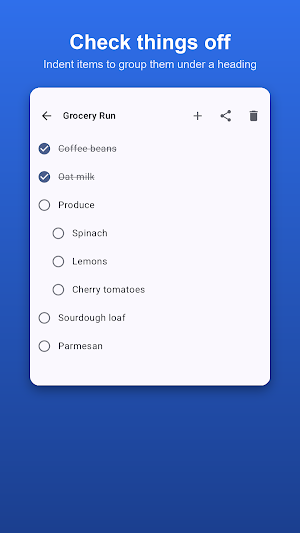
• Check items off, tap one to edit it, and clear everything you have checked in a single step
• Indent items to group them under a heading — aisles in a shop, stops on a trip, rooms in a house
• Reorder by pressing and holding an item, then dragging it where you want it
• Undo any delete, whether it is one item or a whole list
• Export a list as a PDF to print, save or send
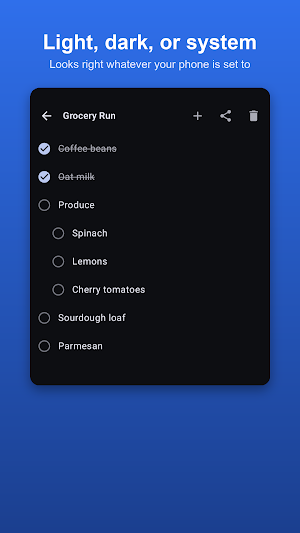
• Light, dark, or follow your phone's setting
• On a tablet, lists and their contents sit side by side
BACKUPS ON YOUR TERMS
My Lists does not take part in Google's automatic backup, so your lists are never copied to your Google account without you asking for it.
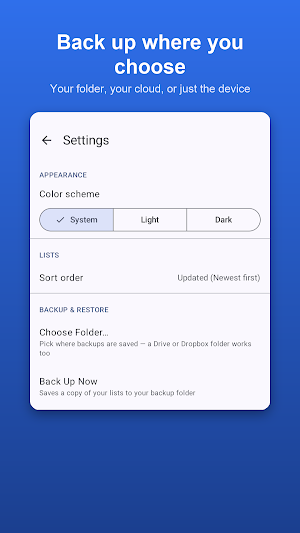
You choose where backups go instead. Pick a folder once — on the device itself, or in a cloud service you already use — and the app saves a snapshot there whenever you tap Back Up Now. Restoring takes a safety copy of your current lists first, so a restore you did not mean to run can be undone.
Backups are ordinary files. You can open, move, copy or delete them yourself, and they are not locked to this app.
Because the app opts out of Google's backup, your lists will not reappear on their own after reinstalling or on a new phone. Backing up is how you carry them across.
COMING FROM AN IPHONE
The iPhone and iPad version (listed on the App Store as myListApp) writes its backups in the same format. Back up on one device, copy the file across, and restore it on the other.
PRIVACY
Anything you create stays on your device unless you back it up, export it or share it, and each of those happens only when you tap it. Nothing is sent to the developer. No analytics, no advertising, no accounts.
What’s new
Version 1.2 · Updated August 25, 2026
First release of My Lists for Android. A simple, private checklist app. No account, no ads, no tracking. What's changed since the last test build: • The app calls itself "My Lists" everywhere now. • My Lists no longer takes part in Google's automatic backup, so your lists are never copied to your Google account.
Alternatives to My Lists
Looking for apps like My Lists? Here are 6 similar Android apps on Google Play. The highest rated is Autosync - File Sync & Backup (4.5/5), and all 6 are free to download.
-
OnePageCRM - Simple CRM System 4.3
-
Nested Folder Notes - Folino 4.2
-
Autosync - File Sync & Backup 4.5
-
2Do - To do List & Reminders 4.1
-
Listok: To do list & Notes 4.1
-
MeisterTask - Task Management 4.3
| App | Rating | Price | Installs | Last updated | Compare |
|---|---|---|---|---|---|
| My Lists | – | Free | 1+ | Aug 25, 2026 | |
| OnePageCRM - Simple CRM System | 4.3 / 5 | Free | 10,000+ | Oct 27, 2026 | Compare |
| Nested Folder Notes - Folino | 4.2 / 5 | Free | 50,000+ | Oct 20, 2026 | Compare |
| Autosync - File Sync & Backup | 4.5 / 5 | Free | 100,000+ | Oct 14, 2026 | Compare |
| 2Do - To do List & Reminders | 4.1 / 5 | Free | 100,000+ | Oct 28, 2026 | Compare |
| Listok: To do list & Notes | 4.1 / 5 | Free | 100,000+ | Aug 18, 2026 | Compare |
| MeisterTask - Task Management | 4.3 / 5 | Free | 1,000,000+ | Aug 4, 2026 | Compare |
Compare My Lists with the top alternatives: ratings, updates, ASO score and keyword gaps →