
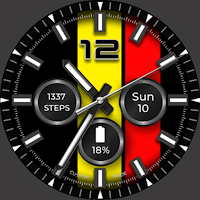
Striped Analog WF Wear OS 4+
Personalization
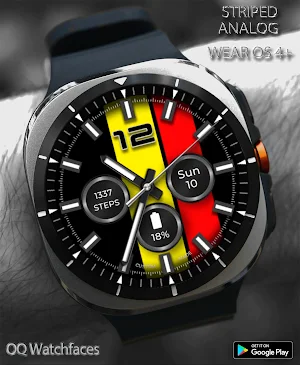
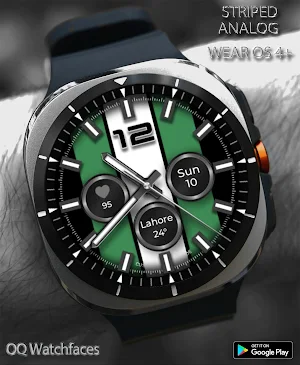
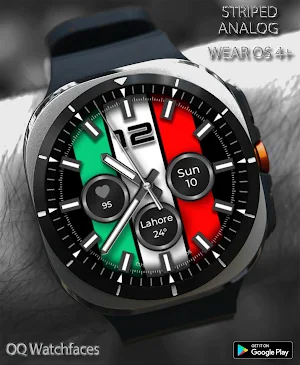
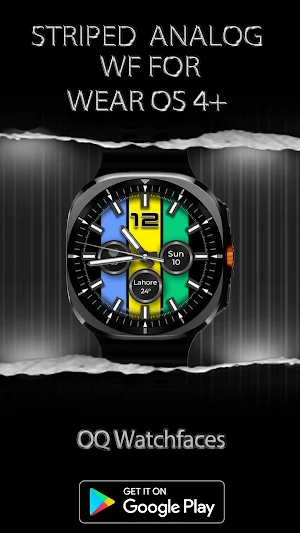
A 3-Stripe highly user customizable colorful stylish Analog Classic Watch face.
- Downloads
- 1.1K+
- on Google Play
- Price
- $1.49
- No in-app purchases
- Updated
- Jul 27
- 2026
Screenshots


About Striped Analog WF Wear OS 4+
=======================================================
NOTICE: READ THIS ALWAYS BEFORE AND AFTER DOWNLOADING OUR WATCH FACE TO AVOID ANY SITUATION YOU DON'T LIKE.
=======================================================
a.This watch face for WEAR OS has been made in latest release Samsung Galaxy Watch face studio V 1.6.10 Stable Version & has been tested on Samsung Watch Ultra , Samsung Watch 4 Classic , Samsung Watch 5 Pro, and Tic watch 5 Pro. It also supports all other wear OS 4+ devices. Some feature experience can be slightly different on other watches.
b. Before you buy this watch face you must know this watch face has more than 9 customization menu options and Customization via Galaxy Wearable Samsung Galaxy Wearable app tends not to behave nice randomly with watch faces made in Samsung Watch Face Studio. This happens irrespective of the watch face developer if the watch face has many Customization Options. So DO NOT buy this watch face if you only are used to do customization via phone.. This bug is for last 4 years and ONLY Samsung can fix Galaxy Wearable App. Stock Watch faces on Samsung Watches are made in Android Studio & NOT Samsung Watch face Studio, so this issue does not exist on them. If you bought it by mistake just email within 24 hours of purchase & you will be refunded 100 percent .
c.Customization via long press on watch face direct never had an issue and works as it should If you need a video testimony of what is said above email at [email protected] .
d. A Big Thanks to Bredlix for source code of new helper app.
Link
https://github.com/bredlix/wf_companion_app
e. An effort also has been made to make a brief install guide as well (an image added with screen previews) .It is the last image in previews of this watch face for new android Wear OS users or those who do not know how to install the watch face to your connected device.
d. DO NOT PAY TWICE FROM WATCH PLAY STORE . Wait for your purchases to be synced or if you do not want to wait you can always select direct install to watch method without even helper app.Just ensure that you select your connected watch in install button drop down menu where your wearable device will be shown.Just simply ensure that when you install from phone play store app.
This watch face for Wear OS has following features:-
1. Each Stripe Left, Center, And Right has 10 x Color Styles each available in customization menu for user to select of own choice.
2. Background underneath complications is customizable and an option to change it has been added in customization menu option of this watchface.
3. Dim Background option has been created and added in customization menu.
4. Tap at 3 o clock hour index bar to open watch phone app.
5. Tap at 9 o clock hour index bar to open watch messaging app.
6. Tap at 4 o clock hour index bar to open watch phone play store app.
7. Tap at 8 o clock hour index bar to open watch Google Maps app.
8. Tap at 5 o clock hour index bar to open watch Alarm app.
9. Tap at 7 o clock hour index bar to open watch music player app.
8. Tap On Date text shown and it will open watch calendar app.
9 . Tap on 12 number text to open watch settings menu.
NOTICE: READ THIS ALWAYS BEFORE AND AFTER DOWNLOADING OUR WATCH FACE TO AVOID ANY SITUATION YOU DON'T LIKE.
=======================================================
a.This watch face for WEAR OS has been made in latest release Samsung Galaxy Watch face studio V 1.6.10 Stable Version & has been tested on Samsung Watch Ultra , Samsung Watch 4 Classic , Samsung Watch 5 Pro, and Tic watch 5 Pro. It also supports all other wear OS 4+ devices. Some feature experience can be slightly different on other watches.
b. Before you buy this watch face you must know this watch face has more than 9 customization menu options and Customization via Galaxy Wearable Samsung Galaxy Wearable app tends not to behave nice randomly with watch faces made in Samsung Watch Face Studio. This happens irrespective of the watch face developer if the watch face has many Customization Options. So DO NOT buy this watch face if you only are used to do customization via phone.. This bug is for last 4 years and ONLY Samsung can fix Galaxy Wearable App. Stock Watch faces on Samsung Watches are made in Android Studio & NOT Samsung Watch face Studio, so this issue does not exist on them. If you bought it by mistake just email within 24 hours of purchase & you will be refunded 100 percent .
c.Customization via long press on watch face direct never had an issue and works as it should If you need a video testimony of what is said above email at [email protected] .
d. A Big Thanks to Bredlix for source code of new helper app.
Link
https://github.com/bredlix/wf_companion_app
e. An effort also has been made to make a brief install guide as well (an image added with screen previews) .It is the last image in previews of this watch face for new android Wear OS users or those who do not know how to install the watch face to your connected device.
d. DO NOT PAY TWICE FROM WATCH PLAY STORE . Wait for your purchases to be synced or if you do not want to wait you can always select direct install to watch method without even helper app.Just ensure that you select your connected watch in install button drop down menu where your wearable device will be shown.Just simply ensure that when you install from phone play store app.
This watch face for Wear OS has following features:-
1. Each Stripe Left, Center, And Right has 10 x Color Styles each available in customization menu for user to select of own choice.
2. Background underneath complications is customizable and an option to change it has been added in customization menu option of this watchface.
3. Dim Background option has been created and added in customization menu.
4. Tap at 3 o clock hour index bar to open watch phone app.
5. Tap at 9 o clock hour index bar to open watch messaging app.
6. Tap at 4 o clock hour index bar to open watch phone play store app.
7. Tap at 8 o clock hour index bar to open watch Google Maps app.
8. Tap at 5 o clock hour index bar to open watch Alarm app.
9. Tap at 7 o clock hour index bar to open watch music player app.
8. Tap On Date text shown and it will open watch calendar app.
9 . Tap on 12 number text to open watch settings menu.
What’s new
Updated July 27, 2026
V1.0.3 Change Log:- 1.Watch face bundle updated to Target min SDK 34 as required by Google with latest Samsung Watch face Studio Version 1.9.5 Sep 2025 Release. 2.New Watch face Companion App updated with latest Google Android Studio Otter 2025.2.2 release.
User reviews

Lovable face ever love it:)

Looks good on Samsung galaxy watch 4
Alternatives to Striped Analog WF Wear OS 4+
Looking for apps like Striped Analog WF Wear OS 4+? Here are 6 similar Android apps on Google Play. The highest rated is Analog Classic 5 Wear OS4 (4.3/5), and all 6 are free to download.
-
Analog Classic 24 Wear OS 4+ 4.0
-
Analog Classic 5 Wear OS4 4.3
-
Gold Classic 1 Wear OS 4+ 4.3
-
Diver 5 Black For Wear OS 4 4.3
-
Digital Gradient WF Wear OS 4+ 4.2
-
Roman Classic Wear OS 4+ 4.1
| App | Rating | Price | Installs | Last updated | Compare |
|---|---|---|---|---|---|
| Striped Analog WF Wear OS 4+ | – | $1.49 | 1,000+ | Jul 27, 2026 | |
| Analog Classic 24 Wear OS 4+ | 4.0 / 5 | Free | 100,000+ | Jul 28, 2026 | Compare |
| Analog Classic 5 Wear OS4 | 4.3 / 5 | Free | 50,000+ | – | Compare |
| Gold Classic 1 Wear OS 4+ | 4.3 / 5 | Free | 100,000+ | Jul 29, 2026 | Compare |
| Diver 5 Black For Wear OS 4 | 4.3 / 5 | Free | 50,000+ | Dec 16, 2025 | Compare |
| Digital Gradient WF Wear OS 4+ | 4.2 / 5 | Free | 100,000+ | Jul 28, 2026 | Compare |
| Roman Classic Wear OS 4+ | 4.1 / 5 | Free | 10,000+ | – | Compare |
Similar apps on Google Play
- Analog Classic 24 Wear OS 4+
- Analog Classic 5 Wear OS4
- Gold Classic 1 Wear OS 4+
- Diver 5 Black For Wear OS 4
- Digital Gradient WF Wear OS 4+
- Roman Classic Wear OS 4+
- Analog Basic 9 Wear OS4
- Analog Basic WF Wear OS 4+
- Analog Classic 12 Wear OS 4+
- Analog Basic 6 EN Wear OS 4+
- Analog Basic 2 for WEAR OS 4
- Digital Basic 1 Wear OS 4+
- Analog Basic 16 Wear OS 4+
- Minimal Basic 2 Wear OS 4+
- Analog Classic 25
- Analog Basic 22 Wear OS 4+
- Minimal Basic 1 For Wear OS 3+
- Text Basic 2 English
- Analog Classic 4 Wear OS
- Diver Classic LE 2 Wear OS 4+
- Extreme Analog 2 Wear OS4+
- Analog Basic 34 Wear OS 4+
- Striped Analog WF Wear OS 4+
- Chronograph Hybrid Wear OS 4+
- Extreme Analog WF Wear OS 4+
- Retro Analog WF Wear OS 4+
- Analog Basic 32 Wear OS 4+
- W6 Field Dark WF Wear OS 4+
- Diver Classic 18B Wear OS4+
- Analog Basic LE Wear OS 4+
- Diver Classic LE Wear OS4
- Analog Basic 31 WF Wear OS 4+
- Diver Classic 18 Wear OS 4
- Big Analog 2 WF For WEAR OS 4+
- Analog Basic 29 Wear OS 4+
- Diver Classic 17 Wear OS 4+
- Analog Basic 30 For Wear OS 4+
- Diver Classic 16 Wear OS 4+
- Animated Analog For Wear OS 3+
- Analog Basic 28 Wear OS 4+
- Big Analog Bright WEAR OS 4+
- Analog Basic 26 Wear OS 4+
- Big Analog WF WEAR OS 4+
- Diver Classic 15
- Combat Field WF Wear OS 4+
- Diver Classic 14 Wear OS 4+
- Analog Basic 25 Wear OS 4+
- Analog Classic 23 Wear OS 4+
- Analog Basic 24 Wear OS 4+
- Analog Classic 21 Wear OS 4+
- Analog Classic 20 Wear OS 4+
- W6 Field Watch Face Wear OS 4+
- W6 Dark Style Wear OS 4+
- Diver Classic 13 Wear OS 4+
- Analog Basic 23 WEAR OS 4+
- W6 Gradient Style Wear OS 4+
- W6 Style WF Wear OS 4+
- Diver Classic 12 For Wear OS
- 24H ONLY Analog WF Wear OS 4+
- Diver Classic 8 Blk Wear OS 4+
- Diver Classic 11 Wear OS 4+
- Diver Classic 10 Wear OS 4+
- Diver Classic 9 Wear OS 4+
- Diver Classic 8 Wear OS 4+
- Field Watch 2 Bright Wear OS4+
- Field Watch 2 Wear OS 4+
- Field Watch Wear OS 4+
- Analog Classic 17 Wear OS 4+
- Analog Classic 16 Wear OS 4+
- Analog Classic 15 WEAR OS 4+
- Diver Classic 7 Wear OS 4+
- Analog Basic 21 Wear OS 4+
- Analog Classic 13 Wear OS 4+
- Digital Basic 8C Wear OS 4+
- Digital Basic 8B Wear OS 4+
- Analog Basic 20 Wear OS 4+
- Luminous 3 Dark Wear OS 4+
- Luminous Watchface Wear OS4
- Aviator Classic Wear OS 4+
- Analog Basic 19
- Diver Classic 6 Wear OS 4+
- Analog Basic 18
- Analog Classic 9 Wear OS
- Analog Basic 16C Wear OS 4+
- Diver Classic 5 Wear OS 4+
- Analog Basic 14 Wear OS 4+
- Analog Basic 13 Wear OS 4+
- Analog Basic 12 Wear OS 4+
- Analog Basic 11B Wear OS 4+
- Digital Basic 14 Wear OS 4+
- Analog Basic 10 For WEAR OS 3+
- Analog Basic 11 For WEAR OS 3+
- Digital Basic 13 Wear OS 3+
- Analog Classic 8 For Wear OS 3
- Racer Watchface Animated
- Vintage Diver Classic
- Diver Classic 4 Wear OS 4+
- Diver Classic 3 Wear OS 4+
- Analog Classic 7 Wear OS 4+
- Analog Basic 8
- Text Basic 2B BR Portuguese WF
- Text Basic 3B
- Analog Basic 7 WEAR OS 3+
- Text Basic 2 Br Portuguese WF
- Digital Basic 7B Wear OS 4+
- Aviator's Watchface Wear OS 4+
- Analog Classic 6 Wear OS 4+
- Digital Basic 10B WEAR OS 3+
- Digital Basic 12
- Digital Basic 11
- Text Basic 3 Wear OS
- Digital Basic 10 Wear OS 4+
- Analog Basic 5 Wear OS 4+
- Minimal Basic 4 Just Time
- Analog Basic 4 for WEAR OS 3+
- DB9 Cracked WF For WEAR OS 3+
- Analog Basic 3 for WEAR OS
- Digital Basic 8 Wear OS 4+
- Contour Analog WF Wear OS 4+
- Digital Basic 4B For Wear OS 3
- Digital Basic 7 Wear OS 4+
- Whatever WF For WEAR OS 3+
- Diver Classic 2 Wear OS 4+
- Digital Basic 5B Wear OS 4+
- Digital Basic 5 Wear OS 4+
- Digital Basic 3 WEAR OS 3+
- Digital Basic 4 Wear OS 3
- Digital Basic 3b Wear OS 4+
- Digital Basic 1 12/24H Wear OS
- Digital Basic 2 12/24H
- Analog Classic 1 Wear OS 4+
- Diver Style Classic Watchface