
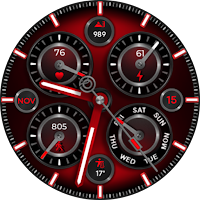
Extreme Analog 2 Wear OS4+
Personalization
Watch face that has many styles and customizations options you will rarely see .
- Downloads
- 500+
- on Google Play
- Price
- $1.49
- No in-app purchases
- Updated
- Jul 27
- 2026
Screenshots
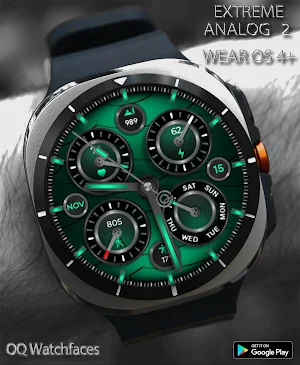
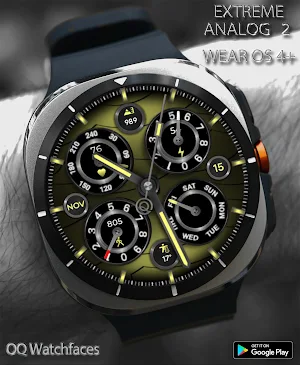
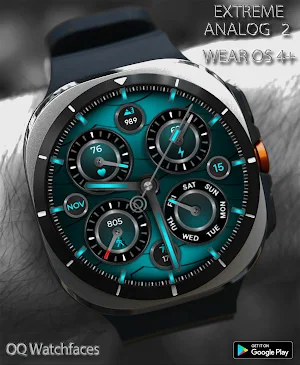
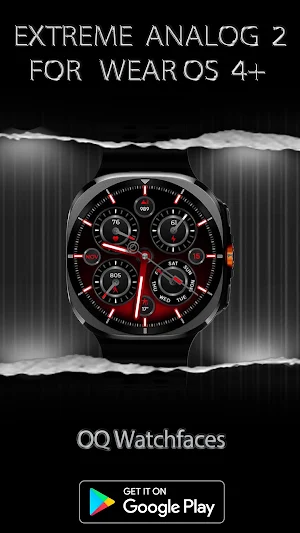


About Extreme Analog 2 Wear OS4+
=======================================================
NOTICE: READ THIS ALWAYS BEFORE AND AFTER DOWNLOADING OUR WATCH FACE TO AVOID ANY SITUATION YOU DON'T LIKE.
=======================================================
a. Before you buy this watch face you must know this watch face has more than 9 customization menu options and Customization via Galaxy Wearable Samsung Galaxy Wearable app tends not to behave nice randomly with watch faces made in Samsung Watch Face Studio that has more than 5 customization options it happens irrespective of the watch face developer if the watch face has many Customization Options.
DO NOT buy this watch face if you only are used to do customization via Galaxy Wearable app. This bug is present for last 4 years in Galaxy Wearable App and ONLY Samsung can fix it. Stock WFs on Samsung Watches are made in Android Studio & NOT Samsung WF Studio, so this issue does not exist on them. If you bought this WF by mistake or just testing and refund button disappeared after default time limitation. Just email within 48 hours of purchase & get a refund from developer's side. Developers have special privileges to refund customers whenever wanted.
This watch face for Wear OS has following features:-
1. Background Styles Options
10x Light based colored Background Styles including default options are available in customization menu both for Main and AoD Display Separately.
2. Shadow On WF Option
On Top of background has been created and added as a customization menu option by default its off and has 2 more settings besides default.
3. Hands Styles Option
has 4 options including default. Please See Screen Preview no 8 on Phone Google Play Store app of this watch face, all 4 types are shown :-
a. 1st & 4th hand styles colored markers on top of base hands are of luminous nature. and their base color is non colored
b. 2nd & 3rd hand styles colored markers on top of base hands are of non luminous nature. and their base color has colored options also.
4. The hours Index Bars Styles Option
have 7 styles. 1st style is default & follows colors shown in colors options in customization menu. All other Hour Index Bar Styles have been created separately and added along with default style as an option in customization menu.
4. Steps, Heart Rate , Days & Battery Chronographs
a. Chronograph Styles Option
10x styles. 1st style is default & follows colors shown in colors options in customization menu. All other Chronograph Styles created separately and added along with default style as an option in customization menu.
b. Chronograph Needles Color Markers
i.Steps Needle & Battery Color Changes at Following percentages:-
0 to 24% Red
25 to 49% Yellow
50 to 74 white
75 to 90 follows theme
90 to 100 green
ii. Heart Rate Marker Colors Change at:-
0 to 60 Yellow.
60 to 100 Green.
100 to 240 Red.
iii. Days Marker All days Stays Colored according to theme color and on Sunday Changes to Yellow.
5. Chronograph Lights Option
This Option turns Colors On/Off inside Both Chronographs where needles and icons are. Options for both Main & AoD are available separately in customization menu.
6. Tap at 5 o clock hour index bar to open watch phone app.
7. Tap at 7 o clock hour index bar to open watch messaging app.
8. Tap at 11 o clock hour index bar to open watch phone play store app.
9. Tap at 1 o clock hour index bar to open watch Google Maps app.
10. Seconds hand can also be turned off/on fro customization menu.
11. Dim Mode For main darkens the background.
12 Dim Mode for AoD is set to maximum power saving. So it works to brighten up the AOD.
13. 6 x customizable complications are also available in customization menu.
14. Tap inside HR Chronometer to open Heart Rate Counter in Samsung Health App. After you take a reading then chronometer will show accordingly whenever you take a reading. It is not live OS that is how Google has implemented it.
NOTICE: READ THIS ALWAYS BEFORE AND AFTER DOWNLOADING OUR WATCH FACE TO AVOID ANY SITUATION YOU DON'T LIKE.
=======================================================
a. Before you buy this watch face you must know this watch face has more than 9 customization menu options and Customization via Galaxy Wearable Samsung Galaxy Wearable app tends not to behave nice randomly with watch faces made in Samsung Watch Face Studio that has more than 5 customization options it happens irrespective of the watch face developer if the watch face has many Customization Options.
DO NOT buy this watch face if you only are used to do customization via Galaxy Wearable app. This bug is present for last 4 years in Galaxy Wearable App and ONLY Samsung can fix it. Stock WFs on Samsung Watches are made in Android Studio & NOT Samsung WF Studio, so this issue does not exist on them. If you bought this WF by mistake or just testing and refund button disappeared after default time limitation. Just email within 48 hours of purchase & get a refund from developer's side. Developers have special privileges to refund customers whenever wanted.
This watch face for Wear OS has following features:-
1. Background Styles Options
10x Light based colored Background Styles including default options are available in customization menu both for Main and AoD Display Separately.
2. Shadow On WF Option
On Top of background has been created and added as a customization menu option by default its off and has 2 more settings besides default.
3. Hands Styles Option
has 4 options including default. Please See Screen Preview no 8 on Phone Google Play Store app of this watch face, all 4 types are shown :-
a. 1st & 4th hand styles colored markers on top of base hands are of luminous nature. and their base color is non colored
b. 2nd & 3rd hand styles colored markers on top of base hands are of non luminous nature. and their base color has colored options also.
4. The hours Index Bars Styles Option
have 7 styles. 1st style is default & follows colors shown in colors options in customization menu. All other Hour Index Bar Styles have been created separately and added along with default style as an option in customization menu.
4. Steps, Heart Rate , Days & Battery Chronographs
a. Chronograph Styles Option
10x styles. 1st style is default & follows colors shown in colors options in customization menu. All other Chronograph Styles created separately and added along with default style as an option in customization menu.
b. Chronograph Needles Color Markers
i.Steps Needle & Battery Color Changes at Following percentages:-
0 to 24% Red
25 to 49% Yellow
50 to 74 white
75 to 90 follows theme
90 to 100 green
ii. Heart Rate Marker Colors Change at:-
0 to 60 Yellow.
60 to 100 Green.
100 to 240 Red.
iii. Days Marker All days Stays Colored according to theme color and on Sunday Changes to Yellow.
5. Chronograph Lights Option
This Option turns Colors On/Off inside Both Chronographs where needles and icons are. Options for both Main & AoD are available separately in customization menu.
6. Tap at 5 o clock hour index bar to open watch phone app.
7. Tap at 7 o clock hour index bar to open watch messaging app.
8. Tap at 11 o clock hour index bar to open watch phone play store app.
9. Tap at 1 o clock hour index bar to open watch Google Maps app.
10. Seconds hand can also be turned off/on fro customization menu.
11. Dim Mode For main darkens the background.
12 Dim Mode for AoD is set to maximum power saving. So it works to brighten up the AOD.
13. 6 x customizable complications are also available in customization menu.
14. Tap inside HR Chronometer to open Heart Rate Counter in Samsung Health App. After you take a reading then chronometer will show accordingly whenever you take a reading. It is not live OS that is how Google has implemented it.
What’s new
Updated July 27, 2026
V1.0.2 Change Log:- 1.Watch face bundle updated to Target min SDK 34 as required by Google with latest Samsung Watch face Studio Version 1.9.5 Sep 2025 Release. 2.Watch face Companion App updated with latest Google Android Studio Otter 2025.2.2 release.
User reviews

Excellent , Developer you simply Rocks

Beautiful and gorgeous face also color schemes is top notch overall 👌 love it.:)
Alternatives to Extreme Analog 2 Wear OS4+
Looking for apps like Extreme Analog 2 Wear OS4+? Here are 6 similar Android apps on Google Play. The highest rated is Digital Basic 1 Wear OS 4+ (4.9/5), and all 6 are free to download.
-
Analog Classic 24 Wear OS 4+ 4.0
-
Gold Classic 1 Wear OS 4+ 4.3
-
Digital Gradient WF Wear OS 4+ 4.2
-
Diver 5 Black For Wear OS 4 4.3
-
Analog Classic 5 Wear OS4 4.3
-
Digital Basic 1 Wear OS 4+ 4.9
| App | Rating | Price | Installs | Last updated | Compare |
|---|---|---|---|---|---|
| Extreme Analog 2 Wear OS4+ | – | $1.49 | 500+ | Jul 27, 2026 | |
| Analog Classic 24 Wear OS 4+ | 4.0 / 5 | Free | 100,000+ | Jul 28, 2026 | Compare |
| Gold Classic 1 Wear OS 4+ | 4.3 / 5 | Free | 100,000+ | Jul 29, 2026 | Compare |
| Digital Gradient WF Wear OS 4+ | 4.2 / 5 | Free | 100,000+ | Jul 28, 2026 | Compare |
| Diver 5 Black For Wear OS 4 | 4.3 / 5 | Free | 50,000+ | Dec 16, 2025 | Compare |
| Analog Classic 5 Wear OS4 | 4.3 / 5 | Free | 50,000+ | – | Compare |
| Digital Basic 1 Wear OS 4+ | 4.9 / 5 | Free | 10,000+ | Jul 28, 2026 | Compare |
Similar apps on Google Play
- Analog Classic 24 Wear OS 4+
- Gold Classic 1 Wear OS 4+
- Digital Gradient WF Wear OS 4+
- Diver 5 Black For Wear OS 4
- Analog Classic 5 Wear OS4
- Digital Basic 1 Wear OS 4+
- Analog Basic 9 Wear OS4
- Roman Classic Wear OS 4+
- Analog Basic WF Wear OS 4+
- Analog Basic 6 EN Wear OS 4+
- Minimal Basic 2 Wear OS 4+
- Analog Classic 25
- Analog Basic 2 for WEAR OS 4
- Big Analog 4 WF Wear OS 4+
- Diver Classic LE 2 Wear OS 4+
- Extreme Analog 2 Wear OS4+
- Analog Basic 34 Wear OS 4+
- Striped Analog WF Wear OS 4+
- Chronograph Hybrid Wear OS 4+
- Extreme Analog WF Wear OS 4+
- Retro Analog WF Wear OS 4+
- Analog Basic 32 Wear OS 4+
- W6 Field Dark WF Wear OS 4+
- Diver Classic 18B Wear OS4+
- Analog Basic LE Wear OS 4+
- Diver Classic LE Wear OS4
- Analog Basic 31 WF Wear OS 4+
- Diver Classic 18 Wear OS 4
- Big Analog 2 WF For WEAR OS 4+
- Analog Basic 29 Wear OS 4+
- Diver Classic 17 Wear OS 4+
- Analog Basic 30 For Wear OS 4+
- Diver Classic 16 Wear OS 4+
- Animated Analog For Wear OS 3+
- Analog Basic 28 Wear OS 4+
- Big Analog Bright WEAR OS 4+
- Analog Basic 26 Wear OS 4+
- Big Analog WF WEAR OS 4+
- Diver Classic 15
- Combat Field WF Wear OS 4+
- Diver Classic 14 Wear OS 4+
- Analog Basic 25 Wear OS 4+
- Analog Classic 23 Wear OS 4+
- Analog Basic 24 Wear OS 4+
- Analog Classic 21 Wear OS 4+
- Analog Classic 20 Wear OS 4+
- W6 Field Watch Face Wear OS 4+
- W6 Dark Style Wear OS 4+
- Diver Classic 13 Wear OS 4+
- Analog Basic 23 WEAR OS 4+
- W6 Gradient Style Wear OS 4+
- W6 Style WF Wear OS 4+
- Diver Classic 12 For Wear OS
- 24H ONLY Analog WF Wear OS 4+
- Analog Basic 22 Wear OS 4+
- Diver Classic 8 Blk Wear OS 4+
- Diver Classic 11 Wear OS 4+
- Diver Classic 10 Wear OS 4+
- Diver Classic 9 Wear OS 4+
- Diver Classic 8 Wear OS 4+
- Field Watch 2 Bright Wear OS4+
- Field Watch 2 Wear OS 4+
- Field Watch Wear OS 4+
- Analog Classic 17 Wear OS 4+
- Analog Classic 12 Wear OS 4+
- Analog Classic 16 Wear OS 4+
- Analog Classic 15 WEAR OS 4+
- Diver Classic 7 Wear OS 4+
- Analog Basic 21 Wear OS 4+
- Analog Classic 13 Wear OS 4+
- Digital Basic 8C Wear OS 4+
- Digital Basic 8B Wear OS 4+
- Analog Basic 20 Wear OS 4+
- Luminous 3 Dark Wear OS 4+
- Luminous Watchface Wear OS4
- Aviator Classic Wear OS 4+
- Analog Basic 19
- Diver Classic 6 Wear OS 4+
- Analog Basic 18
- Analog Classic 9 Wear OS
- Analog Basic 16C Wear OS 4+
- Diver Classic 5 Wear OS 4+
- Analog Basic 16 Wear OS 4+
- Analog Basic 14 Wear OS 4+
- Analog Basic 13 Wear OS 4+
- Analog Basic 12 Wear OS 4+
- Analog Basic 11B Wear OS 4+
- Digital Basic 14 Wear OS 4+
- Analog Basic 10 For WEAR OS 3+
- Analog Basic 11 For WEAR OS 3+
- Digital Basic 13 Wear OS 3+
- Analog Classic 8 For Wear OS 3
- Racer Watchface Animated
- Vintage Diver Classic
- Diver Classic 4 Wear OS 4+
- Diver Classic 3 Wear OS 4+
- Analog Classic 7 Wear OS 4+
- Analog Basic 8
- Text Basic 2B BR Portuguese WF
- Text Basic 3B
- Analog Basic 7 WEAR OS 3+
- Text Basic 2 Br Portuguese WF
- Digital Basic 7B Wear OS 4+
- Aviator's Watchface Wear OS 4+
- Analog Classic 6 Wear OS 4+
- Digital Basic 10B WEAR OS 3+
- Digital Basic 12
- Digital Basic 11
- Text Basic 3 Wear OS
- Digital Basic 10 Wear OS 4+
- Analog Basic 5 Wear OS 4+
- Minimal Basic 4 Just Time
- Analog Basic 4 for WEAR OS 3+
- DB9 Cracked WF For WEAR OS 3+
- Analog Basic 3 for WEAR OS
- Digital Basic 8 Wear OS 4+
- Contour Analog WF Wear OS 4+
- Digital Basic 4B For Wear OS 3
- Digital Basic 7 Wear OS 4+
- Whatever WF For WEAR OS 3+
- Minimal Basic 1 For Wear OS 3+
- Diver Classic 2 Wear OS 4+
- Digital Basic 5B Wear OS 4+
- Digital Basic 5 Wear OS 4+
- Digital Basic 3 WEAR OS 3+
- Digital Basic 4 Wear OS 3
- Digital Basic 3b Wear OS 4+
- Digital Basic 1 12/24H Wear OS
- Text Basic 2 English
- Digital Basic 2 12/24H
- Analog Classic 4 Wear OS
- Analog Classic 1 Wear OS 4+
- Diver Style Classic Watchface