
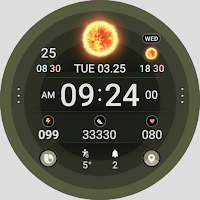
Weather smo502L
Personalization
This is a light version of smo502 with weather-themed animation.
- Downloads
- 246+
- on Google Play
- Price
- $1.49
- No in-app purchases
- Updated
- Aug 11
- 2026 · v1.0.2
Screenshots


About Weather smo502L
This is a watch face that can be used based on WEAR OS 5.
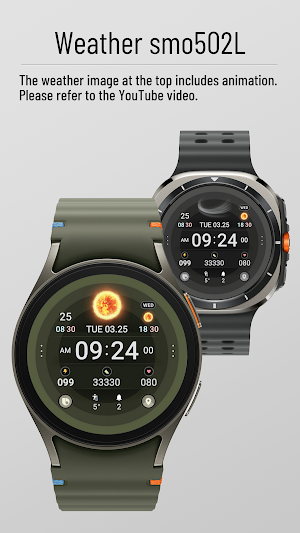
This is a light version of smo502 with a weather theme, and animation is applied to the weather icon.
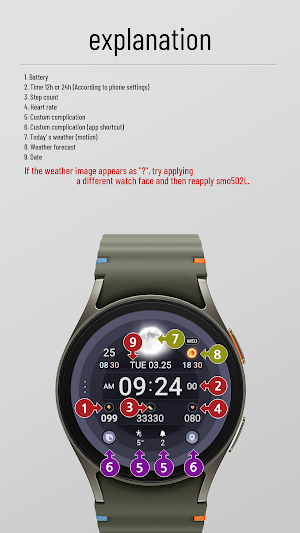
"?" in the weather When the icon appears, press and hold the watch screen to switch to another watch face, then apply it again to smo502L.
Installation method
1. Click the drop-down button next to the install button and select the watch you want to install.
Click the install button and wait until the installation is complete.
2. Activate once installation is complete.
a. To activate it on the watch, press and hold the watch screen and move it to the left to select the watch face.
Add and select the newly installed watch face.
b. To activate on a smartphone, run an app such as (ex) Galaxy Wearable and click at the bottom.
Select ‘Downloaded’ and apply.
You may need to install additional complication apps to use the complication.
All tests were conducted with Samsung Galaxy Watch 4 and Watch 7.
The composition of this watch face is as follows.
• 12h, 24h time settings can be changed (requires changing settings on mobile phone)
• Weather animation, next day weather forecast
• Battery quantity
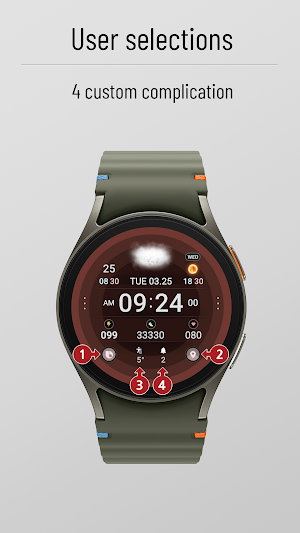
• 4 complications (2 are app shortcuts)
• Number of steps
• Heart rate
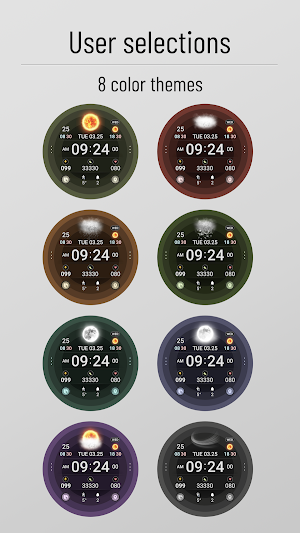
• 8 colors
* Long press on the watch screen > Open custom settings to change the desired configuration.
This is a light version of smo502 with a weather theme, and animation is applied to the weather icon.
"?" in the weather When the icon appears, press and hold the watch screen to switch to another watch face, then apply it again to smo502L.
Installation method
1. Click the drop-down button next to the install button and select the watch you want to install.
Click the install button and wait until the installation is complete.
2. Activate once installation is complete.
a. To activate it on the watch, press and hold the watch screen and move it to the left to select the watch face.
Add and select the newly installed watch face.
b. To activate on a smartphone, run an app such as (ex) Galaxy Wearable and click at the bottom.
Select ‘Downloaded’ and apply.
You may need to install additional complication apps to use the complication.
All tests were conducted with Samsung Galaxy Watch 4 and Watch 7.
The composition of this watch face is as follows.
• 12h, 24h time settings can be changed (requires changing settings on mobile phone)
• Weather animation, next day weather forecast
• Battery quantity
• 4 complications (2 are app shortcuts)
• Number of steps
• Heart rate
• 8 colors
* Long press on the watch screen > Open custom settings to change the desired configuration.
What’s new
Version 1.0.2 · Updated August 11, 2026
API 대응 업데이트
User reviews

Sporty look and polished graphics 👍

Very Nice watch face with fantastic weather animation. I would suggest to remove the outer most circle so that everything gets more space, rihht now everything looks cramped.
Alternatives to Weather smo502L
Looking for apps like Weather smo502L? Here are 6 similar Android apps on Google Play.
-
smo Hybrid Tough101H
-
smo Analog Tough101A
-
Weather smo502
-
Hybrid smo303
-
Digital smo202
-
Weather smo501
| App | Rating | Price | Installs | Last updated | Compare |
|---|---|---|---|---|---|
| Weather smo502L | – | $1.49 | 100+ | Aug 11, 2026 | |
| smo Hybrid Tough101H | – | 1.49 USD | 100+ | Aug 11, 2026 | Compare |
| smo Analog Tough101A | – | 1.49 USD | 100+ | – | Compare |
| Weather smo502 | – | 1.49 USD | 100+ | – | Compare |
| Hybrid smo303 | – | 0.99 USD | 100+ | – | Compare |
| Digital smo202 | – | 1.49 USD | 500+ | – | Compare |
| Weather smo501 | – | 1.49 USD | 100+ | – | Compare |
Compare Weather smo502L with the top alternatives: ratings, updates, ASO score and keyword gaps →