
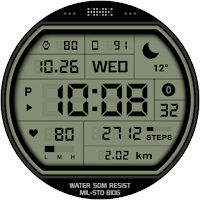
HMKWatch Digi 263
Personalization
Convenient and clear digital watch face
- Rating
- 4.4
- 84 ratings
- Downloads
- 2.6K+
- on Google Play
- Price
- $1.49
- No in-app purchases
- Updated
- Oct 11
- 2026
Screenshots
Save to Pinterest


About HMKWatch Digi 263
*This watch face supports wear OS devices.
* Please install additional apps by referring to 'About this app'.
=======================================================
[How to install]
Make sure your watch is selected first before you press the payment button.
Press the small black triangle next to the Payment button to select the watch.
If you don't follow the above method, you can use Chrome or Samsung browser on your PC or smartphone.
After entering the store with a web browser, click Install on another device to install it on the watch.
After the release of Watch 5, a new UI was applied to Watch 4.
The newly installed watchface can be found in the following ways.
1. Press and hold the watch screen to enter the 'Frequently Used Watch Face List'.
2. Turn it to the rightmost and press 'Add watchface'.
3. Then, enter the 'Installed Watchface List'.
4. Find and select the watch face you purchased.
=======================================================
[Additional installation app]
1. Smart phone battery app (Free app)
Please install the additional app of the link below on the watch and smartphone, and set up the complication.
If the link does not open, please search for the 'Phone Battery Complication' app and install it.
https://play.google.com/store/apps/details?id=com.weartools.phonebattcomp
2. Complications Suite - Wear OS (Free app)
https://play.google.com/store/apps/details?id=com.weartools.weekdayutccomp
3. Heart Rate Complication (Paid app)
https://play.google.com/store/apps/details?id=com.weartools.heartratecomp
4. Health Services Complications (Paid app)
https://play.google.com/store/apps/details?id=com.weartools.hscomplications
All credits goes to original app creator:
amoledwatchfaces - https://play.google.com/store/apps/dev?id=5591589606735981545
=======================================================
Get new news from my Instagram.
www.instagram.com/hmkwatch
Please send me an email if you have any errors or suggestions.
[email protected]
* Please install additional apps by referring to 'About this app'.
=======================================================
[How to install]
Make sure your watch is selected first before you press the payment button.
Press the small black triangle next to the Payment button to select the watch.
If you don't follow the above method, you can use Chrome or Samsung browser on your PC or smartphone.
After entering the store with a web browser, click Install on another device to install it on the watch.
After the release of Watch 5, a new UI was applied to Watch 4.
The newly installed watchface can be found in the following ways.
1. Press and hold the watch screen to enter the 'Frequently Used Watch Face List'.
2. Turn it to the rightmost and press 'Add watchface'.
3. Then, enter the 'Installed Watchface List'.
4. Find and select the watch face you purchased.
=======================================================
[Additional installation app]
1. Smart phone battery app (Free app)
Please install the additional app of the link below on the watch and smartphone, and set up the complication.
If the link does not open, please search for the 'Phone Battery Complication' app and install it.
https://play.google.com/store/apps/details?id=com.weartools.phonebattcomp
2. Complications Suite - Wear OS (Free app)
https://play.google.com/store/apps/details?id=com.weartools.weekdayutccomp
3. Heart Rate Complication (Paid app)
https://play.google.com/store/apps/details?id=com.weartools.heartratecomp
4. Health Services Complications (Paid app)
https://play.google.com/store/apps/details?id=com.weartools.hscomplications
All credits goes to original app creator:
amoledwatchfaces - https://play.google.com/store/apps/dev?id=5591589606735981545
=======================================================
Get new news from my Instagram.
www.instagram.com/hmkwatch
Please send me an email if you have any errors or suggestions.
[email protected]
Alternatives to HMKWatch Digi 263
Looking for apps like HMKWatch Digi 263? Here are 6 similar Android apps on Google Play. The highest rated is HMKWatch Digi 268 (5.0/5), and 1 of the 6 are free to download.
-
HMKWatch Analog 164 F
-
HMKWatch Digi 279
-
HMKWatch Digi 268 5.0
-
HMKWatch Analog 170
-
HMKWatch Analog 169
-
HMKWatch Digi 266 Invert
| App | Rating | Price | Installs | Last updated | Compare |
|---|---|---|---|---|---|
| HMKWatch Digi 263 | 4.4 / 5 | $1.49 | 1,000+ | Oct 11, 2026 | |
| HMKWatch Analog 164 F | – | Free | 100,000+ | Oct 10, 2026 | Compare |
| HMKWatch Digi 279 | – | 0.99 USD | 500+ | Oct 11, 2026 | Compare |
| HMKWatch Digi 268 | 5.0 / 5 | 0.99 USD | 1,000+ | Oct 11, 2026 | Compare |
| HMKWatch Analog 170 | – | 0.49 USD | 1,000+ | Oct 10, 2026 | Compare |
| HMKWatch Analog 169 | – | 0.99 USD | 1,000+ | Oct 10, 2026 | Compare |
| HMKWatch Digi 266 Invert | – | 0.99 USD | 500+ | Oct 11, 2026 | Compare |
Compare HMKWatch Digi 263 with the top alternatives: ratings, updates, ASO score and keyword gaps →
Similar apps on Google Play
- HMKWatch Analog 164 F
- HMKWatch Digi 279
- HMKWatch Digi 263
- HMKWatch Digi 268
- HMKWatch Analog 170
- HMKWatch Analog 169
- HMKWatch Digi 266 Invert
- HMKWatch Digi 275
- HMKWatch Digi 050
- HMKWatch Digi 314
- HMKWatch Digi 266
- HMKWatch Analog 265
- HMKWatch Digi 274
- HMKWatch Analog 168
- HMKWatch Digi 234 OC
- HMKWatch Digi 278
- HMKWatch Digi 272
- HMKWatch Digi 214
- HMKWatch Digi 252
- HMKWatch Digi 123
- HMKWatch Analog 264 Invert
- HMKWatch Digi 161
- HMKWatch Digi 184
- HMKWatch Digi 234
- HMKWatch Digi 189
- HMKWatch Analog 210
- HMKWatch Digi 088
- HMKWatch Analog 166
- HMKWatch Analog 165
- HMKWatch Digi 182
- HMKWatch Digi 257 Invert
- HMKWatch Analog 164 Re
- HMKWatch Digi 257
- HMKWatch Digi 264 Invert
- HMKWatch Analog 163
- HMKWatch Analog 264
- HMKWatch Digi 146
- HMKWatch Digi 180
- HMKWatch Digi 134 Re
- HMKWatch Digi 179
- HMKWatch Digi 178
- HMKWatch Digi 119
- HMKWatch Digi 264
- HMKWatch Digi 237
- HMKWatch Digi 254 K
- HMKWatch Digi 254
- HMKWatch Digi 199 K
- HMKWatch Digi 056
- HMKWatch Digi 027
- HMKWatch Analog 086
- HMKWatch Analog 162 Cosmos
- HMKWatch Digi 091
- HMKWatch Digi 148 Solid
- HMKWatch Digi 148 K Solid
- HMKWatch Digi 071 Cosmos
- HMKWatch Digi 071 K Cosmos
- HMKWatch Christmas03
- HMKWatch Funny01
- HMKWatch Christmas02
- HMKWatch Christmas01
- HMKWatch Analog 053
- HMKWatch Analog 035
- HMKWatch Analog 023
- HMKWatch Analog 125 K
- HMKWatch Analog 162
- HMKWatch Analog 160
- HMKWatch Digi 177
- HMKWatch Digi 176
- HMKWatch Digi 175
- HMKWatch Digi 175 K
- HMKWatch Analog 140
- HMKWatch Analog 155
- HMKWatch Analog 130
- HMKWatch Digi 174
- HMKWatch Digi 174 K
- HMKWatch Analog 139
- HMKWatch Digi 061
- HMKWatch Digi 061 K
- HMKWatch Digi 071 K
- HMKWatch Digi 071
- HMKWatch Digi 074 K
- HMKWatch Digi 074
- HMKWatch Digi 094 K
- HMKWatch Digi 094
- HMKWatch Digi 136
- HMKWatch Digi 089
- HMKWatch Digi 089 K
- HMKWatch Digi 136 K
- HMKWatch Digi 145
- HMKWatch Digi 145 K
- HMKWatch Digi 172
- HMKWatch_Digi_172_K
- HMKWatch_Analog_134
- HMKWatch_Digi_114
- HMKWatch_Digi_104
- HMKWatch_Digi_104_K
- HMKWatch_Digi_171_K
- HMKWatch_Digi_171
- HMKWatch_Digi_116
- HMKWatch_Digi_170_K
- HMKWatch_Digi_170
- HMKWatch_Digi_148_K
- HMKWatch_Digi_148
- HMKWatch_Digi_084_K
- HMKWatch_Digi_084
- HMKWatch_Digi_164_Invert
- HMKWatch_Digi_163_K_Invert
- HMKWatch_Digi_163_Invert
- HMKWatch_Digi_154_K
- HMKWatch_Digi_154
- HMKWatch_Digi_157_K_Invert
- HMKWatch_Digi_157_Invert
- HMKWatch_Analog_131
- HMKWatch_Digi_070
- HMKWatch_Digi_070_K
- HMKWatch_Simple_015
- HMKWatch_Digi_127
- HMKWatch_Digi_127_K
- HMKWatch_Digi_142
- HMKWatch_Digi_142_K
- HMKWatch_Simple_024
- HMKWatch_Analog_153
- HMKWatch_Digi_157_K
- HMKWatch_Digi_157
- HMKWatch_Analog_100_K
- HMKWatch_Analog_100
- HMKWatch_Digi_137_K
- HMKWatch_Digi_137
- HMKWatch_Digi_140_K
- HMKWatch_Digi_152_K
- HMKWatch_Digi_152
- HMKWatch_Digi_163_K
- HMKWatch_Digi_099
- HMKWatch_Digi_099_K
- HMKWatch_Analog_110
- HMKWatch_Digi_140
- HMKWatch_Analog_125
- HMKWatch_Analog_144
- HMKWatch_Analog_152
- HMKWatch_Digi_163