
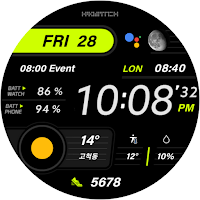
HMKWatch Digi 146
Personalization
Comfortable and clear digital watch face.
- Downloads
- 1K+
- on Google Play
- Price
- $0.99
- No in-app purchases
- Updated
- Oct 11
- 2026
Screenshots
Save to Pinterest


About HMKWatch Digi 146
If you can't install it on your watch, try it on your web browser.
워치에 설치가 안되면 웹브라우저에서 시도해보세요.
=======================================================
1. You can change 10 point colors and 10 background colors.
- You can change it in Customize.
2. We support the 12-hour system and the 24-hour system.
- If you change the settings of the smartphone connected to the watch, the watch will also change.
3. Please check the exact location of the shortcut in the attached image.
4. In order to display the battery status of your smartphone in Complication 3 on the description image, you must install 'Phone Battery Complication' on your watch and smartphone.
https://play.google.com/store/apps/details?id=com.weartools.phonebattcomp
5. I recommend you to do what you set up in the attached image. Each complication has a different size of the area required, so it cannot be tailored to all compositions.
* If the android play store showing app as not compatible, use web browser to install.
*This watch face supports wear OS devices.
Get new news from my Instagram.
www.instagram.com/hmkwatch
Please send me an email if you have any errors or suggestions.
[email protected]
1. 10가지 포인트컬러와 10가지 배경색상이 변경 가능합니다
- 꾸미기에서 변경하실 수 있습니다.
2. 12시간제와 24시간제를 지원합니다.
- 워치와 연결된 스마트폰의 설정에서 변경하시면 워치도 같이 바뀝니다.
3. 바로가기의 정확한 위치는 첨부 이미지에서 확인 바랍니다.
4. 설명이미지 상의 컴플리케이션 3에서 스마트폰의 배터리 상태를 표시하려면, 워치와 스마트폰에 'Phone Battery Complication'을 설치해야 합니다.
https://play.google.com/store/apps/details?id=com.weartools.phonebattcomp
5. 컴플리케이션은 첨부 이미지에 설정한 대로 하시기를 추천합니다. 각 컴플리케이션 마다 필요로 하는 영역의 크기가 다르므로 모든 컴플리케이션에 맞게 할 수 없는 점 양해 부탁드립니다.
* 플레이스토어 앱에서 기기호환이 안된다고 뜰 수 있습니다.
이럴 경우 오른쪽 상단의 공유하기에서 주소링크를 복사하셔서 웹브라우저를 통해 플레이스토어에 들어가시면 다운로드 가능합니다.
* 이 워치페이스는 Wear OS 디바이스를 지원합니다.
인스타그램 팔로우를 하시면 새로운 워치페이스 제작 소식을 빠르게 만나보실 수 있습니다.
www.instagram.com/hmkwatch
사용중 발생하는 오류 또는 제안사항이 있으시면 메일로 연락주세요.
[email protected]
User reviews

An excellent digital face with all the necessary statistical data at your disposal (including chance of rain, a rare data field not often available). From a very accomplished and highly prolific design studio. Well done yet again and thanks.
Alternatives to HMKWatch Digi 146
Looking for apps like HMKWatch Digi 146? Here are 6 similar Android apps on Google Play. The highest rated is HMKWatch Digi 268 (4.9/5), and 1 of the 6 are free to download.
-
HMKWatch Analog 164 F
-
HMKWatch Digi 279
-
HMKWatch Digi 263
-
HMKWatch Digi 268 4.9
-
HMKWatch Analog 170
-
HMKWatch Analog 169
| App | Rating | Price | Installs | Last updated | Compare |
|---|---|---|---|---|---|
| HMKWatch Digi 146 | – | $0.99 | 1,000+ | Oct 11, 2026 | |
| HMKWatch Analog 164 F | – | Free | 100,000+ | Oct 10, 2026 | Compare |
| HMKWatch Digi 279 | – | 0.99 USD | 500+ | Oct 11, 2026 | Compare |
| HMKWatch Digi 263 | – | 0.99 USD | 1,000+ | Oct 11, 2026 | Compare |
| HMKWatch Digi 268 | 4.9 / 5 | 0.99 USD | 1,000+ | Oct 11, 2026 | Compare |
| HMKWatch Analog 170 | – | 0.49 USD | 1,000+ | Oct 10, 2026 | Compare |
| HMKWatch Analog 169 | – | 0.99 USD | 1,000+ | Oct 10, 2026 | Compare |
Compare HMKWatch Digi 146 with the top alternatives: ratings, updates, ASO score and keyword gaps →
Similar apps on Google Play
- HMKWatch Analog 164 F
- HMKWatch Digi 279
- HMKWatch Digi 263
- HMKWatch Digi 268
- HMKWatch Analog 170
- HMKWatch Analog 169
- HMKWatch Digi 266 Invert
- HMKWatch Digi 275
- HMKWatch Digi 050
- HMKWatch Digi 314
- HMKWatch Digi 266
- HMKWatch Analog 265
- HMKWatch Digi 274
- HMKWatch Analog 168
- HMKWatch Digi 234 OC
- HMKWatch Digi 278
- HMKWatch Digi 272
- HMKWatch Digi 214
- HMKWatch Digi 252
- HMKWatch Digi 123
- HMKWatch Analog 264 Invert
- HMKWatch Digi 161
- HMKWatch Digi 184
- HMKWatch Digi 234
- HMKWatch Digi 189
- HMKWatch Analog 210
- HMKWatch Digi 088
- HMKWatch Analog 166
- HMKWatch Analog 165
- HMKWatch Digi 182
- HMKWatch Digi 257 Invert
- HMKWatch Analog 164 Re
- HMKWatch Digi 257
- HMKWatch Digi 264 Invert
- HMKWatch Analog 163
- HMKWatch Analog 264
- HMKWatch Digi 146
- HMKWatch Digi 180
- HMKWatch Digi 134 Re
- HMKWatch Digi 179
- HMKWatch Digi 178
- HMKWatch Digi 119
- HMKWatch Digi 264
- HMKWatch Digi 237
- HMKWatch Digi 254 K
- HMKWatch Digi 254
- HMKWatch Digi 199 K
- HMKWatch Digi 056
- HMKWatch Digi 027
- HMKWatch Analog 086
- HMKWatch Analog 162 Cosmos
- HMKWatch Digi 091
- HMKWatch Digi 148 Solid
- HMKWatch Digi 148 K Solid
- HMKWatch Digi 071 Cosmos
- HMKWatch Digi 071 K Cosmos
- HMKWatch Christmas03
- HMKWatch Funny01
- HMKWatch Christmas02
- HMKWatch Christmas01
- HMKWatch Analog 053
- HMKWatch Analog 035
- HMKWatch Analog 023
- HMKWatch Analog 125 K
- HMKWatch Analog 162
- HMKWatch Analog 160
- HMKWatch Digi 177
- HMKWatch Digi 176
- HMKWatch Digi 175
- HMKWatch Digi 175 K
- HMKWatch Analog 140
- HMKWatch Analog 155
- HMKWatch Analog 130
- HMKWatch Digi 174
- HMKWatch Digi 174 K
- HMKWatch Analog 139
- HMKWatch Digi 061
- HMKWatch Digi 061 K
- HMKWatch Digi 071 K
- HMKWatch Digi 071
- HMKWatch Digi 074 K
- HMKWatch Digi 074
- HMKWatch Digi 094 K
- HMKWatch Digi 094
- HMKWatch Digi 136
- HMKWatch Digi 089
- HMKWatch Digi 089 K
- HMKWatch Digi 136 K
- HMKWatch Digi 145
- HMKWatch Digi 145 K
- HMKWatch Digi 172
- HMKWatch_Digi_172_K
- HMKWatch_Analog_134
- HMKWatch_Digi_114
- HMKWatch_Digi_104
- HMKWatch_Digi_104_K
- HMKWatch_Digi_171_K
- HMKWatch_Digi_171
- HMKWatch_Digi_116
- HMKWatch_Digi_170_K
- HMKWatch_Digi_170
- HMKWatch_Digi_148_K
- HMKWatch_Digi_148
- HMKWatch_Digi_084_K
- HMKWatch_Digi_084
- HMKWatch_Digi_164_Invert
- HMKWatch_Digi_163_K_Invert
- HMKWatch_Digi_163_Invert
- HMKWatch_Digi_154_K
- HMKWatch_Digi_154
- HMKWatch_Digi_157_K_Invert
- HMKWatch_Digi_157_Invert
- HMKWatch_Analog_131
- HMKWatch_Digi_070
- HMKWatch_Digi_070_K
- HMKWatch_Simple_015
- HMKWatch_Digi_127
- HMKWatch_Digi_127_K
- HMKWatch_Digi_142
- HMKWatch_Digi_142_K
- HMKWatch_Simple_024
- HMKWatch_Analog_153
- HMKWatch_Digi_157_K
- HMKWatch_Digi_157
- HMKWatch_Analog_100_K
- HMKWatch_Analog_100
- HMKWatch_Digi_137_K
- HMKWatch_Digi_137
- HMKWatch_Digi_140_K
- HMKWatch_Digi_152_K
- HMKWatch_Digi_152
- HMKWatch_Digi_163_K
- HMKWatch_Digi_099
- HMKWatch_Digi_099_K
- HMKWatch_Analog_110
- HMKWatch_Digi_140
- HMKWatch_Analog_125
- HMKWatch_Analog_144
- HMKWatch_Analog_152
- HMKWatch_Digi_163