
Weather Changes For Wear OS
Personalization
These watch faces run on Wear OS
- Downloads
- 79+
- on Google Play
- Price
- $2.99
- No in-app purchases
- Updated
- Jul 17
- 2025
Screenshots
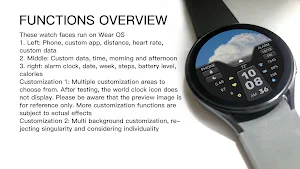


About Weather Changes For Wear OS
These watch faces run on Wear OS
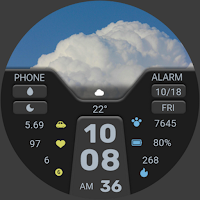
1. Left: Phone, custom app, distance, heart rate, custom data
2. Middle: Custom data, time, morning and afternoon
3. right: alarm clock, date, week, steps, battery level, calories
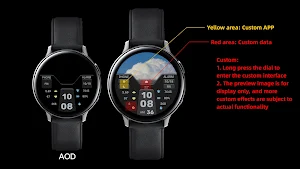
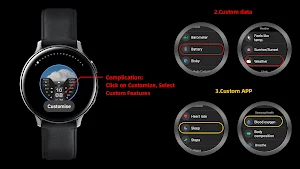
Customization 1: Multiple customization areas to choose from. After testing, the world clock icon does not display. Please be aware that the preview image is for reference only. More customization functions are subject to actual effects
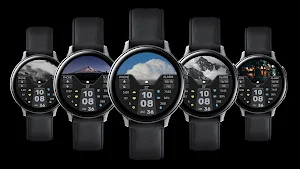
Customization 2: Multi background customization, rejecting singularity and considering individuality
Compatible with devices: Pixel Watch, Galaxy Watch 4, Galaxy Watch 5, Galaxy Watch 6 and other devices
How do I install the watch face on WearOS ?
1. Install it from Google Play Wear Store on your watch
2. Install the companion app for fully customization (Android phone devices)
1. Left: Phone, custom app, distance, heart rate, custom data
2. Middle: Custom data, time, morning and afternoon
3. right: alarm clock, date, week, steps, battery level, calories
Customization 1: Multiple customization areas to choose from. After testing, the world clock icon does not display. Please be aware that the preview image is for reference only. More customization functions are subject to actual effects
Customization 2: Multi background customization, rejecting singularity and considering individuality
Compatible with devices: Pixel Watch, Galaxy Watch 4, Galaxy Watch 5, Galaxy Watch 6 and other devices
How do I install the watch face on WearOS ?
1. Install it from Google Play Wear Store on your watch
2. Install the companion app for fully customization (Android phone devices)
What’s new
Updated July 17, 2025
Release a new watch companion to help quickly install dials on mobile devices
Alternatives to Weather Changes For Wear OS
Looking for apps like Weather Changes For Wear OS? Here are 6 similar Android apps on Google Play. 5 of the 6 are free to download.
-
ZKin Watch Blue Firefly Quartz
-
ZKin Watch Face Obsidian Moon
-
ZKin Watch Face Super Standby
-
ZKin WatchFace Half Screen LCD
-
ZKin Watch Face Grey Color
-
Simple Functions For Wear OS
| App | Rating | Price | Installs | Last updated | Compare |
|---|---|---|---|---|---|
| Weather Changes For Wear OS | – | $2.99 | 50+ | Jul 17, 2025 | |
| ZKin Watch Blue Firefly Quartz | – | Free | 1,000+ | Sep 16, 2026 | Compare |
| ZKin Watch Face Obsidian Moon | – | Free | 1,000+ | Feb 18, 2025 | Compare |
| ZKin Watch Face Super Standby | – | Free | 500+ | Oct 2, 2026 | Compare |
| ZKin WatchFace Half Screen LCD | – | Free | 1,000+ | Feb 20, 2025 | Compare |
| ZKin Watch Face Grey Color | – | 0.99 USD | 100+ | Sep 17, 2026 | Compare |
| Simple Functions For Wear OS | – | Free | 500+ | Sep 17, 2026 | Compare |
Similar apps on Google Play
- ZKin Watch Blue Firefly Quartz
- ZKin Watch Face Obsidian Moon
- ZKin Watch Face Super Standby
- ZKin WatchFace Half Screen LCD
- ZKin Watch Face Grey Color
- Simple Functions For Wear OS
- ZKin Watch Face Monochrome LCD
- ZKin Watch Dynamic Astronaut
- ZKin Watch 新年节节高升( Wear OS)
- ZKinWatch Dark Grey Ink Orange
- ZKin Watch Green Light Quartz
- ZKin Watch Blue Series Planet
- Blue Coast ZKin Watch Face
- Pink Quartz ZKin Watch Face
- ZKin WatchFace Half Wheel Ring
- ZKin Watch Face Lunar Widget
- ZKin Watch Transparent blue
- ZKin Watch Gray Dark Blocks
- ZKin WatchFace Sunny Component
- ZKin Watch Retro Deep Brown
- ZKin Watch Face Neon Function
- ZKinWatch Silver Nature Quartz
- ZKin Watch Flat Gradient Color
- ZKin WatchFace Animation Clock
- ZKin Watch Dark Gray Component
- ZKin Watch Dark Color Function
- ZKin Watch Business Rust Red
- ZKinWatch Dream Blue Component
- ZKin WatchFace Retro Deep Grey
- ZKin Watch Face Broken Quartz
- ZKin Silver Multifunctional
- 励志打工录( Wear OS)
- Weather Changes For Wear OS
- Gray Dark White For Wear OS
- ZKin Watch Dual Mode Shadow
- ZKin Watch Auroral Mountain
- ZKin Watch Bright Green Line
- ZKin Watch Face Day and Night
- ZKin Watch Face Function Ring
- ZKin Watch Face Crescent Moon
- ZKin Watch Face Colorful Halo
- ZKin WatchFace Charm Blue Halo
- ZKin Watch Shining Star Card
- ZKin Watch Brilliant Splendid
- ZKin Watch Silver Black Glass
- 喜庆短句( Wear OS)
- ZKinWatch Snowy Mountain Range
- 新年转运多模式( Wear OS)
- Gradient Light Lines Wear OS
- Ink Purple Quartz For Wear OS
- Digital Color Block For WearOS
- 福年踏春来( Wear OS)
- 摇摇生财( Wear OS)
- ZKin Watch Warm Light Quartz
- ZKin Watch Dark Green Dualmode
- 励志文字( Wear OS)
- Gradual Spring Green Wear OS
- Mixed color Function Wear OS
- Fantasy Blue LCD For Wear OS
- Dark Aurora Green For Wear OS
- Luster Function For Wear OS
- Elegant White Ring For Wear OS
- ZKin Watch 国风书卷( Wear OS)
- Romantic Purple For Wear OS
- Indigo Quartz For Wear OS
- Night Depth of Field Wear OS
- Bright Color LCD For Wear OS
- Colorful Components For WearOS
- ZKin Watch Knight Business
- 新年超顺( Wear OS)
- 翡翠暴富( Wear OS)
- 金年送福( Wear OS)
- ZKin Watch Smooth Machinery
- Stacked Purple Green Wear OS
- Red Blue Arc String For WearOS
- Clear Functionality For WearOS
- Flat Colorful Black For WearOS
- Cloud Component For Wear OS
- Rhombus Quartz Green Wear OS
- Black Shine Quartz For Wear OS
- Toner Fluorescence For Wear OS
- Ink Purple Star For Wear OS
- Functional Glow Line Wear OS
- Clear Bright White For Wear OS
- Fresh Components For Wear OS
- Green Glimmering For Wear OS
- Pink Starlight For Wear OS
- Dark texture quartz For WearOS
- Soft Light PinkWhite Wear OS
- Unreal Blue Line For Wear OS
- Simulated Colorful For Wear OS
- Functional LCD White Wear OS
- Dark Night Starry For Wear OS
- Retro Colored Round For WearOS
- Big color blocks For Wear OS
- Practical Components Wear OS
- ZKin WatchFace 国风时辰养生(Wear OS)
- Colorful Weather For Wear OS
- ZKin WatchFace Mountain Shadow
- ZKin Watch Colorful Half Arc
- Colorful Translucent Wear OS
- Fuzzy Grille For Wear OS
- Metallic texture For Wear OS
- Flash Yellow Quartz For WearOS
- Retro Mint Green For Wear OS
- Purple Gorgeous For Wear OS
- Green Field Aurora For Wear OS
- Black Shiny Quartz For Wear OS
- Flat Components For Wear OS
- Depth of Field Moon For WearOS
- Colorful Dual Mode For Wear OS
- Mimetic Reversal For Wear OS
- Light Purple Green For Wear OS
- Transparent Quartz For Wear OS
- Colorful Fluorescent Wear OS
- Ink Pink Component For Wear OS
- Art Clock For Wear OS
- Turquoise Quartz For Wear OS
- Mountain Components For WearOS
- Aurora Quartz For Wear OS
- Psychedelic Glass For Wear OS
- Water Colored Planet Wear OS
- Gradient Line Block For WearOS
- Starry Sky Quartz For Wear OS
- Blue Depth of Field For WearOS
- Deep Blue Component For WearOS
- Purple Clouds Clouds Wear OS
- Blue Fluorescence For Wear OS
- ZKin Watch Tricolor Colored
- Ink Color Components Wear OS
- Colorful Vibrant For Wear OS
- Shines Brightly For Wear OS
- Forest Time For Wear OS
- Watering For Wear OS
- Yellow Flower For Wear OS
- Fading Blue For Wear OS
- Purple Texture For Wear OS
- Concave block For Wear OS
- Orange Information For Wear OS
- Luminous Mountain For Wear OS
- ZKin Watch Black White Message
- Green Fresh For Wear OS
- Bright Gold For Wear OS
- Unreal Line For Wear OS
- Pink Blue Bright For Wear OS
- Burnt Gold Flowstone Wear OS
- Practical Green For Wear OS
- Function Alternating Wear OS
- LCD Grid Function For Wear OS
- White ink Function For Wear OS