
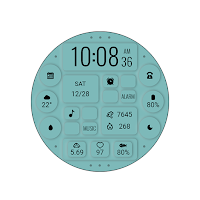
Dark Green Dualmode For WearOS
Personalization
These watch faces run on Wear OS
- Downloads
- 628+
- on Google Play
- Price
- $2.99
- No in-app purchases
- Updated
- Sep 17
- 2026
Screenshots
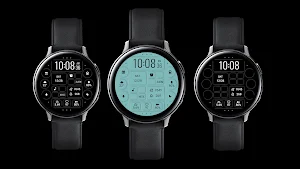


About Dark Green Dualmode For WearOS
Dark Green Dualmode For WearOS
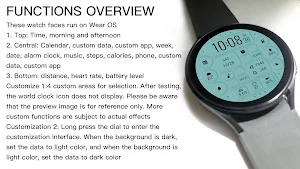
These watch faces run on Wear OS
1. Top: Time, morning and afternoon
2. Central: Calendar, custom data, custom app, week, date, alarm clock, music, steps, calories, phone, custom data, custom app
3. Bottom: distance, heart rate, battery level
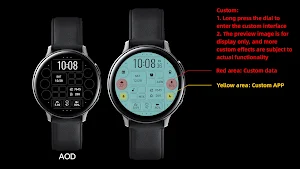
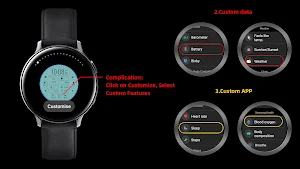
Customization: Multiple customization areas are available for selection
Compatible devices: Pixel Watch, Galaxy Watch 4/5/6/7 and above, and other devices
How do I install the watch face on WearOS ?
1. Install it from Google Play Wear Store on your watch
2. Install the companion app for fully customization (Android phone devices)
These watch faces run on Wear OS
1. Top: Time, morning and afternoon
2. Central: Calendar, custom data, custom app, week, date, alarm clock, music, steps, calories, phone, custom data, custom app
3. Bottom: distance, heart rate, battery level
Customization: Multiple customization areas are available for selection
Compatible devices: Pixel Watch, Galaxy Watch 4/5/6/7 and above, and other devices
How do I install the watch face on WearOS ?
1. Install it from Google Play Wear Store on your watch
2. Install the companion app for fully customization (Android phone devices)
What’s new
Updated September 17, 2026
Release a new watch companion to help quickly install watch faces on mobile devices
Alternatives to Dark Green Dualmode For WearOS
Looking for apps like Dark Green Dualmode For WearOS? Here are 6 similar Android apps on Google Play.
-
Gradient Light Lines Wear OS
-
Ink Purple Quartz For Wear OS
-
Digital Color Block For WearOS
-
新年节节高升( Wear OS)
-
福年踏春来( Wear OS)
-
摇摇生财( Wear OS)
| App | Rating | Price | Installs | Last updated | Compare |
|---|---|---|---|---|---|
| Dark Green Dualmode For WearOS | – | $2.99 | 500+ | Sep 17, 2026 | |
| Gradient Light Lines Wear OS | – | 0.99 USD | 1+ | Sep 17, 2026 | Compare |
| Ink Purple Quartz For Wear OS | – | 0.99 USD | 0+ | Jan 24, 2025 | Compare |
| Digital Color Block For WearOS | – | 0.99 USD | 1+ | Sep 17, 2026 | Compare |
| 新年节节高升( Wear OS) | – | 0.99 USD | 0+ | Jan 23, 2025 | Compare |
| 福年踏春来( Wear OS) | – | 0.99 USD | 0+ | Jan 23, 2025 | Compare |
| 摇摇生财( Wear OS) | – | 0.99 USD | 0+ | Jan 23, 2025 | Compare |
Similar apps on Google Play
- Gradient Light Lines Wear OS
- Ink Purple Quartz For Wear OS
- Digital Color Block For WearOS
- 新年节节高升( Wear OS)
- 福年踏春来( Wear OS)
- 摇摇生财( Wear OS)
- Warm Light Quartz For Wear OS
- Dark Green Dualmode For WearOS
- 励志文字( Wear OS)
- Gradual Spring Green Wear OS
- Mixed color Function Wear OS
- Fantasy Blue LCD For Wear OS
- Dark Aurora Green For Wear OS
- Luster Function For Wear OS
- Elegant White Ring For Wear OS
- 国风书卷( Wear OS)
- Romantic Purple For Wear OS
- Indigo Quartz For Wear OS
- Night Depth of Field Wear OS
- Bright Color LCD For Wear OS
- Colorful Components For WearOS
- Knight Business For Wear OS
- Obsidian Moon For Wear OS
- 新年超顺( Wear OS)
- 翡翠暴富( Wear OS)
- 金年送福( Wear OS)
- Smooth Machinery For Wear OS
- Stacked Purple Green Wear OS
- Red Blue Arc String For WearOS
- Dark Grey Ink Orange Wear OS
- Clear Functionality For WearOS
- Flat Colorful Black For WearOS
- Cloud Component For Wear OS
- Rhombus Quartz Green Wear OS
- Black Shine Quartz For Wear OS
- Toner Fluorescence For Wear OS
- Ink Purple Star For Wear OS
- Functional Glow Line Wear OS
- Clear Bright White For Wear OS
- Fresh Components For Wear OS
- Green Glimmering For Wear OS
- Pink Starlight For Wear OS
- Dark texture quartz For WearOS
- Soft Light PinkWhite Wear OS
- Unreal Blue Line For Wear OS
- Simulated Colorful For Wear OS
- Functional LCD White Wear OS
- Dark Night Starry For Wear OS
- Retro Colored Round For WearOS
- Big color blocks For Wear OS
- Practical Components Wear OS
- 国风时辰养生 Wear OS
- Colorful Weather For Wear OS
- Mountain Shadow For Wear OS
- Colorful Half Arc For Wear OS
- Colorful Translucent Wear OS
- Fuzzy Grille For Wear OS
- Metallic texture For Wear OS
- Flash Yellow Quartz For WearOS
- Retro Mint Green For Wear OS
- Purple Gorgeous For Wear OS
- Green Field Aurora For Wear OS
- Super Standby For Wear OS
- Black Shiny Quartz For Wear OS
- Flat Components For Wear OS
- Depth of Field Moon For WearOS
- Colorful Dual Mode For Wear OS
- Mimetic Reversal For Wear OS
- Light Purple Green For Wear OS
- Transparent Quartz For Wear OS
- Colorful Fluorescent Wear OS
- Ink Pink Component For Wear OS
- Art Clock For Wear OS
- Turquoise Quartz For Wear OS
- Mountain Components For WearOS
- Aurora Quartz For Wear OS
- Psychedelic Glass For Wear OS
- Water Colored Planet Wear OS
- Gradient Line Block For WearOS
- Starry Sky Quartz For Wear OS
- Blue Depth of Field For WearOS
- Deep Blue Component For WearOS
- Purple Clouds Clouds Wear OS
- Blue Fluorescence For Wear OS
- Tricolor Colored For Wear OS
- Ink Color Components Wear OS
- Colorful Vibrant For Wear OS
- Shines Brightly For Wear OS
- Forest Time For Wear OS
- Watering For Wear OS
- Yellow Flower For Wear OS
- Fading Blue For Wear OS
- Purple Texture For Wear OS
- Concave block For Wear OS
- Orange Information For Wear OS
- Luminous Mountain For Wear OS
- Black White Message Wear OS
- Green Fresh For Wear OS
- Bright Gold For Wear OS
- Unreal Line For Wear OS
- Pink Blue Bright For Wear OS
- Burnt Gold Flowstone Wear OS
- Practical Green For Wear OS
- Function Alternating Wear OS
- LCD Grid Function For Wear OS
- White ink Function For Wear OS
- Functional planning For WearOS
- Spiral Component For Wear OS
- Quiet Night Hill For Wear OS
- Snow Depth of Field For WearOS
- Clouds Shadows For Wear OS
- Bright Component For Wear OS
- Practical Component For WearOS
- Quartz Gray Matter For Wear OS
- Starrysky Snowscene For WearOS
- Daisy Blue Quartz For Wear OS
- Beautiful Clouds For Wear OS
- Glow Yellow Quartz For Wear OS
- Clear Ink White For Wear OS
- Dreamy Weather For Wear OS
- Functional Weather For Wear OS
- Depth of Field Sun For Wear OS
- Luster Component For Wear OS
- Pink Cloud For Wear OS
- Green Firefly Quartz Wear OS
- Reflection quartz For Wear OS
- Functional Glow Blue Wear OS
- Half Moon For Wear OS
- Light And Shadow For Wear OS
- Blue Light Quartz For Wear OS
- Dream Candy For Wear OS
- Blue Translucent For Wear OS
- Orange Grid Pattern For WearOS
- Dreamy Blue Shape For Wear OS
- Sweet Orange Vision For WearOS
- Gray Metal Block For Wear OS
- Unreal Pink For Wear OS
- Green Pale Yellow For Wear OS
- Colorful Forest For Wear OS
- Little Sunflower For Wear OS
- Science Silver For Wear OS
- Machinery For Wear OS
- Happy Machinery For Wear OS
- Warm For Wear OS
- Gradual Fade For Wear OS
- Dark Gray Hole For Wear OS
- Orange Silver For Wear OS
- DeepSea gradient For Wear OS
- Flat Sponge For Wear OS
- Refreshing For Wear OS