
PrimeTime Watch Face
jigu watchface Lifestyle Contains ads
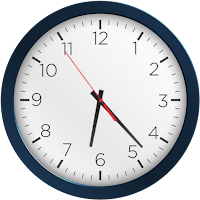
Elegant analog watch face with classic style and smooth ticking motion.
- Downloads
- 1K+
- on Google Play
- Price
- Free
- No in-app purchases
- Updated
- Aug 19
- 2026
Screenshots


About PrimeTime Watch Face
Upgrade your wrist with timeless elegance using the PrimeTime Watch Face. This Wear OS watch face features a refined analog design with distinct hour, minute, and second hands, offering a perfect balance between tradition and simplicity.
🕰️ Designed for those who appreciate a polished and professional look.
Key Features:
1)Elegant classic analog design
2)Smooth moving second hand
3)Clear and easy-to-read hour and minute markers
4)Optimized for battery efficiency
5)Supports Always-On Display mode
Installation Instructions:
1)Open the Companion App on your phone.
2)Tap "Install on Watch."
3)Select PrimeTime Watch Face on your Wear OS device.
Compatibility:
✅ Compatible with all Wear OS devices API 33+ (e.g., Google Pixel Watch, Samsung Galaxy Watch)
❌ Not suitable for rectangular watches
Classic style. Prime performance.
🕰️ Designed for those who appreciate a polished and professional look.
Key Features:
1)Elegant classic analog design
2)Smooth moving second hand
3)Clear and easy-to-read hour and minute markers
4)Optimized for battery efficiency
5)Supports Always-On Display mode
Installation Instructions:
1)Open the Companion App on your phone.
2)Tap "Install on Watch."
3)Select PrimeTime Watch Face on your Wear OS device.
Compatibility:
✅ Compatible with all Wear OS devices API 33+ (e.g., Google Pixel Watch, Samsung Galaxy Watch)
❌ Not suitable for rectangular watches
Classic style. Prime performance.
Alternatives to PrimeTime Watch Face
Looking for apps like PrimeTime Watch Face? Here are 6 similar Android apps on Google Play. The highest rated is Flora Elegant Watch Face (4.5/5), and all 6 are free to download.
-
Galaxy 3D Watch Face
-
Flora Elegant Watch Face 4.5
-
Pride Animated Watch Face
-
Pastel Floral Watch Face
-
Butterfly WatchFace 4.2
-
3D Cherry Blossom Watch Face
| App | Rating | Price | Installs | Last updated | Compare |
|---|---|---|---|---|---|
| PrimeTime Watch Face | – | Free | 1,000+ | Aug 19, 2026 | |
| Galaxy 3D Watch Face | – | Free | 10,000+ | – | Compare |
| Flora Elegant Watch Face | 4.5 / 5 | Free | 10,000+ | Aug 4, 2026 | Compare |
| Pride Animated Watch Face | – | Free | 5,000+ | Aug 20, 2026 | Compare |
| Pastel Floral Watch Face | – | Free | 10,000+ | Aug 20, 2026 | Compare |
| Butterfly WatchFace | 4.2 / 5 | Free | 10,000+ | – | Compare |
| 3D Cherry Blossom Watch Face | – | Free | 5,000+ | Aug 20, 2026 | Compare |
Similar apps on Google Play
- Galaxy 3D Watch Face
- Flora Elegant Watch Face
- Pride Animated Watch Face
- Pastel Floral Watch Face
- Butterfly WatchFace
- 3D Cherry Blossom Watch Face
- 3D USA Flag Watch Face
- Pride Month Watch Face
- Butterfly Simple Watch Face
- Animated Flag – USA Time
- Yellow Digital Watch Face
- Summer Vacation Watch Face
- Butterfly Garden WatchFace
- Rainbow Pride Watch Face
- Heart Rate Monitor - Watch
- 4th July USA Watch Face
- Minimal Watch Faces
- Pink Blossom Love Watch Face
- Spring Butterfly Watch Face
- Flower - Spring Summer Watch
- Sunflowers Watch Face
- Hybrid Classic Watch Face
- Soft Pink Blue Watch Face
- Flowers Spring Summer Watch 2
- Sunset Vibes WatchFace
- Happy Colorful Analog Watch
- Wedding Anniversary Watch Face
- Business Watch Face
- Sunset Digital Watch Face
- Cute Spring ButterflyWatchFace
- Power Saver Watch Face
- Pastel Blossom Watch Face
- Animated USA Flag Analog WF
- Love WatchFace
- Flower Butterfly WatchFace
- Minimal BOLD - Watch Face
- Love Glow Valentine Watch
- Digital Minimalist
- DigitGlow Watch Face
- Memorial Flag Watch Face
- Beach Themed WatchFace
- Love - Pride Analog Watch
- Minimal Black Watch Face
- Mountain View WatchFace
- Watch Shortcuts
- Realistic Luxury Flowers Watch
- Pride Is Love – Rainbow Watch
- Analog Watch Face-WF1
- SimpleFit Analog Watch Face
- Sunset Serenity WatchFace
- Silver Classic Watch Face
- Dynamic Carbon Watch Face
- Analog Classic Watch Face
- Astronaut Earth Watch Face
- Pet Lovers Watch Face –Cat-Dog
- Hoppy Easter Watch
- Analog Watch Face-WF2
- Nature Landscape WatchFace
- Summer Island Time Watch
- Analog Watch Face-WF3
- Calculator Game Watch Face
- Happy Dog WatchFace
- Modern Classic Watch Face
- Battle Royale Watch Face
- Butterfly Bloom Watch Face
- Flower Digital Face Watch
- Always On Display – WatchFace
- Floral Easter Glow Watch Face
- Classic Elegant Hybrid Watch
- USA Memorial Watch Face
- Magic Butterfly WatchFace
- Tactical Diver WatchFace
- Falling Hearts Animated
- Lovely Butterfly WatchFace
- Roman Noir Watch Face
- Springtime Bloom WatchFace
- Valentine's Day Love Watch
- Midnight Classic Analog WF
- Cyber Watch Face
- ColorBurst Analog Watch
- Happy Easter Watch Face 2
- Love Time
- Valentine's Day Beauty Watch
- Cute Valentine's Day WatchFace
- Easter Bunny Watch Face
- Sweet Dog WatchFace
- Dog Lover WatchFace
- Cute Dog WatchFace
- Digital Tracker WatchFace
- Royal Peacock Watch Face
- Retro Radiance Watch Face
- Animals Tiger WatchFace
- Pink Blossom WatchFace
- Mother's Day WatchFace
- Peacock Feather Watch Face
- MonoTime Watch Face
- ModernTick Watch Face
- LuxeTime Classic Watch Face
- Easter Spring Bunny Watch
- Cute Bunny Digital Watch Face
- Easter Bunny Watch Face 2
- Spring Sunrise Digital Watch
- Spring Easter Watch
- Happy Easter Watch Face 4
- Explorer - Digital Watch Face
- Happy Easter Watch Face 3
- Easter Bunny Time Watch Face
- Cute Easter Bunny Watch Face
- Happy Easter Watch Face
- Easter Bunny Smiles Watch
- Women's Day Elegance Watch
- Valentine's Day Elegance