
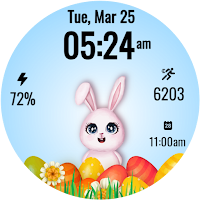
Easter Bunny Time Watch Face
jigu watchface Personalization Contains ads
Adorable Easter bunny watch face with time, steps, battery, and calendar info.
- Downloads
- 912+
- on Google Play
- Price
- Free
- No in-app purchases
- Updated
- Aug 17
- 2026
Screenshots
Save to Pinterest


About Easter Bunny Time Watch Face
Hop into Easter with the Easter Bunny Time Watch Face for Wear OS! This cute and festive watch face features a charming Easter bunny surrounded by colorful eggs, bringing joy to your wrist while keeping you updated with essential information. Perfect for the holiday season, this watch face shows the time, step count, battery percentage, and even calendar events, helping you stay organized in a fun and playful way.
Key Features:
1.Delightful Easter bunny theme with vibrant, seasonal colors.
2.Real-time tracking of step count, battery percentage, and calendar events.
3.Supports Ambient Mode and Always-On Display (AOD).
4.Designed for round Wear OS devices, ensuring smooth performance and a perfect fit.
Installation Instructions:
1.Open the Companion App on your phone.
2.Tap "Install on Watch."
3.On your watch, select Easter Bunny Time Watch Face from your settings or watch face gallery.
Compatibility:
✅ Compatible with all Wear OS devices API 33+ (e.g., Google Pixel Watch, Samsung Galaxy Watch).
❌ Not suitable for rectangular watches.
Celebrate Easter in style with the Easter Bunny Time Watch Face, blending a fun holiday theme with practical features to keep you on track all day long!
Alternatives to Easter Bunny Time Watch Face
Looking for apps like Easter Bunny Time Watch Face? Here are 6 similar Android apps on Google Play. All of them are free to download.
-
Easter Bunny Watch Face
-
Happy Easter Watch Face 3
-
Happy Easter Watch Face
-
Easter Bunny Smiles Watch
-
Flowers Spring Summer Watch 2
-
Happy Easter Watch Face 2
| App | Rating | Price | Installs | Last updated | Compare |
|---|---|---|---|---|---|
| Easter Bunny Time Watch Face | – | Free | 500+ | Aug 17, 2026 | |
| Easter Bunny Watch Face | – | Free | 10,000+ | – | Compare |
| Happy Easter Watch Face 3 | – | Free | 1,000+ | – | Compare |
| Happy Easter Watch Face | – | Free | 5,000+ | Aug 2, 2026 | Compare |
| Easter Bunny Smiles Watch | – | Free | 1,000+ | Aug 2, 2026 | Compare |
| Flowers Spring Summer Watch 2 | – | Free | 5,000+ | Aug 4, 2026 | Compare |
| Happy Easter Watch Face 2 | – | Free | 1,000+ | Aug 17, 2026 | Compare |
Similar apps on Google Play
- Easter Bunny Watch Face
- Happy Easter Watch Face 3
- Happy Easter Watch Face
- Easter Bunny Smiles Watch
- Flowers Spring Summer Watch 2
- Happy Easter Watch Face 2
- Butterfly Simple Watch Face
- Cute Easter Bunny Watch Face
- Sunflowers Watch Face
- Flower - Spring Summer Watch
- Floral Easter Glow Watch Face
- Flora Elegant Watch Face
- Butterfly WatchFace
- Heart Rate Monitor - Watch
- Realistic Luxury Flowers Watch
- Summer Vacation Watch Face
- Pink Blossom Love Watch Face
- Sunset Digital Watch Face
- Happy Colorful Analog Watch
- Pastel Blossom Watch Face
- Minimal BOLD - Watch Face
- Wedding Anniversary Watch Face
- Business Watch Face
- Yellow Digital Watch Face
- Digital Minimalist
- Valentine's Day Beauty Watch
- Minimal Watch Faces
- DigitGlow Watch Face
- Classic Elegant Hybrid Watch
- Valentine's Day Elegance
- Love WatchFace
- Flower Digital Face Watch
- Soft Pink Blue Watch Face
- Silver Classic Watch Face
- Valentine's Day Love Watch
- Minimal Black Watch Face
- Explorer - Digital Watch Face
- Cyber Watch Face
- Hybrid Classic Watch Face
- Analog Classic Watch Face
- Women's Day Elegance Watch
- Love Time
- Falling Hearts Animated
- Cute Valentine's Day WatchFace
- Love Glow Valentine Watch
- Calculator Game Watch Face
- Watch Shortcuts
- Power Saver Watch Face
- Analog Watch Face-WF3
- Analog Watch Face-WF2
- Analog Watch Face-WF1
- Dynamic Carbon Watch Face
- SimpleFit Analog Watch Face
- Battle Royale Watch Face