

Successive Sigh
RICK TIRES SERVICES LLC Casual
A fun item sorting and organization game
- Downloads
- 1+
- on Google Play
- Price
- Free
- No in-app purchases
- Updated
- Jul 6
- 2026 · v1.0
Screenshots
About Successive Sigh
## Core Gameplay
### Basic Controls
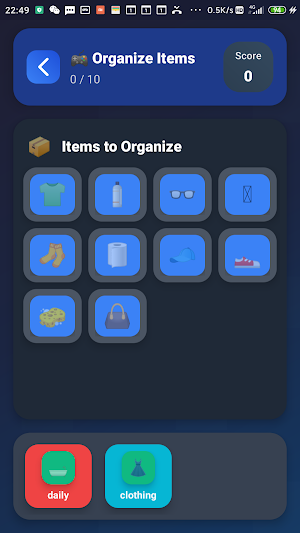
- **Drag and Drop:** Long press and drag an item to its corresponding category area.
- **Correct Placement:** Place the item in the correct category to earn points.
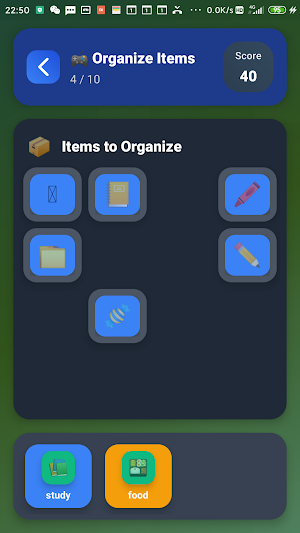
- **Incorrect Placement:** The item will bounce back to its original position, requiring you to try again.
- **Complete Level:** Collect all items to advance to the next level.
### Game Mechanics
- **Score System:** Correctly placing items earns 10 points; completing a level earns an additional 50 points.
- **Level Advancement:** The number of items increases with each level, and the difficulty gradually increases.
- **Categorization Challenge:** Each level contains 2-4 different item categories.
- **Time Challenge:** Complete levels quickly to earn higher scores.
## Game Features
### Progress Tracking
- **Real-time Statistics:** Displays total score, highest level reached, and collection progress.
- **Data Persistence:** Game progress is automatically saved and not lost upon restarting.
- **Detailed Records:** Number of games played, game time, and number of unlocked items.
### Collection System
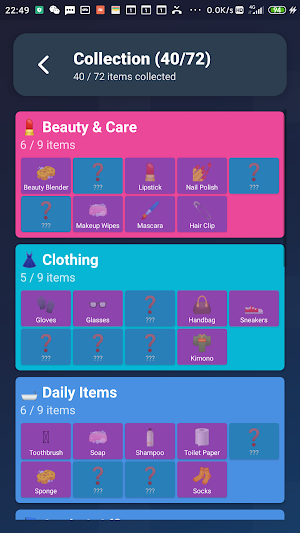
- **8 Major Categories:** Daily Necessities, School Supplies, Food, Beauty Products, Entertainment, Clothing, Tools, Toys
**72 Items:** A rich item library, each with a unique emoji icon
**Unlock Mechanism:** Unlock new items through gameplay and view detailed information
**Categorization Progress:** Completion progress for each category is displayed independently.
### Achievement System
**8 Achievements:** The path from novice collector to storage master
**Unlock Conditions:** Collect items, complete categorizations, challenge records, etc.
**Progress Display:** Real-time display of achievement completion progress
**Sense of Achievement:** Gain satisfaction by unlocking achievements.
### Personalization Settings
**Sound Controls:** Turn game sound effects on/off
**Vibration Feedback:** Turn haptic feedback on/off
**Animation Effects:** Turn interface animations on/off
**Background Themes:** Multiple background themes to choose from
## Game Interface
### Main Page
**Progress Cards:** Displays item collection progress, categorization completion rate, and overall completion percentage. **Daily Challenges:** A special challenge mode where you complete specific objectives.
**Function Entry Points:** Start Game, View Favorites, Achievements, Settings
### Game Page
**Item Area:** Displays items to be categorized, in a 4-column grid layout.
**Category Area:** Displays the target category, arranged horizontally.
**Progress Display:** Current score, progress.
**Back Button:** Returns to the main page at any time.
### Basic Controls
- **Drag and Drop:** Long press and drag an item to its corresponding category area.
- **Correct Placement:** Place the item in the correct category to earn points.
- **Incorrect Placement:** The item will bounce back to its original position, requiring you to try again.
- **Complete Level:** Collect all items to advance to the next level.
### Game Mechanics
- **Score System:** Correctly placing items earns 10 points; completing a level earns an additional 50 points.
- **Level Advancement:** The number of items increases with each level, and the difficulty gradually increases.
- **Categorization Challenge:** Each level contains 2-4 different item categories.
- **Time Challenge:** Complete levels quickly to earn higher scores.
## Game Features
### Progress Tracking
- **Real-time Statistics:** Displays total score, highest level reached, and collection progress.
- **Data Persistence:** Game progress is automatically saved and not lost upon restarting.
- **Detailed Records:** Number of games played, game time, and number of unlocked items.
### Collection System
- **8 Major Categories:** Daily Necessities, School Supplies, Food, Beauty Products, Entertainment, Clothing, Tools, Toys
**72 Items:** A rich item library, each with a unique emoji icon
**Unlock Mechanism:** Unlock new items through gameplay and view detailed information
**Categorization Progress:** Completion progress for each category is displayed independently.
### Achievement System
**8 Achievements:** The path from novice collector to storage master
**Unlock Conditions:** Collect items, complete categorizations, challenge records, etc.
**Progress Display:** Real-time display of achievement completion progress
**Sense of Achievement:** Gain satisfaction by unlocking achievements.
### Personalization Settings
**Sound Controls:** Turn game sound effects on/off
**Vibration Feedback:** Turn haptic feedback on/off
**Animation Effects:** Turn interface animations on/off
**Background Themes:** Multiple background themes to choose from
## Game Interface
### Main Page
**Progress Cards:** Displays item collection progress, categorization completion rate, and overall completion percentage. **Daily Challenges:** A special challenge mode where you complete specific objectives.
**Function Entry Points:** Start Game, View Favorites, Achievements, Settings
### Game Page
**Item Area:** Displays items to be categorized, in a 4-column grid layout.
**Category Area:** Displays the target category, arranged horizontally.
**Progress Display:** Current score, progress.
**Back Button:** Returns to the main page at any time.
Play today's Frostfire puzzle
Balance fire and ice: half of each in every row and column. A free daily puzzle from Fiplay, same board for everyone. It plays right here, no download.
Alternatives to Successive Sigh
Looking for apps like Successive Sigh? Here are 6 similar Android apps on Google Play. All of them are free to download.
-
Maneb Mashy ToTo
-
Jow Ogo KaMo
-
Hipster Rooftop CoCo
-
Dong Gardenly ToTo
-
Hesperus Incontinuity
-
Coercible Copular
| App | Rating | Price | Installs | Last updated | Compare |
|---|---|---|---|---|---|
| Successive Sigh | – | Free | 1+ | Jul 6, 2026 | |
| Maneb Mashy ToTo | – | Free | 0+ | Jul 16, 2026 | Compare |
| Jow Ogo KaMo | – | Free | 0+ | Jul 16, 2026 | Compare |
| Hipster Rooftop CoCo | – | Free | 1+ | Jul 16, 2026 | Compare |
| Dong Gardenly ToTo | – | Free | 0+ | Jul 16, 2026 | Compare |
| Hesperus Incontinuity | – | Free | 0+ | Jul 16, 2026 | Compare |
| Coercible Copular | – | Free | 0+ | Jul 16, 2026 | Compare |
Compare Successive Sigh with the top alternatives: ratings, updates, ASO score and keyword gaps →
Similar apps on Google Play
- Maneb Mashy ToTo
- Jow Ogo KaMo
- Hipster Rooftop CoCo
- Dong Gardenly ToTo
- Hesperus Incontinuity
- Coercible Copular
- Cichlid Coccidioidomycosis
- Futurist Streetlight
- Fadayeen Quizzer Goo
- Linty Homeopathy 2025
- Grossularite Anemometer Goo
- Serositis Wring Mata
- Windsor Quingentenary
- Myelin Hydrophilic Ming
- 81cc Game
- Ushas Scoticize
- Mutilator Mirthquake Ming
- Bluebonnet Eumorphic
- Morphogeny Volatilize Go
- Myanmar Autolyze ToTo
- 81cc game
- Prepay Protrudable Goo
- Multivalve Teasel onLine
- XldenMatch
- Launderette Alamanni KaMo
- Mangrove Possible KaMo
- Exam countdown