

Coercible Copular
RICK TIRES SERVICES LLC Casual
A beautifully designed Android life countdown app.
- Price
- Free
- No in-app purchases
- Updated
- Jul 16
- 2026 · v1.0
Screenshots
About Coercible Copular
## Application Functionality
### Core Functionality
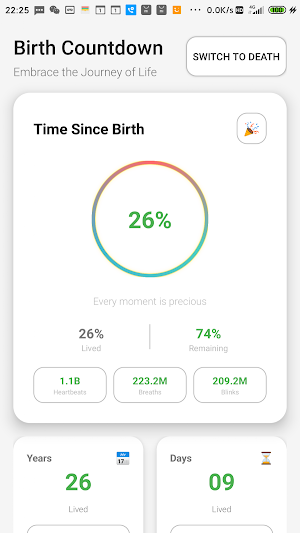
- **Life Countdown**: Calculates lived time and remaining time.
- **Dual Mode Switching**: Death countdown mode vs. life countdown mode.
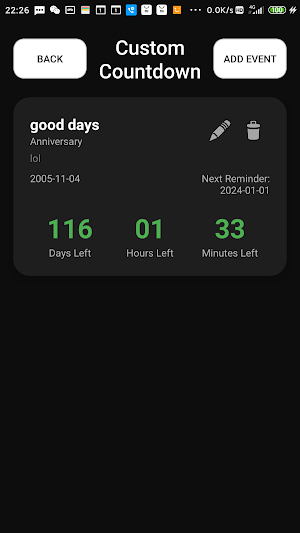
- **Custom Events**: Add birthdays, anniversaries, and custom important dates.
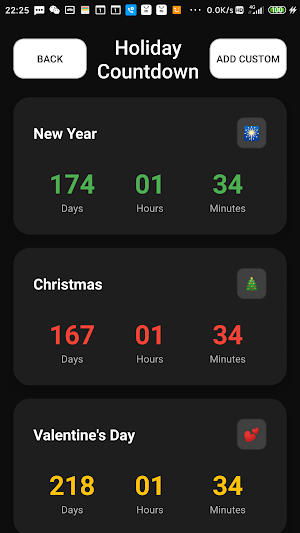
- **Holiday Countdown**: Built-in countdown timer for important holidays.
- **Desktop Widget**: Displays life progress on the home screen.
### Interface Features
- **Immersive Status Bar**: Automatically adapts to dark/light themes.
- **Smooth Animations**: Beautiful animations for page transitions and button clicks.
- **Dual Theme Design**:
- Death Mode: Dark theme, emphasizing the preciousness of life.
- Life Mode: Light theme, showcasing the beauty of life.
- **Card Flip Effect**: 3D flip animation during mode switching.
### Data Display
- **Detailed Statistics**: Heart rate, respiratory rate, blink rate.
- **Percentage Display**: Percentage of lived time and remaining time.
- **Real-time Updates**: Countdown automatically updates every minute.
- **Zero-fill format:** All numbers are displayed as two digits (e.g., 05 instead of 5).
## User Guide
### First Use
1. A welcome dialog box will appear after launching the application.
2. Click the "Set Birthday" button and select your birth date.
3. Set your life expectancy (default 80 years).
4. Click "Start Experience" to enter the main interface.
### Main Interface Operations
- **Mode Switching:** Click the switch button at the top to switch between Death Mode and Life Mode.
- **View Statistics:** Detailed statistics are displayed for each mode.
- **Settings Adjustment:** Click the settings button to modify your birthday and life expectancy.
### Custom Events
1. Click the "Custom Countdown" button on the main interface.
2. Click the "Add Event" button.
3. Fill in the event information:
- Event Name
- Event Type (Birthday/Anniversary/Custom)
- Event Notes (Optional)
- Select Date
4. After saving, the event will be displayed in the list and a real-time countdown will begin.
### Holiday Countdown
1. Click the "Holiday Countdown" button on the main interface.
2. View the built-in countdowns for important holidays.
3. Includes holidays such as Chinese New Year, Christmas, and New Year's Day.
## Technical Features
### Development Technology
- **Language**: Pure Java development, no third-party framework dependencies
- **Minimum Supported Version**: Android 6.0 (API 24)
- **Target Version**: Android 14 (API 35)
- **UI Components**: RecyclerView, CardView, Custom View
### Data Storage
- **SharedPreferences**: Local storage of user settings and event data
- **Gson Serialization**: JSON serialization and storage of complex objects
- **Automatic Synchronization**: Data is saved in real time and not lost upon application restart.
### Performance Optimization
- **Memory Management**: Automatic resource cleanup when Activity is destroyed
- **Timer Optimization**: Only updates visible countdown components
- **Smooth Animation**: Hardware acceleration ensures 60fps animation.
### Core Functionality
- **Life Countdown**: Calculates lived time and remaining time.
- **Dual Mode Switching**: Death countdown mode vs. life countdown mode.
- **Custom Events**: Add birthdays, anniversaries, and custom important dates.
- **Holiday Countdown**: Built-in countdown timer for important holidays.
- **Desktop Widget**: Displays life progress on the home screen.
### Interface Features
- **Immersive Status Bar**: Automatically adapts to dark/light themes.
- **Smooth Animations**: Beautiful animations for page transitions and button clicks.
- **Dual Theme Design**:
- Death Mode: Dark theme, emphasizing the preciousness of life.
- Life Mode: Light theme, showcasing the beauty of life.
- **Card Flip Effect**: 3D flip animation during mode switching.
### Data Display
- **Detailed Statistics**: Heart rate, respiratory rate, blink rate.
- **Percentage Display**: Percentage of lived time and remaining time.
- **Real-time Updates**: Countdown automatically updates every minute.
- **Zero-fill format:** All numbers are displayed as two digits (e.g., 05 instead of 5).
## User Guide
### First Use
1. A welcome dialog box will appear after launching the application.
2. Click the "Set Birthday" button and select your birth date.
3. Set your life expectancy (default 80 years).
4. Click "Start Experience" to enter the main interface.
### Main Interface Operations
- **Mode Switching:** Click the switch button at the top to switch between Death Mode and Life Mode.
- **View Statistics:** Detailed statistics are displayed for each mode.
- **Settings Adjustment:** Click the settings button to modify your birthday and life expectancy.
### Custom Events
1. Click the "Custom Countdown" button on the main interface.
2. Click the "Add Event" button.
3. Fill in the event information:
- Event Name
- Event Type (Birthday/Anniversary/Custom)
- Event Notes (Optional)
- Select Date
4. After saving, the event will be displayed in the list and a real-time countdown will begin.
### Holiday Countdown
1. Click the "Holiday Countdown" button on the main interface.
2. View the built-in countdowns for important holidays.
3. Includes holidays such as Chinese New Year, Christmas, and New Year's Day.
## Technical Features
### Development Technology
- **Language**: Pure Java development, no third-party framework dependencies
- **Minimum Supported Version**: Android 6.0 (API 24)
- **Target Version**: Android 14 (API 35)
- **UI Components**: RecyclerView, CardView, Custom View
### Data Storage
- **SharedPreferences**: Local storage of user settings and event data
- **Gson Serialization**: JSON serialization and storage of complex objects
- **Automatic Synchronization**: Data is saved in real time and not lost upon application restart.
### Performance Optimization
- **Memory Management**: Automatic resource cleanup when Activity is destroyed
- **Timer Optimization**: Only updates visible countdown components
- **Smooth Animation**: Hardware acceleration ensures 60fps animation.
Play today's Inkspill puzzle
Spread your ink until the whole board is one color, within the move limit. A free daily puzzle from Fiplay, same board for everyone. It plays right here, no download.
Alternatives to Coercible Copular
Looking for apps like Coercible Copular? Here are 6 similar Android apps on Google Play. All of them are free to download.
-
Maneb Mashy ToTo
-
Jow Ogo KaMo
-
Hipster Rooftop CoCo
-
Dong Gardenly ToTo
-
Hesperus Incontinuity
-
Cichlid Coccidioidomycosis
| App | Rating | Price | Installs | Last updated | Compare |
|---|---|---|---|---|---|
| Coercible Copular | – | Free | 0+ | Jul 16, 2026 | |
| Maneb Mashy ToTo | – | Free | 0+ | Jul 16, 2026 | Compare |
| Jow Ogo KaMo | – | Free | 0+ | Jul 16, 2026 | Compare |
| Hipster Rooftop CoCo | – | Free | 1+ | Jul 16, 2026 | Compare |
| Dong Gardenly ToTo | – | Free | 0+ | Jul 16, 2026 | Compare |
| Hesperus Incontinuity | – | Free | 0+ | Jul 16, 2026 | Compare |
| Cichlid Coccidioidomycosis | – | Free | 1+ | Jul 16, 2026 | Compare |
Compare Coercible Copular with the top alternatives: ratings, updates, ASO score and keyword gaps →
Similar apps on Google Play
- Maneb Mashy ToTo
- Jow Ogo KaMo
- Hipster Rooftop CoCo
- Dong Gardenly ToTo
- Hesperus Incontinuity
- Cichlid Coccidioidomycosis
- Futurist Streetlight
- Fadayeen Quizzer Goo
- Linty Homeopathy 2025
- Grossularite Anemometer Goo
- Serositis Wring Mata
- Windsor Quingentenary
- Myelin Hydrophilic Ming
- 81cc Game
- Ushas Scoticize
- Mutilator Mirthquake Ming
- Bluebonnet Eumorphic
- Morphogeny Volatilize Go
- Myanmar Autolyze ToTo
- 81cc game
- Prepay Protrudable Goo
- Multivalve Teasel onLine
- XldenMatch
- Launderette Alamanni KaMo
- Mangrove Possible KaMo
- Successive Sigh
- Exam countdown