
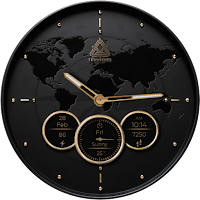
World Map Classic Watch Face
Personalization
Elegant gold watch face with hybrid clock, date, steps, battery and weather!
- Downloads
- 80+
- on Google Play
- Price
- $0.99
- No in-app purchases
- Updated
- Feb 11
- 2025
Screenshots


About World Map Classic Watch Face
🌍 World Map Classic Watch Face – Timeless Elegance on Your Wrist! ⌚✨
Embrace sophistication with the World Map Classic Watch Face, designed for those who appreciate luxury, precision, and functionality. Featuring a stunning gold-accented world map, this watch face combines modern technology with a timeless aesthetic.
💎 Key Features:
✔ Hybrid Clock (Analog & Digital) – The best of both worlds for ultimate readability 🕰️
✔ Full Date Display – Stay on track with the complete day, date, and month 📅
✔ Steps Counter – Monitor your daily activity effortlessly 👣
✔ Battery Information – Keep an eye on your smartwatch’s power level 🔋
✔ Weather Updates – Get real-time weather conditions at a glance 🌤️
✔ Gold & Luxury Design – A premium, elegant look for any occasion ✨
✔ Cool Always-On Display (AOD) – Stylish even in standby mode 🌙
Upgrade your smartwatch with the World Map Classic Watch Face and make a bold statement of elegance and sophistication. Download now and enjoy the luxury of time! ⌚✨
_____________________________________________________________________
Watch face installation notes on smart watch:
Phone app serves only as a placeholder to make it easier to install & find the watch face on your Wear OS watch. You have to select your watch device from the install dropdown menu.
If you download the helper directly with the phone , you need to open application and touch on the display or the download button. -> will start to install on the watch.
A wear os watch need to be connected.
If not working in that way , you can copy that link into your phone chrome browser and click on arrow down from right , and you choose the watch face to install.
_________________________________________________________________
After installation you need to set that watch face to your screen , from wear OS app , go down at downloaded watch faces and you will find it.
If you have problems , please contact me on [email protected]
xxxxxxxxxxxxxxxxxxxxxxxxxxxxxxxxxxxxxxxxxxxxxxxx
FOLLOW US AT TELEGRAM : https://t.me/TRWatchfaces
FOLLOW US WEBSITE TO GET FREE COUPONS : https://trwatches9.wordpress.com/
xxxxxxxxxxxxxxxxxxxxxxxxxxxxxxxxxxxxxxxxxxxxxxxxx
Try to see others designs in my google profile.
Embrace sophistication with the World Map Classic Watch Face, designed for those who appreciate luxury, precision, and functionality. Featuring a stunning gold-accented world map, this watch face combines modern technology with a timeless aesthetic.
💎 Key Features:
✔ Hybrid Clock (Analog & Digital) – The best of both worlds for ultimate readability 🕰️
✔ Full Date Display – Stay on track with the complete day, date, and month 📅
✔ Steps Counter – Monitor your daily activity effortlessly 👣
✔ Battery Information – Keep an eye on your smartwatch’s power level 🔋
✔ Weather Updates – Get real-time weather conditions at a glance 🌤️
✔ Gold & Luxury Design – A premium, elegant look for any occasion ✨
✔ Cool Always-On Display (AOD) – Stylish even in standby mode 🌙
Upgrade your smartwatch with the World Map Classic Watch Face and make a bold statement of elegance and sophistication. Download now and enjoy the luxury of time! ⌚✨
_____________________________________________________________________
Watch face installation notes on smart watch:
Phone app serves only as a placeholder to make it easier to install & find the watch face on your Wear OS watch. You have to select your watch device from the install dropdown menu.
If you download the helper directly with the phone , you need to open application and touch on the display or the download button. -> will start to install on the watch.
A wear os watch need to be connected.
If not working in that way , you can copy that link into your phone chrome browser and click on arrow down from right , and you choose the watch face to install.
_________________________________________________________________
After installation you need to set that watch face to your screen , from wear OS app , go down at downloaded watch faces and you will find it.
If you have problems , please contact me on [email protected]
xxxxxxxxxxxxxxxxxxxxxxxxxxxxxxxxxxxxxxxxxxxxxxxx
FOLLOW US AT TELEGRAM : https://t.me/TRWatchfaces
FOLLOW US WEBSITE TO GET FREE COUPONS : https://trwatches9.wordpress.com/
xxxxxxxxxxxxxxxxxxxxxxxxxxxxxxxxxxxxxxxxxxxxxxxxx
Try to see others designs in my google profile.
Alternatives to World Map Classic Watch Face
Looking for apps like World Map Classic Watch Face? Here are 6 similar Android apps on Google Play.
-
Big Minimal Watch Face
-
Minimal Glass Watch Face
-
Digital Dot Watch Face
-
Cartoon Animals Watch Face
-
Fancy Digital Watch Face
-
Sport Army Watch Face
| App | Rating | Price | Installs | Last updated | Compare |
|---|---|---|---|---|---|
| World Map Classic Watch Face | – | $0.99 | 50+ | Feb 11, 2025 | |
| Big Minimal Watch Face | – | 0.99 USD | 50+ | – | Compare |
| Minimal Glass Watch Face | – | 1.49 USD | 10+ | Mar 22, 2025 | Compare |
| Digital Dot Watch Face | – | 1.49 USD | 10+ | Mar 21, 2025 | Compare |
| Cartoon Animals Watch Face | – | 1.49 USD | 1,000+ | Mar 20, 2025 | Compare |
| Fancy Digital Watch Face | – | 0.99 USD | 10+ | Mar 14, 2025 | Compare |
| Sport Army Watch Face | – | 0.99 USD | 10+ | – | Compare |
Similar apps on Google Play
- Big Minimal Watch Face
- Minimal Glass Watch Face
- Digital Dot Watch Face
- Cartoon Animals Watch Face
- Fancy Digital Watch Face
- Sport Army Watch Face
- American Old Plate Watch Face
- Classic Fusion Watch Face
- Color Classic Neon Watch Face
- Future Caps Watch face
- Time Elegance Watch Face
- World Map Classic Watch Face
- Luxury Cars Watch Face
- Animated Minimal Watch Face
- Ancient Swiss Watch Face
- Retro Digital Watch Face
- Nothing Minimal Watch Face
- Luxury Watch Face
- Cool Wild Animals Watch Face
- Nature World Watch Face
- Train 3D Animated Watch Face
- Fantasy Minimal Watch Face
- Neon Watch Face
- Casual Fit Watch Face
- Odyssey Watch Face
- Titan Edge Watch Face
- Hybrid Simple Watch Face
- Fall Numbers Watch Face
- Christmas Tree Watch Face
- Color Shade Watch Face
- Top Gun Watch Face
- Modern Digital Watch Face
- Space Earth Watch Face
- Christmas Numbers Watch Face
- Crazy Animals Watch Face
- Big Casual Watch Face
- Cyborg Neon Watch Face
- Christmas Holidays Watch Face
- Big Digital Clock Watch Face
- Realistic Fashion Watch Face
- Nature Dream Watch Face
- Animated Fireworks Watch Face
- Magic Skull Watch Face
- Casual Complex Watch Face
- Future Cool Watch Face
- Wolf Story Watch Face
- Magical Bird Watch Face
- Dot Elegant Watch Face
- Dark Led Watch Face
- Abstract Paint Watch Face
- New World Watch Face
- Magical Art Watch Face
- Classic Neo Watch Face
- Multifunctional WatchFace
- Christmas Watchface Wear Os
- Phoenix Watchface Wear Os
- Circles Watchface Wear Os
- Skull Red Watchface Wear Os
- Tiger Fire Watch Face
- Fresh Green Watch Face
- Orange Aviator Watch Face
- Duck Watch Face Wear Os
- Tribal Wolf Wear Os Watchface
- Wolf Luxury Wear Os Watchface
- Nature Time Wear Os Watchface
- Orange Fox Watch Face
- Casual Color Watch Face
- Red Wolf Watch Face
- Green Skull Watch Face
- A 3D Skull Watch Face
- Blue Wolf Watch Face Wear Os
- Business Watchface Wear Os
- Winter Wolf Watchface Wear Os
- Cyan Lion Watch Face WearOs
- Color Owl Watch Face Wear OS
- Wolf Story Watch Face Wear OS