

Partial Screenshot: Auto Trim
Monova Tech Pvt. Ltd. Tools
Smart partial screenshots with automatic trimming for status and nav bars.
- Downloads
- 315+
- on Google Play
- Price
- Free
- No in-app purchases
- Updated
- Aug 2
- 2026 · v1.0.1
Screenshots
About Partial Screenshot: Auto Trim
Tired of taking full-screen captures only to spend time manually cropping out your status bar, battery percentage, and navigation icons? Welcome to Partial Screenshot: Auto Trim—the ultimate precision screen capture utility designed for clean, fast, and seamless workflows.
Whether you need to capture a single snippet of a conversation, a clean image without system UI clutter, or an entire scrolling page, our smart overlay tool handles it all in a single tap.
🚀 Key Features
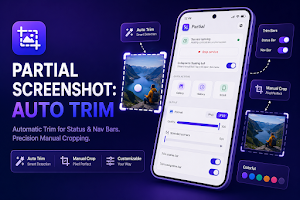
Smart Auto-Trimming: Automatically detect and remove the status bar and navigation bar from your captures. Get pixel-perfect, clean screenshots instantly without manual editing.
Precision Partial Cropping: Don't capture the whole screen if you only need a piece. Use our floating controls to select and capture exact areas instantly.
Scroll Capture (Stitching): Need to save a long article or thread? Use the built-in scrolling capture tool to seamlessly stitch long pages into a single high-quality file.
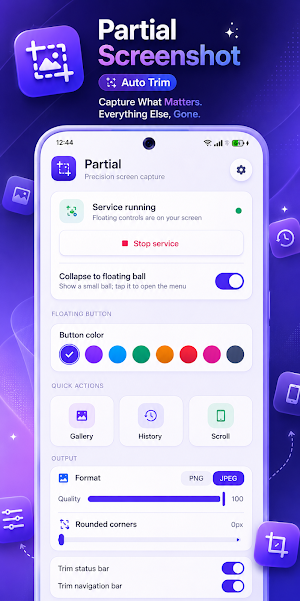
Custom Geometric Corners: Adjust the aesthetics of your output images. Go from sharp edges to perfectly rounded corners (0px to custom) to make your snips look professional.
Maximum Quality Output: Choose between PNG for lossless details or JPEG with an adjustable 100% quality slider to save storage without sacrificing clarity.
Material You Personalization: Built natively for modern Android. The app automatically adapts to your system theme colors, and you can fully customize the floating action trigger ball with your favorite accent colors.
🛠️ Effortless Control Methods
Floating Control Ball: Keep a small, non-intrusive interactive trigger on your screen. Tap it to open the precision crop tool or collapse it into a tiny ball when not in use.
Quick Settings Tile: Pull down your system quick-settings shade and capture your screen with a single tap—no complicated button combinations required.
History & Built-In Gallery: Easily manage your past captures. Browse, share, or delete your custom crops directly inside the app's lightweight history manager.
💎 Why Choose Us Over the Competition?
Unlike older, bloated utilities that slow down your system and clutter your images with ads, our utility is built to be incredibly lightweight, battery-efficient, and blazing fast. We support Android 7.0 (API 24+) and higher, ensuring a super smooth, system-native experience on almost any modern phone.
Stop dealing with messy crops and crowded status bars. Download Partial Screenshot: Auto Trim today and take control of your screen captures!
Whether you need to capture a single snippet of a conversation, a clean image without system UI clutter, or an entire scrolling page, our smart overlay tool handles it all in a single tap.
🚀 Key Features
Smart Auto-Trimming: Automatically detect and remove the status bar and navigation bar from your captures. Get pixel-perfect, clean screenshots instantly without manual editing.
Precision Partial Cropping: Don't capture the whole screen if you only need a piece. Use our floating controls to select and capture exact areas instantly.
Scroll Capture (Stitching): Need to save a long article or thread? Use the built-in scrolling capture tool to seamlessly stitch long pages into a single high-quality file.
Custom Geometric Corners: Adjust the aesthetics of your output images. Go from sharp edges to perfectly rounded corners (0px to custom) to make your snips look professional.
Maximum Quality Output: Choose between PNG for lossless details or JPEG with an adjustable 100% quality slider to save storage without sacrificing clarity.
Material You Personalization: Built natively for modern Android. The app automatically adapts to your system theme colors, and you can fully customize the floating action trigger ball with your favorite accent colors.
🛠️ Effortless Control Methods
Floating Control Ball: Keep a small, non-intrusive interactive trigger on your screen. Tap it to open the precision crop tool or collapse it into a tiny ball when not in use.
Quick Settings Tile: Pull down your system quick-settings shade and capture your screen with a single tap—no complicated button combinations required.
History & Built-In Gallery: Easily manage your past captures. Browse, share, or delete your custom crops directly inside the app's lightweight history manager.
💎 Why Choose Us Over the Competition?
Unlike older, bloated utilities that slow down your system and clutter your images with ads, our utility is built to be incredibly lightweight, battery-efficient, and blazing fast. We support Android 7.0 (API 24+) and higher, ensuring a super smooth, system-native experience on almost any modern phone.
Stop dealing with messy crops and crowded status bars. Download Partial Screenshot: Auto Trim today and take control of your screen captures!
What’s new
Version 1.0.1 · Updated August 2, 2026
Update release of Partial Screenshot: Auto Trim: Fixes and Optimizaitons
Alternatives to Partial Screenshot: Auto Trim
Looking for apps like Partial Screenshot: Auto Trim? Here are 6 similar Android apps on Google Play. All of them are free to download.





| App | Rating | Price | Installs | Last updated | Compare |
|---|---|---|---|---|---|
| Partial Screenshot: Auto Trim | – | Free | 100+ | Aug 2, 2026 | |
| Spider Tracker | – | Free | 10,000+ | Oct 16, 2026 | Compare |
| Dazz Cam | – | Free | 100,000+ | Oct 25, 2026 | Compare |
| Rooster Clock | – | Free | 100+ | – | Compare |
| Lighter Simulator App | – | Free | 10+ | Aug 6, 2026 | Compare |
| Thermal Camera Fx | – | Free | 0+ | – | Compare |
| Calendar Planner | – | Free | 10+ | Sep 6, 2026 | Compare |
Similar apps on Google Play
- Spider Tracker
- Dazz Cam
- Rooster Clock
- Lighter Simulator App
- Thermal Camera Fx
- Calendar Planner
- Image to PDF Converter Offline
- 1998 Vintage Camera
- Snake on Screen - Prank
- Birthday Countdown & Reminder
- Money Saving Goal Tracker
- Horoscope
- Floating Flashlight
- Night Vision Filter
- Edge Lighting
- Stay Focused - Screen Time
- Night Camera Mode
- Train Sounds
- Spider in Phone Prank
- Drink Cocktails Simulator
- Beer Simulator Game
- Rooster Sound
- Cola Simulator
- Cigarette Simulator Prank
- Adaptive Notch
- Floating Action Button
- Magnifying Glass 1000x Zoom
- Manau
- Rain Sound
- Periodic Table Offline
- Pocket Football
- Prism Blast
- Color Dash
- All in one Games
- Pawbridge
- Nivaas
- Privacy Display
- Cat Sudoku
- Tower Stack 3D
- Broken Screen Prank Funny
- Screen Off Video Recorder
- Cheats for GTA 5: V
- Fake Shopping App
- Skincare Tracker
- Arrow Puzzle: Tap Away
- Finance Calculator All in One
- I Scream: Scream to move
- Fonts for Instagram Editor
- Merge PDF: Split & Converter
- She: Daily Affirmations
- Battery Health & Life Check
- Battery Health & Charge Meter
- Video Compressor MP4
- Monthly Budget Planner
- Couple Quiz Game
- Personality Quiz
- Digital Speedometer
- Idol Prank Video Call & Chat
- I have never - Party Game
- Aura Farming Rizz Pickup Lines
- Shake Flashlight: Shake to On
- Fake Food Delivery
- Shake To Lock Unlock Screen
- Volume Booster Max: EQ & Amp
- Microscope 1000x Zoom Camera
- Period Tracker
- Inventory Stock Management App
- School fee Management app
- Auto Clicker
- Expense Ledger Book
- Countdown Days Left Tracker
- Telescope 100x: Zoom Camera
- Snake Explorer
- Timetable App For Students
- Truth or Dare Generator
- Expense Tracker: Money Manager
- Rental Cash Flow
- Random Decision Maker
- Motivation Reminder
- Habit Tracker Offline
- Split Bill Calculator
- Gemini Watermark Remover
- World Cup 2026 Schedule
- Mood Log
- Home Maintenance Reminder
- Daily Routine Reminder
- Cheats for GTA Vice City: VC
- Parked Car Finder
- Seed & Chunk Map for Minecraft
- Ebook Reader Offline
- Diary Notebook
- DoorDone: Home Checklist
- Map & Tracker for GTA 5
- PetPal: PetCare Tracker