
Image to PDF Converter Offline
Monova Tech Pvt. Ltd. Tools Contains ads
Turn images into PDFs in seconds. Simple, private, and completely offline.
- Downloads
- 1+
- on Google Play
- Price
- Free
- No in-app purchases
- Updated
- Aug 30
- 2026 · v1.2
Screenshots
About Image to PDF Converter Offline
Image to PDF — Simple, Fast & 100% Offline
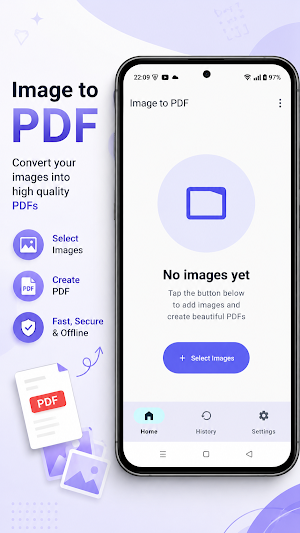
Turn your photos and images into professional PDF documents in just a few taps. Image to PDF makes PDF creation simple, private, and completely offline no internet connection required.
Whether you need to combine scanned documents, save photos as a PDF, organize receipts, create study notes, or share multiple images as one document, Image to PDF gives you everything you need in one clean app.
📸 Convert Multiple Images to PDF
Select multiple images from your device and turn them into a single PDF document.
Select multiple images at once
- Choose images from your gallery or file picker
- Reorder images with simple drag and drop
- Remove individual images whenever you want
- Clear your entire selection with one tap
- Receive images directly from other apps using Share
- Create one PDF page for each selected image
Arrange your images exactly the way you want before creating your PDF.
⚡ Fast & Efficient PDF Creation
Create PDFs without complicated steps.
The app is designed to handle images efficiently while maintaining a smooth experience, including large images. Images are processed intelligently to reduce memory usage while preserving quality.
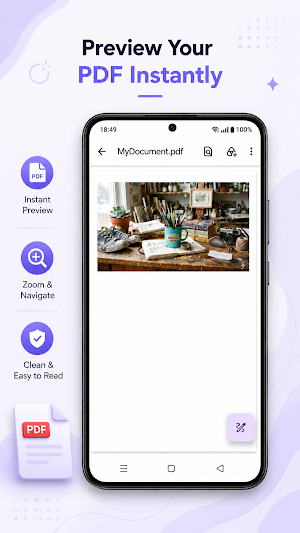
After conversion, your newly created PDF can be opened instantly.
🎨 Customize Your PDF
Create PDFs that match your needs with flexible export options.
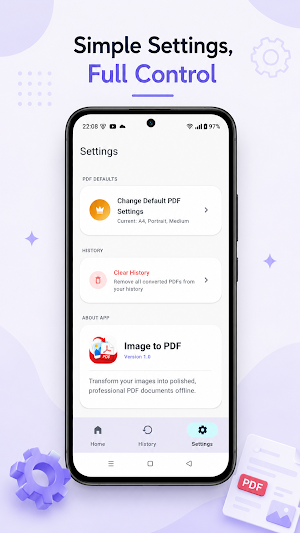
Choose from:
Page Size: A4, Letter, Legal, or Custom
Orientation: Portrait or Landscape
Margins: None, Small, Medium, or Large
Image Fit: Auto, Fit Width, Fit Height, or Original Size
Image Filters: Original, Grayscale, Black & White, or Magic Color
Image Quality: Adjustable from 10% to 100%
Preview your page settings before creating the final PDF.
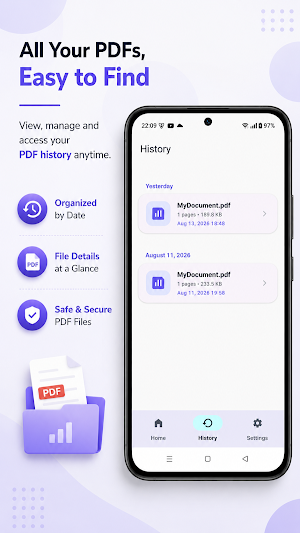
📄 Keep Your PDF History Organized
Never lose track of your previous conversions.
The built-in History section automatically organizes your created PDFs by date, making it easy to find documents you've created recently.
You can:
View your PDF history
Browse conversions by date
See file name, page count, and file size
Reopen previously created PDFs
View PDF details
Delete PDFs you no longer need
🔒 100% Offline & Private
Your images and PDFs stay on your device.
Image to PDF works completely offline. Your images don't need to be uploaded to a server or processed online. This makes the app a great choice when privacy matters.
No internet connection is required to convert images into PDFs.
✨ Perfect For Everyday PDF Tasks
Use Image to PDF for:
📚 Study notes and assignments
🧾 Receipts and invoices
📄 Scanned documents
📝 Forms and paperwork
🖼️ Photos and image collections
💼 Business documents
🎓 School and college projects
📦 Product or delivery records
📑 Combining multiple images into one PDF
🚀 Why Choose Image to PDF?
Simple — Convert images into PDFs without complicated tools.
Fast — Select your images, customize them, and create your PDF in just a few taps.
Flexible — Choose page size, orientation, margins, image fit, filters, and quality.
Private — Your files remain on your device.
Offline — No internet connection is required for PDF creation.
Organized — Easily find your previous PDFs through conversion history.
📥 Create Your First PDF Today
Select your images, arrange them in the right order, customize your PDF settings, and tap convert.
Image to PDF — an easy way to turn your images into clean, professional PDF documents, completely offline.
Turn your photos and images into professional PDF documents in just a few taps. Image to PDF makes PDF creation simple, private, and completely offline no internet connection required.
Whether you need to combine scanned documents, save photos as a PDF, organize receipts, create study notes, or share multiple images as one document, Image to PDF gives you everything you need in one clean app.
📸 Convert Multiple Images to PDF
Select multiple images from your device and turn them into a single PDF document.
Select multiple images at once
- Choose images from your gallery or file picker
- Reorder images with simple drag and drop
- Remove individual images whenever you want
- Clear your entire selection with one tap
- Receive images directly from other apps using Share
- Create one PDF page for each selected image
Arrange your images exactly the way you want before creating your PDF.
⚡ Fast & Efficient PDF Creation
Create PDFs without complicated steps.
The app is designed to handle images efficiently while maintaining a smooth experience, including large images. Images are processed intelligently to reduce memory usage while preserving quality.
After conversion, your newly created PDF can be opened instantly.
🎨 Customize Your PDF
Create PDFs that match your needs with flexible export options.
Choose from:
Page Size: A4, Letter, Legal, or Custom
Orientation: Portrait or Landscape
Margins: None, Small, Medium, or Large
Image Fit: Auto, Fit Width, Fit Height, or Original Size
Image Filters: Original, Grayscale, Black & White, or Magic Color
Image Quality: Adjustable from 10% to 100%
Preview your page settings before creating the final PDF.
📄 Keep Your PDF History Organized
Never lose track of your previous conversions.
The built-in History section automatically organizes your created PDFs by date, making it easy to find documents you've created recently.
You can:
View your PDF history
Browse conversions by date
See file name, page count, and file size
Reopen previously created PDFs
View PDF details
Delete PDFs you no longer need
🔒 100% Offline & Private
Your images and PDFs stay on your device.
Image to PDF works completely offline. Your images don't need to be uploaded to a server or processed online. This makes the app a great choice when privacy matters.
No internet connection is required to convert images into PDFs.
✨ Perfect For Everyday PDF Tasks
Use Image to PDF for:
📚 Study notes and assignments
🧾 Receipts and invoices
📄 Scanned documents
📝 Forms and paperwork
🖼️ Photos and image collections
💼 Business documents
🎓 School and college projects
📦 Product or delivery records
📑 Combining multiple images into one PDF
🚀 Why Choose Image to PDF?
Simple — Convert images into PDFs without complicated tools.
Fast — Select your images, customize them, and create your PDF in just a few taps.
Flexible — Choose page size, orientation, margins, image fit, filters, and quality.
Private — Your files remain on your device.
Offline — No internet connection is required for PDF creation.
Organized — Easily find your previous PDFs through conversion history.
📥 Create Your First PDF Today
Select your images, arrange them in the right order, customize your PDF settings, and tap convert.
Image to PDF — an easy way to turn your images into clean, professional PDF documents, completely offline.
What’s new
Version 1.2 · Updated August 30, 2026
• Premium minimal UI • New dedicated PDF Settings screen • Bug fixes & stability
Alternatives to Image to PDF Converter Offline
Looking for apps like Image to PDF Converter Offline? Here are 6 similar Android apps on Google Play. All of them are free to download.
-
Spider Tracker
-
Dazz Cam
-
Rooster Clock
-
Lighter Simulator App
-
Cheats for GTA 6: VI
-
Thermal Effect Camera
| App | Rating | Price | Installs | Last updated | Compare |
|---|---|---|---|---|---|
| Image to PDF Converter Offline | – | Free | 1+ | Aug 30, 2026 | |
| Spider Tracker | – | Free | 10,000+ | Oct 16, 2026 | Compare |
| Dazz Cam | – | Free | 100,000+ | Oct 25, 2026 | Compare |
| Rooster Clock | – | Free | 100+ | – | Compare |
| Lighter Simulator App | – | Free | 10+ | Aug 6, 2026 | Compare |
| Cheats for GTA 6: VI | – | Free | 1,000+ | Aug 22, 2026 | Compare |
| Thermal Effect Camera | – | Free | 0+ | – | Compare |
Similar apps on Google Play
- Spider Tracker
- Dazz Cam
- Rooster Clock
- Lighter Simulator App
- Cheats for GTA 6: VI
- Thermal Effect Camera
- Calendar Planner
- Json Viewer
- Nostalgia Camera
- Snake on Screen - Prank
- Birthday Countdown & Reminder
- Money Saving Goal Tracker
- Horoscope
- Negative Camera Filter
- Floating Flashlight
- Night Vision Filter
- Edge Lighting
- Stay Focused - Screen Time
- Night Camera Mode
- Train Sounds
- Spider in Phone Prank
- Drink Cocktails Simulator
- Beer Simulator Game
- Rooster Sound
- Cola Simulator
- Cigarette Simulator Prank
- Adaptive Notch
- Floating Action Button
- Magnifying Glass 1000x Zoom
- Manau
- Rain Sound
- Periodic Table Offline
- Pocket Football
- Prism Blast
- Color Dash
- All in one Games
- Pawbridge
- Nivaas
- Privacy Display
- Cat Sudoku
- Tower Stack 3D
- Broken Screen Prank Funny
- Screen Off Video Recorder
- Cheats for GTA 5: V
- Fake Shopping App
- Skincare Tracker
- Arrow Puzzle: Tap Away
- Finance Calculator All in One
- I Scream: Scream to move
- Fonts for Instagram Editor
- Merge PDF: Split & Converter
- She: Daily Affirmations
- Battery Health & Life Check
- Battery Health & Charge Meter
- Video Compressor MP4
- Monthly Budget Planner
- Couple Quiz Game
- Personality Quiz
- Digital Speedometer
- Idol Prank Video Call & Chat
- I have never - Party Game
- Aura Farming Rizz Pickup Lines
- Shake Flashlight: Shake to On
- Fake Food Delivery
- Shake To Lock Unlock Screen
- Partial Screenshot: Auto Trim
- Volume Booster Max: EQ & Amp
- Microscope 1000x Zoom Camera
- Period Tracker
- Inventory Stock Management App
- School fee Management app
- Auto Clicker
- Expense Ledger Book
- Countdown Days Left Tracker
- Telescope 100x: Zoom Camera
- Snake Explorer
- Timetable App For Students
- Truth or Dare Generator
- Expense Tracker: Money Manager
- Rental Cash Flow
- Random Decision Maker
- Motivation Reminder
- Habit Tracker Offline
- Split Bill Calculator
- Gemini Watermark Remover
- World Cup 2026 Schedule
- Mood Log
- Home Maintenance Reminder
- Daily Routine Reminder
- Cheats for GTA Vice City: VC
- Parked Car Finder
- Seed & Chunk Map for Minecraft
- Ebook Reader Offline
- Diary Notebook
- DoorDone: Home Checklist
- Map & Tracker for GTA 5
- PetPal: PetCare Tracker