
Monthly Budget Planner
Monova Tech Pvt. Ltd. Finance
Expense tracker for budgets, spending insights and CSV export
- Downloads
- 3+
- on Google Play
- Price
- Free
- No in-app purchases
- Updated
- Aug 1
- 2026 · v1.5
Screenshots
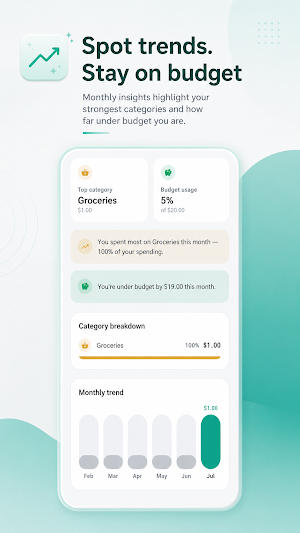


About Monthly Budget Planner
Expense manager for simple daily spending control.
SpendFlow: Expense Manager helps you record income and expenses, understand where your money goes, and stay within a monthly budget without making personal finance feel complicated. Add transactions, review clean analytics, track categories, and keep your money data organized in one lightweight expense manager.
Why use SpendFlow?
• Track expenses and income quickly
Log spending, income, notes and categories so your balance stays clear.
• Simple monthly budget planner
Set a budget amount, monitor budget usage, and see how much remains for the month.
• Daily, weekly and monthly analytics
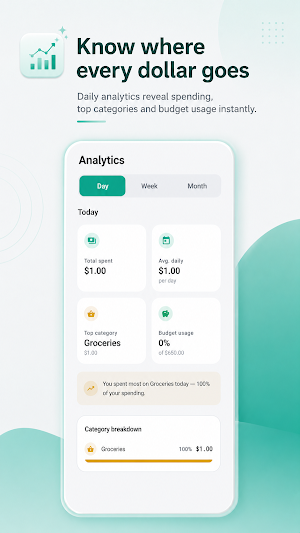
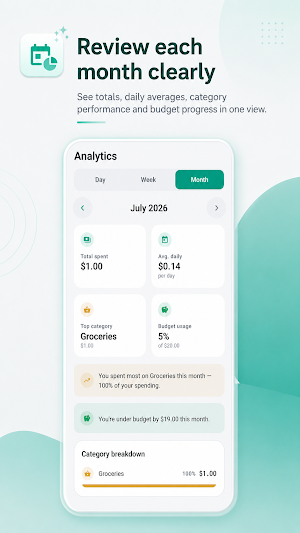
Switch between day, week and month views to understand your spending patterns over time.
• Category breakdowns
See which categories take the biggest share of your expenses, from groceries to bills and other daily costs.
• Spending trends and reports
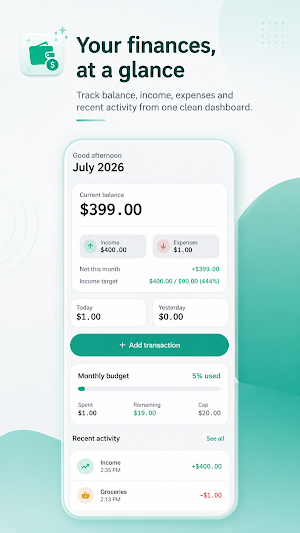
Review totals, average daily spending, monthly trends and budget progress in a clean dashboard.
• Recent activity at a glance
Check your latest income and expense entries without digging through complicated menus.
• CSV export
Export your transaction history to open it in Sheets, Excel or Numbers when you want a backup or deeper analysis.
• Reminders for consistency
Use daily reminders to build the habit of logging expenses before small purchases disappear from memory.
• Privacy-first offline use
Your data stays on your device. SpendFlow is built for people who want an expense manager with no account, no network requirement and no unnecessary complexity.
• Clean appearance
Use system, light or dark theme options for a comfortable money tracking experience.
SpendFlow is perfect for anyone who wants a simple expense tracker, budget tracker and money manager in one place. Use this expense manager to track daily expenses, manage a monthly budget, monitor income and expenses, review category spending, or understand whether you are under or over budget.
This expense manager is especially useful for students, families, freelancers, small earners, side hustlers, and anyone who prefers manual money tracking instead of connecting bank accounts. It is made for quick everyday logging: groceries, transport, subscriptions, bills, cash purchases, card spending, income entries and monthly budget checks.
A good expense manager should make your money easier to understand, not harder. SpendFlow focuses on clarity, accuracy and routine. The dashboard shows current balance, income, expenses, net this month, budget progress and recent activity. Analytics help you compare daily spending, weekly spending and monthly spending so you can spot habits early and make better decisions.
Use SpendFlow as your personal finance tracker, spending tracker, budget planner, income expense tracker, daily expense tracker and monthly budget app. Track expenses, manage budgets, export CSV files, review spending categories, follow budget usage and build healthier money habits with a simple expense manager designed for everyday life.
Start with one transaction today and let SpendFlow turn small money logs into clear financial insight.
SpendFlow: Expense Manager helps you record income and expenses, understand where your money goes, and stay within a monthly budget without making personal finance feel complicated. Add transactions, review clean analytics, track categories, and keep your money data organized in one lightweight expense manager.
Why use SpendFlow?
• Track expenses and income quickly
Log spending, income, notes and categories so your balance stays clear.
• Simple monthly budget planner
Set a budget amount, monitor budget usage, and see how much remains for the month.
• Daily, weekly and monthly analytics
Switch between day, week and month views to understand your spending patterns over time.
• Category breakdowns
See which categories take the biggest share of your expenses, from groceries to bills and other daily costs.
• Spending trends and reports
Review totals, average daily spending, monthly trends and budget progress in a clean dashboard.
• Recent activity at a glance
Check your latest income and expense entries without digging through complicated menus.
• CSV export
Export your transaction history to open it in Sheets, Excel or Numbers when you want a backup or deeper analysis.
• Reminders for consistency
Use daily reminders to build the habit of logging expenses before small purchases disappear from memory.
• Privacy-first offline use
Your data stays on your device. SpendFlow is built for people who want an expense manager with no account, no network requirement and no unnecessary complexity.
• Clean appearance
Use system, light or dark theme options for a comfortable money tracking experience.
SpendFlow is perfect for anyone who wants a simple expense tracker, budget tracker and money manager in one place. Use this expense manager to track daily expenses, manage a monthly budget, monitor income and expenses, review category spending, or understand whether you are under or over budget.
This expense manager is especially useful for students, families, freelancers, small earners, side hustlers, and anyone who prefers manual money tracking instead of connecting bank accounts. It is made for quick everyday logging: groceries, transport, subscriptions, bills, cash purchases, card spending, income entries and monthly budget checks.
A good expense manager should make your money easier to understand, not harder. SpendFlow focuses on clarity, accuracy and routine. The dashboard shows current balance, income, expenses, net this month, budget progress and recent activity. Analytics help you compare daily spending, weekly spending and monthly spending so you can spot habits early and make better decisions.
Use SpendFlow as your personal finance tracker, spending tracker, budget planner, income expense tracker, daily expense tracker and monthly budget app. Track expenses, manage budgets, export CSV files, review spending categories, follow budget usage and build healthier money habits with a simple expense manager designed for everyday life.
Start with one transaction today and let SpendFlow turn small money logs into clear financial insight.
What’s new
Version 1.5 · Updated August 1, 2026
What’s new in this version: • Smart Budget Tracker: Set monthly spending limits and manage your money effortlessly. • Instant Expense Manager: Track daily expenses and know where every dollar goes. • Deep Finance Analytics: Spot trends clearly with custom weekly and monthly chart summaries. • Ultimate Privacy: Keep your financial data safe. Everything stays entirely secure on your device. Start budgeting smarter today!
Alternatives to Monthly Budget Planner
Looking for apps like Monthly Budget Planner? Here are 6 similar Android apps on Google Play. All of them are free to download.





| App | Rating | Price | Installs | Last updated | Compare |
|---|---|---|---|---|---|
| Monthly Budget Planner | – | Free | 1+ | Aug 1, 2026 | |
| Spider Tracker | – | Free | 10,000+ | Oct 16, 2026 | Compare |
| Dazz Cam | – | Free | 100,000+ | Oct 25, 2026 | Compare |
| Rooster Clock | – | Free | 100+ | – | Compare |
| Lighter Simulator App | – | Free | 10+ | Aug 6, 2026 | Compare |
| Thermal Camera Fx | – | Free | 0+ | – | Compare |
| Calendar Planner | – | Free | 10+ | Sep 6, 2026 | Compare |
Similar apps on Google Play
- Spider Tracker
- Dazz Cam
- Rooster Clock
- Lighter Simulator App
- Thermal Camera Fx
- Calendar Planner
- Image to PDF Converter Offline
- 1998 Vintage Camera
- Snake on Screen - Prank
- Birthday Countdown & Reminder
- Money Saving Goal Tracker
- Horoscope
- Floating Flashlight
- Night Vision Filter
- Edge Lighting
- Stay Focused - Screen Time
- Night Camera Mode
- Train Sounds
- Spider in Phone Prank
- Drink Cocktails Simulator
- Beer Simulator Game
- Rooster Sound
- Cola Simulator
- Cigarette Simulator Prank
- Adaptive Notch
- Floating Action Button
- Magnifying Glass 1000x Zoom
- Manau
- Rain Sound
- Periodic Table Offline
- Pocket Football
- Prism Blast
- Color Dash
- All in one Games
- Pawbridge
- Nivaas
- Privacy Display
- Cat Sudoku
- Tower Stack 3D
- Broken Screen Prank Funny
- Screen Off Video Recorder
- Cheats for GTA 5: V
- Fake Shopping App
- Skincare Tracker
- Arrow Puzzle: Tap Away
- Finance Calculator All in One
- I Scream: Scream to move
- Fonts for Instagram Editor
- Merge PDF: Split & Converter
- She: Daily Affirmations
- Battery Health & Life Check
- Battery Health & Charge Meter
- Video Compressor MP4
- Couple Quiz Game
- Personality Quiz
- Digital Speedometer
- Idol Prank Video Call & Chat
- I have never - Party Game
- Aura Farming Rizz Pickup Lines
- Shake Flashlight: Shake to On
- Fake Food Delivery
- Shake To Lock Unlock Screen
- Partial Screenshot: Auto Trim
- Volume Booster Max: EQ & Amp
- Microscope 1000x Zoom Camera
- Period Tracker
- Inventory Stock Management App
- School fee Management app
- Auto Clicker
- Expense Ledger Book
- Countdown Days Left Tracker
- Telescope 100x: Zoom Camera
- Snake Explorer
- Timetable App For Students
- Truth or Dare Generator
- Expense Tracker: Money Manager
- Rental Cash Flow
- Random Decision Maker
- Motivation Reminder
- Habit Tracker Offline
- Split Bill Calculator
- Gemini Watermark Remover
- World Cup 2026 Schedule
- Mood Log
- Home Maintenance Reminder
- Daily Routine Reminder
- Cheats for GTA Vice City: VC
- Parked Car Finder
- Seed & Chunk Map for Minecraft
- Ebook Reader Offline
- Diary Notebook
- DoorDone: Home Checklist
- Map & Tracker for GTA 5
- PetPal: PetCare Tracker